How to get in, where they came from, and their PO number
The gate code on the crew's phone at the door, a source on every client so you know which sign brings work, and the customer's own reference printed on every invoice they see.
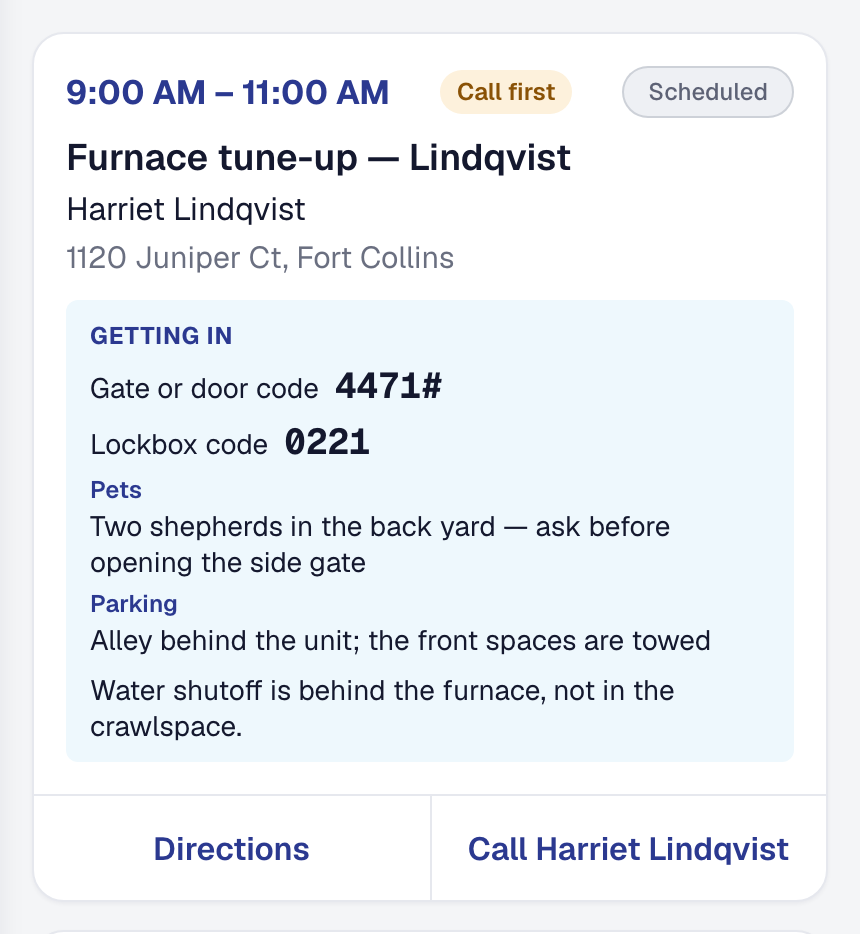
Every product you have compared us against has custom fields: name a field, pick a type, and it appears on the client. Ask what people actually put in them and the same three answers come back — how to get in, where the customer came from, and the number the customer’s own system issued. So those are what we built, as three things the product understands rather than three empty boxes.
How to get in, on the phone of the person standing at the gate. The gate or door code, the lockbox, the alarm, the dog, where to park, and a note for the crew, recorded once on the client. The office sees it on the client and again on the job at dispatch time, so nobody is looking at a different answer from the person driving. The crew sees it on the day’s card — on the card, not behind a tap — with a Call first badge at the top for a customer who would rather have a phone call than a knock.
These details go nowhere else. Not in a text or an email we send, not on your client’s own pages, not to any other system you connect. They are in your own export, because they are yours and a business leaving takes its gate codes with it.
Where every client came from. Each one now carries the door they arrived through — your public page, a past client’s referral, the directory, a phone call the assistant took, an online booking, a tool you connected, a spreadsheet you imported, or the office typing them in. It is written by the door itself, so it is right without anybody remembering, and a referral names the client who sent them so you can go and thank them. Add a label of your own where the list does not say it: Yard sign, Nextdoor, the name of the Zap. Then filter the Clients list by it, and read 12 of 84 beside the filter — because 12 on its own does not tell you whether that is most of your book.
Correcting a client changes nothing about the lead it came from. Where leads come from still answers what happened at the time.
Their number, on every invoice they see. A property manager’s accounts payable matches your invoice against the purchase order their system issued, and an invoice without it is not paid late — it comes back. Put their PO, work order or account number on the job once, and every invoice raised from that job carries it: printed under the invoice number on the PDF, in the email, on the page they pay from, and on the row in their own hub. Each invoice keeps its own copy, so a customer who issues a second PO for the second bill gets exactly that. Search either list by it, too — when somebody rings about PO-4471, that is the only reference they have.
And all three come in on a file. Switching to us from another product is a spreadsheet, not an afternoon of retyping: the client import takes the codes, the source and the labels alongside everything else, your exports write the same columns back, and the customer’s reference is on the job and invoice files. A source we do not recognize is refused with the row number and the words that would have worked, rather than quietly filed under something else.
On every plan. These are columns on records we already keep.