
Ask about your own business
Ask what you made last quarter, what moved it, or why a job came in under — answered from your own reports, with a monthly summary that arrives without being asked for.
Your reports already know what you made, which kinds of work carried it, and how each job did against its estimate. This is a way to ask them a question instead of finding the right report, setting a date range on it and reading it — and a monthly summary that arrives on its own so you read something about the business every month rather than when you remember to.
Ask what the business made
Open the assistant — Ask the assistant at the bottom right of any console page, or Ctrl+K, ⌘K on a Mac — and ask in your own words:
- What did I make last quarter?
- How did we do last month?
- How much did we keep in September?
The answer names the period it used before it gives you a figure. That matters more than it sounds: a question read as the wrong three months is answered with numbers that are all correct, for a period you did not ask about.
It understands this month, last month, this quarter, last quarter, this year, last year, the last few months, or a month by name. A period it cannot work out is said so plainly, with what it does understand — it never guesses at the nearest one.
Anything that runs to today is measured against the same stretch of the month or quarter before, never against the whole of it. Fifteen days of July against the whole of June reads as a business that has halved.
Ask what moved it
What moved last quarter? compares a period against the one before it, and breaks the difference into the kinds of work that account for it — repipes up nine thousand, service calls down two. Each row links to the margin report behind it.
It is bounded at four, and it only names them when they account for most of the movement. Where the change is genuinely spread it says so rather than picking the largest of twenty small ones, because a breakdown that always names a leader presents a rounding difference as the reason, in a sentence that reads exactly like an explanation.
A business in its first period is told there is nothing to compare against. It is not up infinitely.
Ask how one job did
Why did the Henderson job come in under? gives you that job’s estimate against its actual, and what the difference is made of — revenue, labor, materials and expenses, equipment — largest first, each row opening the job’s own Financials tab.
Three things worth knowing about that answer:
- Where labor ran over, it says so in hours against the estimate the job was quoted at, and which estimate that was — the proposal’s, or one entered by hand. Hours go over weeks before the margin does.
- Change orders you approved after the estimate are named separately, with how much of them has not been invoiced yet. Without that line a job that grew by agreed scope reads as a crew running over, and it did nothing wrong.
- A job with nothing recorded against it is told to you as that, not as a margin of zero. A job nobody has worked has an unknown margin.
You can ask about finished and archived work here, which is the point — this is a question about how something turned out.
Ask a question that needs more than one answer
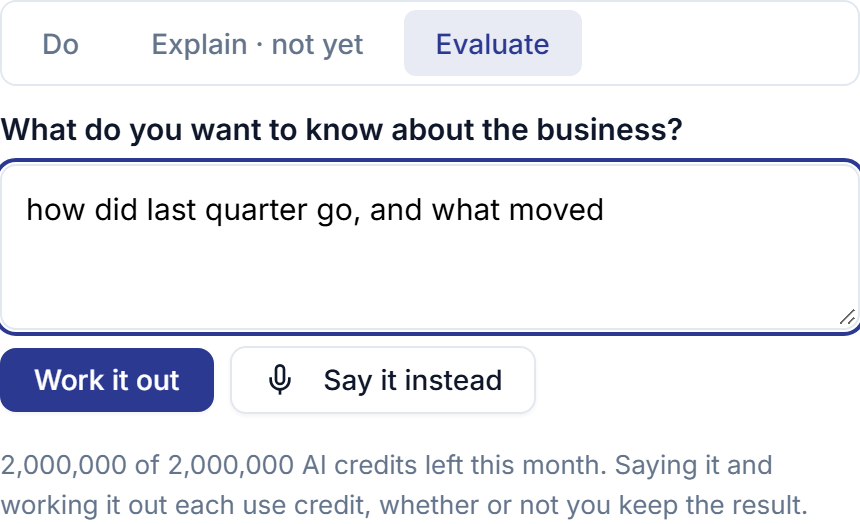
How did last quarter go, and what moved? is two questions. Switch the assistant to Evaluate — the tabs above the box — and ask it as one.
It runs the readings your question needs, then writes a short paragraph over their results. Under that paragraph it shows you what it read, each reading named, every row still linking to the report it came from — so the answer can be checked rather than taken on trust.
Every figure in that paragraph is your reports’ own. It is checked back against the readings before you see it, and a summary that states a number the readings do not contain is not shown at all. When that happens, or when the summary cannot be written, you get the figures with a line saying the summary is what went missing. The figures are worked out before anything is written, so they are never the part that is lost.
It describes what the records show. It does not tell you what to do about it, and it cannot change anything: in this mode the assistant is only offered the parts of its catalog that read.
Get the month without asking
Monthly Business Summary, under Profile → Notifications, arrives on the first of the month with what you made last month, what moved it, and a short summary over those figures. Pick the hour it sends; it defaults to seven in the morning.
It is a draft for you. Nothing in it goes to a client, and there is nothing in the product that forwards it. It also lands in Profile → Assistant History with every other answer, so a month is still there in six weeks’ time.
A month your reports found nothing in gets no email. A digest that arrives every month saying nothing is one people stop opening.
You can switch it off without touching My Day or My Week — see the calendar digests, which are a different thing on the same screen.
What it costs, and what it will not do
Asking needs Professional, and it spends the same monthly AI allowance as drafting a proposal. The remaining balance is shown in the assistant before you use it.
What you are paying for is narrower than it looks. The figures cost nothing — they come from reports running on our own systems. What spends the allowance is working out which question you asked, and writing the paragraph in Evaluate mode. The monthly summary spends one call a month, because it already knows which reports it wants.
Two things it will not do:
- It never produces a figure of its own. Every number you see was computed by the same report you could have opened, and in Evaluate mode it is checked back against that report before you see it.
- It never proposes a change. Not to a rate, a template, or a job. It says what the records show, and a summary that told you what to do instead is refused before it reaches you.
Asking is for the people who run the business — the same as the reports it reads, so a manager can ask and a field worker cannot.
This page describes AI Business Evaluation. It is written from that feature’s record and covers what has shipped, never what is planned.