Automations
Set a standing instruction once — chase the quote, ask for the review, nudge the invoice — and it happens every time without anybody remembering.
Watch it

Service businesses lose money in the gaps between things, not during them. The quote nobody chased. The invoice that went thirty days without a nudge. The customer who would happily have left a five-star review if anyone had asked while the work was still fresh.
Owners know all of this and still do not do it, because the moment it needs doing is the moment they are under somebody’s sink. An automation is a standing instruction that does it for you.
Understand the shape
Every automation is the same three parts:
When something happens · if some condition holds · do something.
When a job is finished, if the client has an email address, email them two hours later asking for a review. You say it once, and it happens every time afterwards.
Turn one on
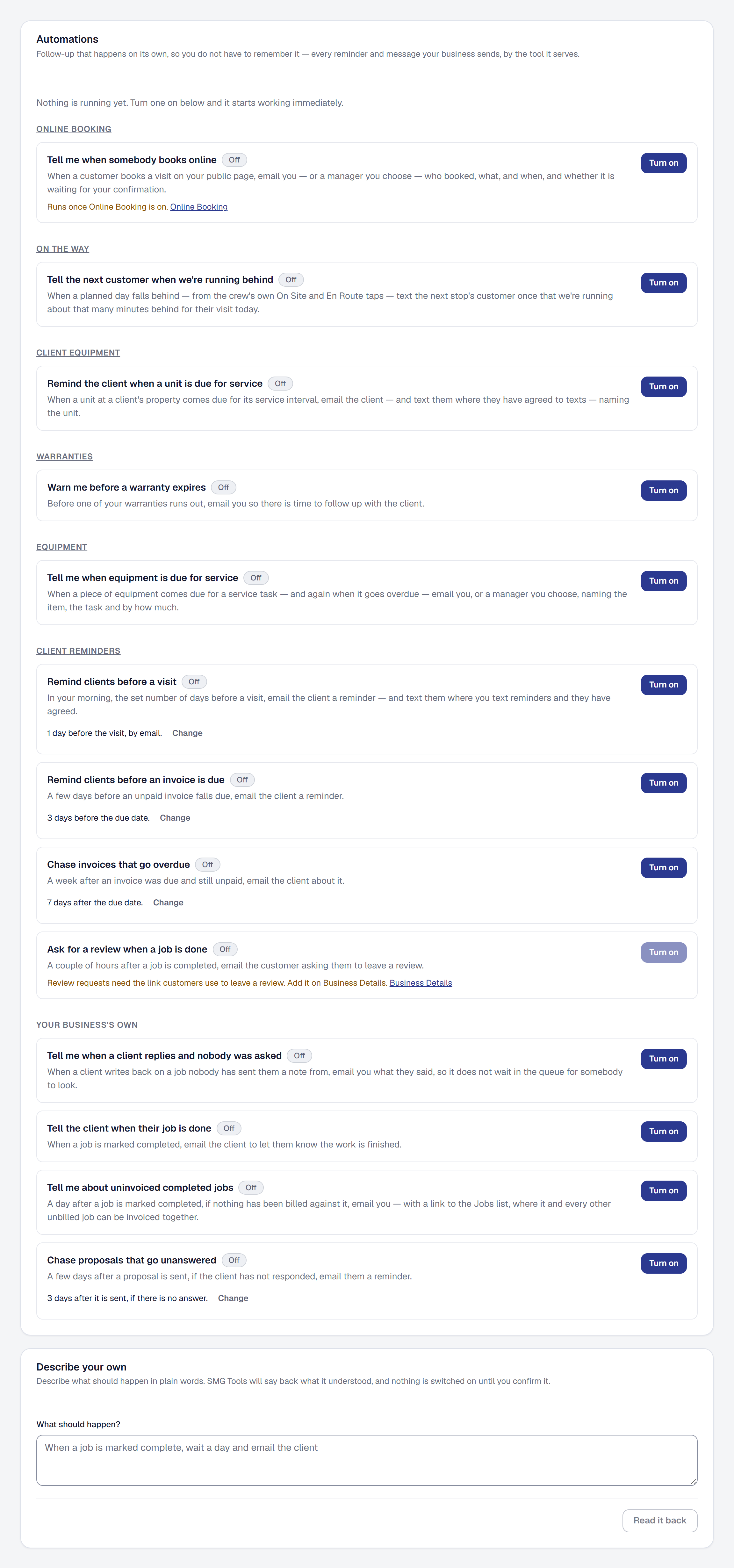
Open Automations and pick a recipe. Each one is a ready-made instruction with its parts already matched up, so you are choosing a behavior rather than assembling one from a blank screen.
Everything your business sends on its own is listed there, grouped by the tool it serves — Client Reminders’ reminders, Warranties’ warning, the text On the way sends the next customer — then your business’s own, such as proposal follow-ups. Each tool’s own page shows its reminders too, under Works with, with the same switch: turning the warranty warning on from Warranties turns it on here. While Automations is off, those say so, and the owner can add it from there.
Turn on starts it at once, with the wait and the wording it ships with; there is nothing else to set up. Adjust changes either afterwards. A reminder timed by a date — an invoice’s due date, a visit’s days before — keeps its timing on its own row, under Change (how many days, and for a visit whether it is texted too), and sends its own email, so there is nothing else to adjust. The due-again reminder is timed the same way, with its days before under Change, and its subject and message are yours to word under Adjust. Only a rule you describe in your own words is read back to you before anything is switched on — see Describe one in your own words.
Reminders to book
A reminder that asks a client for new work — the reminder when a unit is due for service, and the reminder that work a client had before is due again — is sent the way the law asks: by email only, saying it is a reminder from your business about booking work, with your business’s postal address and a Stop these reminders link that needs no sign-in, and the one-click unsubscribe mail apps show. One stop covers every reminder to book from you and nothing else; invoices, visit reminders and messages about work the client asked for still go. See Stop reminders to book.
It cannot be turned on until your postal address is on Business Details. One that was on before you had one is held: its row says so, nothing is sent, and the owner’s For you says which, until the address is entered.
What they are good for
The recipes cover the gaps that cost the most:
- Chasing a quote that has been sent and not answered.
- Nudging an invoice that has gone past due — and, if it stays unpaid, following up more firmly, then with a final reminder. See Overdue reminders that firm up below.
- Asking for a review while the work is still fresh.
- Telling the client a stage of their job is done, with Projects on — by email, with a link to their own page to see what comes next. Never for a stage you hid from them.
- Reminding a client of a visit, in your own morning, the number of days before you choose under Client Reminders.
- Reminding a client their work is due again — the gutters, the furnace, the pest service — the days before you choose, naming every kind due that week, with a button to book each. Preview shows it as a real client would get it and Send a test to me sends it to you. See Remind them by email.
- Telling you about finished jobs nobody has invoiced — and that email opens the Jobs list with those jobs already selected, so you can bill them in one go. See Invoicing several jobs at once.
- Telling you a crew’s day is running behind, from their own taps, before the customer calls — on your phone as well as by email. See Notifications on your phone.
- Telling you a part has fallen to its reorder point, or a van’s monthly count is overdue, with Inventory on — the part, the place and what to fill it to, or the van and the day it was due.
- Telling you about your orders, with Purchasing on — an order emailed or marked sent, an order that came in, a supplier’s bill waiting to be checked, a backorder’s new date — and telling whoever asked when you approve their order. Each goes to you or the manager you choose.
- Telling you the weather puts a visit at risk, with Weather on — the visit, its day and why, to you or the manager you choose, from the forecast refresh at 5 AM, noon and 5 PM.
Overdue reminders that firm up
An unpaid invoice can be chased up to three times, each its own row under Client Reminders:
- Chase invoices that go overdue — a friendly reminder, a week after the due date unless you change it.
- Follow up firmly when an invoice stays unpaid — two weeks after the first, it says how many days past due the invoice is and asks for payment this week.
- Send a final reminder on an invoice still unpaid — twenty-four days after the firm one, it says this is the last reminder before you get in touch yourself.
With the days as they ship, that is a week, three weeks and about six and a half weeks past due. Each step’s days are under Change on its row, and the firm and final ones count from the reminder before — anywhere from 3 to 60 days — so the steps can never land out of order. If you send a reminder by hand in between, or send the invoice again, the next step counts from yours, so your client is not reminded twice in a week.
Each step goes once per invoice and only after the one before has gone: turn on just the first, or the first two, and the series stops there. They all stop when the invoice is paid or voided, or when its own reminders are switched off on the invoice. A step turned on today chases invoices sent from now on — invoices already out are not sent a backlog of reminders they missed.
Describe one in your own words
When no recipe fits, Describe your own at the bottom of Automations takes a sentence — When a job is marked complete, wait a day and email the client — and Read it back says what SMG Tools understood, in its own words rather than yours, so a misunderstanding shows before it runs. Nothing is saved until you press Turn it on. If it is not what you meant, change the wording and read it back again, or Discard it.
A rule is one thing that happens, any conditions, one thing to do and one wait — never a chain of rules setting each other off. Reading it back uses the assistant, so describing your own is on Professional and the plans above it, and each read-back spends a little of your monthly AI allowance; turning it on costs nothing more. The ready-made ones work on every plan.
Turn one off
Switch an automation off and it stops. Nothing it already did is undone — the texts that went, went — but no further ones are sent.
It is worth reviewing what you have on after a few months. An automation you forgot about is still messaging your clients.
What it costs
The automations themselves are on every plan. What an individual one does follows the usual rule: an email costs nothing and is on Starter, and a text needs Professional because a message costs per send. See Text messages and consent.
The texts that go are about work the client asked for: a visit’s reminder, and the text On the way sends the next customer. A Text message you give any other automation under Adjust is a marketing text, and marketing texts are paused for every client until clients can agree to them themselves, so for now those automations email only — see Get consent, in two kinds. The field says so beside it, and you can write the text now: what you write is kept, and goes once texting them is approved. A reminder to book is never texted.
Add it, or put it away
Automations is one of the tools your business chooses: the owner adds it, or removes it, under Tools in the main menu — see Your tools. Every recipe that is switched on runs only while Automations is on. Removing it asks whether to pause your recipes too, with pausing chosen — see Remove a tool. Removing it deletes nothing you have recorded; add it back and everything is where you left it, its settings included.
This page describes Automations & Workflows. It is written from that feature’s record and covers what has shipped, never what is planned.