The calendar
One view of everything with a date on it — appointments, milestones, invoice due dates, proposal expiries and warranty follow-ups.
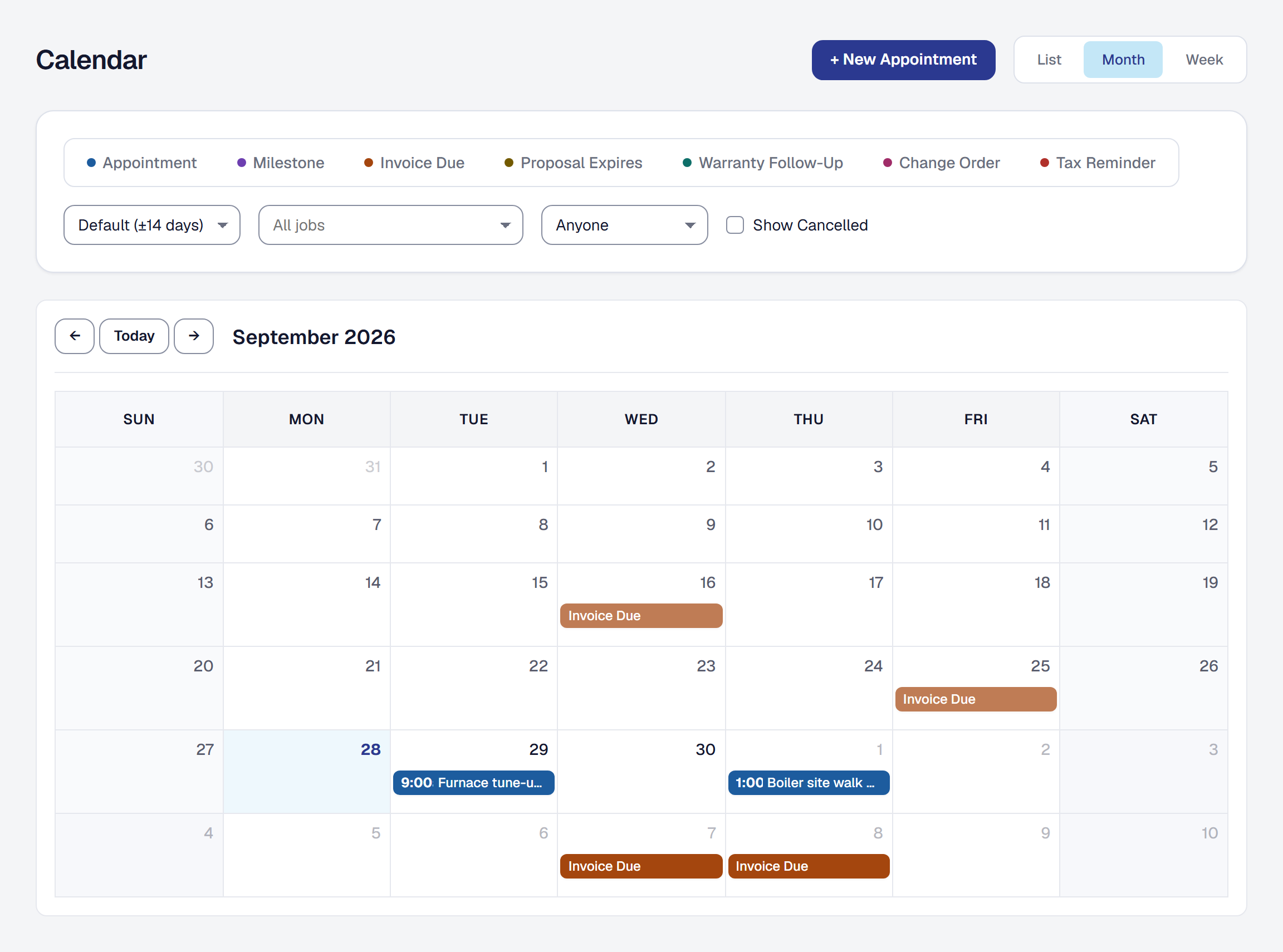
The calendar is every time commitment your business has in one place. Rather than being a separate diary you have to keep up to date, it reads from the work you have already recorded — so a milestone you move moves on the calendar too.
See everything with a date on it
Eight kinds of thing appear on the calendar, and only the first two are something you put there yourself:
| What | When it appears |
|---|---|
| Appointments | Whenever you create one — see Appointments. |
| Planned visits | A repeating visit’s coming visits, outlined as Planned: until each is booked — see Repeat a visit. |
| Milestones | When a milestone has a due date. |
| Invoice due dates | Who owes it, then the invoice — Harriet Lindqvist · invoice due · INV-20261021-007 — when an invoice has a due date, until it is paid in full. |
| Proposal expiries | Proposal expires — {client}, for a sent proposal with a valid-until date. |
| Warranty follow-ups | From the reminder date, or the earliest expiry. |
| Change orders | When one is sent. |
| Quarterly tax payments | On the IRS deadline. |
Understand why you cannot edit most of it
The jobs, invoices and proposals are the record; the calendar is a reflection of them. Change a milestone’s due date and the calendar follows; give one a date later and it appears; mark it done and it shows as done; void it and it leaves. Void an invoice, or get it paid in full, and its due date disappears. You never have to remember to update two places, because there is only one place.
That is also why a system-generated entry offers Edit at source rather than an edit form: the date belongs to the milestone or the invoice, and that is where it should be changed.
Only appointments are yours to edit directly, because only appointments are yours to begin with.
Find what you are looking for
Filter by the kind of entry, or by job, to cut the view down to what you actually want. The list also narrows to a stretch of dates or to one person’s visits.
On a phone the month shows each day as a count of what is on it. Tap the day to see the list. Something whose source was voided or canceled is hidden by default — it is not deleted, so the history is still there if you go looking, but a canceled thing should not be competing for your attention on a Tuesday morning.
Get the day emailed to you
My Day and My Week are email digests of what is coming. They are on every plan.
They used to need Professional and no longer do: a digest is an email running on our own systems, and the rule is that Starter gets everything that does.
There is a third switch on the same screen and it is not a calendar digest: Monthly Business Summary is about money rather than about what is coming, it needs Professional, and switching it on or off does nothing to these two. See Get the month without asking.
Put your visits in your own calendar
Your visits can sit in the calendar you already keep — Google, Apple or Outlook — beside the rest of your week. SMG Tools gives you a private address with your work in it, and your calendar subscribes to that address.
- Open your profile’s User details. Under Calendar feed, choose Make my calendar feed.
- Add the address to your calendar:
- Apple Calendar — on an iPhone, an iPad or a Mac, choose Add to Apple Calendar, and Calendar asks you to subscribe. In the SMG Tools app on an iPhone, the button is Add to my calendar.
- Google Calendar — Google takes an address only in a web browser on a computer, not in its app. Choose Copy, open Google Calendar on a computer, choose + beside Other calendars, then From URL, paste the address and choose Add calendar. It then shows in Google Calendar on your phone as well.
- Outlook — choose Copy, then in Outlook choose Add calendar, then Subscribe from web, paste the address, give it a name, and choose Import.
What is in it. The visits you are on, through the worker record you sign in as, from thirty days back to six months ahead — at most the 1,000 nearest today. Each has its time, its title and client, the address, so your phone offers directions, who else is on it, Waiting to confirm for a booking not yet confirmed, and a link back to the visit in SMG Tools. Your time away is there too, with its reason, and the stretches you are on call while your business has Shifts & time off. If you sign in as no worker record, the card says so: your feed stays empty until somebody puts you on a visit.
What is never in it. A gate or lockbox code, a phone number, a price, a cost or a note. Whatever is in the feed is in your calendar provider’s hands, so it carries what gets you to the job and nothing more.
It goes one way, and not at once. Your calendar reads the address when it chooses to: a visit moved in SMG Tools moves in your calendar the next time it checks, and how often that is depends on your calendar — it can be more than a day. A canceled visit leaves. Nothing you change in your own calendar comes back to SMG Tools.
The address is a secret. Anybody who has it can read what is in it, so keep it to yourself. Make a new address stops the old one at once — every calendar using it stops updating until you add the new one — and Turn off removes the feed. Your feeds stop if you leave the business or your seat is paused, and someone who comes back starts with none. The address is never in your business’s data export.
Everyone’s visits. If your role sees jobs and the schedule — as the Owner, Manager, Dispatcher, Estimator and Bookkeeper roles do as they come — the card also offers Everyone’s visits: every visit in the business, each naming who is on it (Furnace tune-up — Lindqvist · Sam Okafor) and linking to its job, or to the calendar on its day when it has none; everyone’s time away as Sam Okafor — away, without the reason; and who is on call. It has its own address, made new and turned off the same way. If your role stops seeing the schedule, that feed stops for good; your own is untouched.
A calendar feed is on every plan.
This page describes Calendar Integration. It is written from that feature’s record and covers what has shipped, never what is planned.