Invoicing several jobs at once
Pick the completed jobs nobody has billed yet and make all their invoices in one go, then send them together.
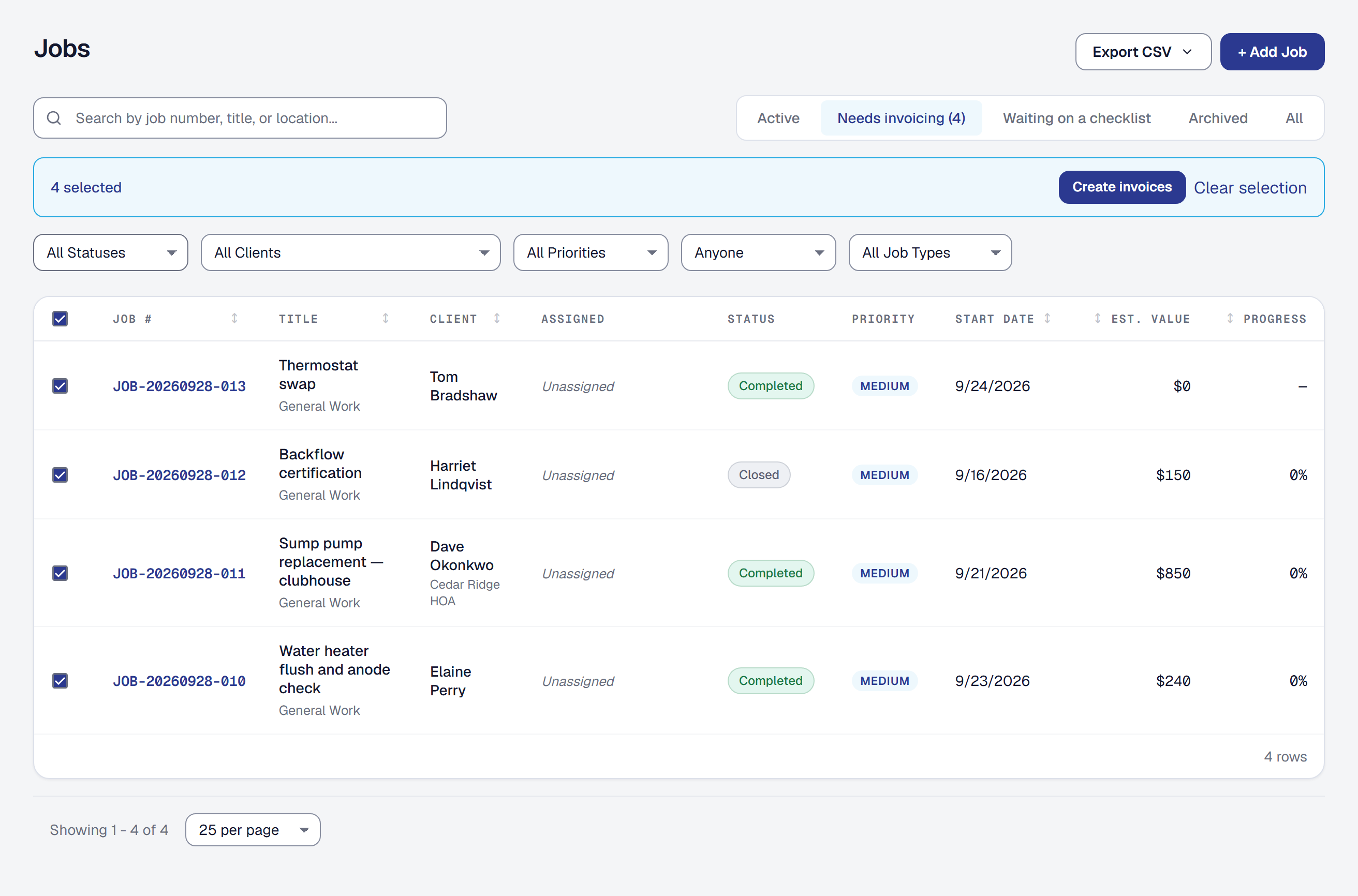
The most expensive thing a business forgets to do is invoice. This is the Friday-afternoon answer to eleven finished jobs and eleven trips through the same form: select the jobs, get the invoices.
Find the jobs nobody has billed
The Jobs list has a Needs invoicing filter: finished jobs with something left to bill. A job with an agreed price is on it until all of that price is on an invoice — so one whose deposit you invoiced is still there for the rest — and a job billed as it goes is on it until it has an invoice. A draft counts; a voided invoice does not. That is the list, and it is usually shorter and more alarming than people expect. Export CSV on the list exports what it shows — this filter, a search and every other filter included — for the jobs finished in the period you pick.
If you have the automated reminder turned on, each email it sends about an unbilled job has an Invoice it button that opens this list with that job already selected, so the nudge and the fix are one click apart — and anything else waiting there is a checkbox away from going with it.
Create the invoices
Select the jobs you want and choose Create invoices. You get one draft invoice per job, up to fifty jobs at a time.
A job with an agreed price gets its final invoice — exactly what Bill the rest in the Invoices panel on the job’s Financials tab makes: every milestone that still carries an amount, every payment on its schedule and every change order the client accepted, not yet invoiced, the balance last at whatever is left of the agreed price — or, on a job with no balance, one line, Remaining on the agreement, for the difference. It is marked final. A job billed as it goes gets the lines the single New Invoice page offers for it:
- the payments on its schedule not yet invoiced,
- any milestone that still carries an amount and is not yet invoiced, and
- the change orders the client accepted, not yet invoiced,
with the tax that page starts with — the job’s own sales tax rate. You choose one due date for them all when you create them: 30 days, as on the single form, unless you pick 60, 90 or a date. Nothing is guessed differently just because it was done in bulk.
For one job, Bill the rest in the Invoices panel on its Financials tab opens the same final invoice on the New Invoice page, filled in, with the reason for any remainder said above the lines — change or remove anything before you save.
A job with nothing billable on it is skipped and named, never given an empty invoice. You end on a page listing what was created and what was skipped and why, with every draft one click away for whoever wants to look before anything goes out.
They are drafts. Nothing has reached a client yet.
Send them together
Send all sends each draft the way Email to client on a single invoice does — the same email, the same payment link, the same record on the invoice and in that client’s history. It is on the page you end on after creating them, and on the Invoices list filtered to Draft, where you can select drafts made earlier and send them together the same way.
They go one at a time, deliberately. If one cannot go — a client with no email address on file is skipped and named — that is one invoice’s problem and the others are unaffected. You are told which one, and the rest have already gone.
What is deliberately not included
Logged hours and expenses are not added. Whether a job’s hours get billed, and at what rate, is a judgment the New Invoice page leaves to a person — and batching it would make that judgment for you eleven times without asking.
If you bill time and materials, open the job and invoice it there. Batch invoicing is for the jobs where the milestones and change orders already say what is owed.
This page describes Batch Invoicing. It is written from that feature’s record and covers what has shipped, never what is planned.