Job costing and margins
Price work from real labor rates, then watch the estimate against what the job is actually costing while it is still running.
Watch it

Costing is how you find out whether a job made money, and ideally before it is over. You set your labor rates once, build proposals out of line items that use them, and the job then compares what you estimated against what it is actually costing.
Set your labor rates
Under Organization → Labor rates, write down each kind of labor you sell — Owner, Skilled Labor, Helper, whatever your crew actually looks like. Each one carries two numbers:
- Cost rate — what that hour costs you.
- Billable rate — what you charge for it.
The gap between those two is where your margin comes from, which is why the product asks for both rather than one rate with a markup bolted on. If your operation is simple, the two can be the same number.
Mark one profile as the default and it is picked for you on new line items.
The page is for whoever sees your prices and costs as well as your settings — the owner and a manager, or a role you built with both.
Rate profiles are kinds of labor, not people. One “Skilled Labor” rate covers everyone doing that work.
Changing a rate never changes the past
Raise your rates and every proposal you have already written, and every hour already logged, keeps the rate it was priced at. The old job stays true to what it was quoted at, and your history does not silently rewrite itself when you put your prices up.
Build estimates out of line items
A proposal is priced with line items, of two kinds, and one proposal can mix them.
A costed line is built up by hand, and carries:
- Estimated hours at a chosen labor rate.
- Materials cost.
- Equipment cost — typed as a figure, or worked out from a machine’s hours or days at its cost rate using the helper beside the field.
- A markup percentage applied on top of all three.
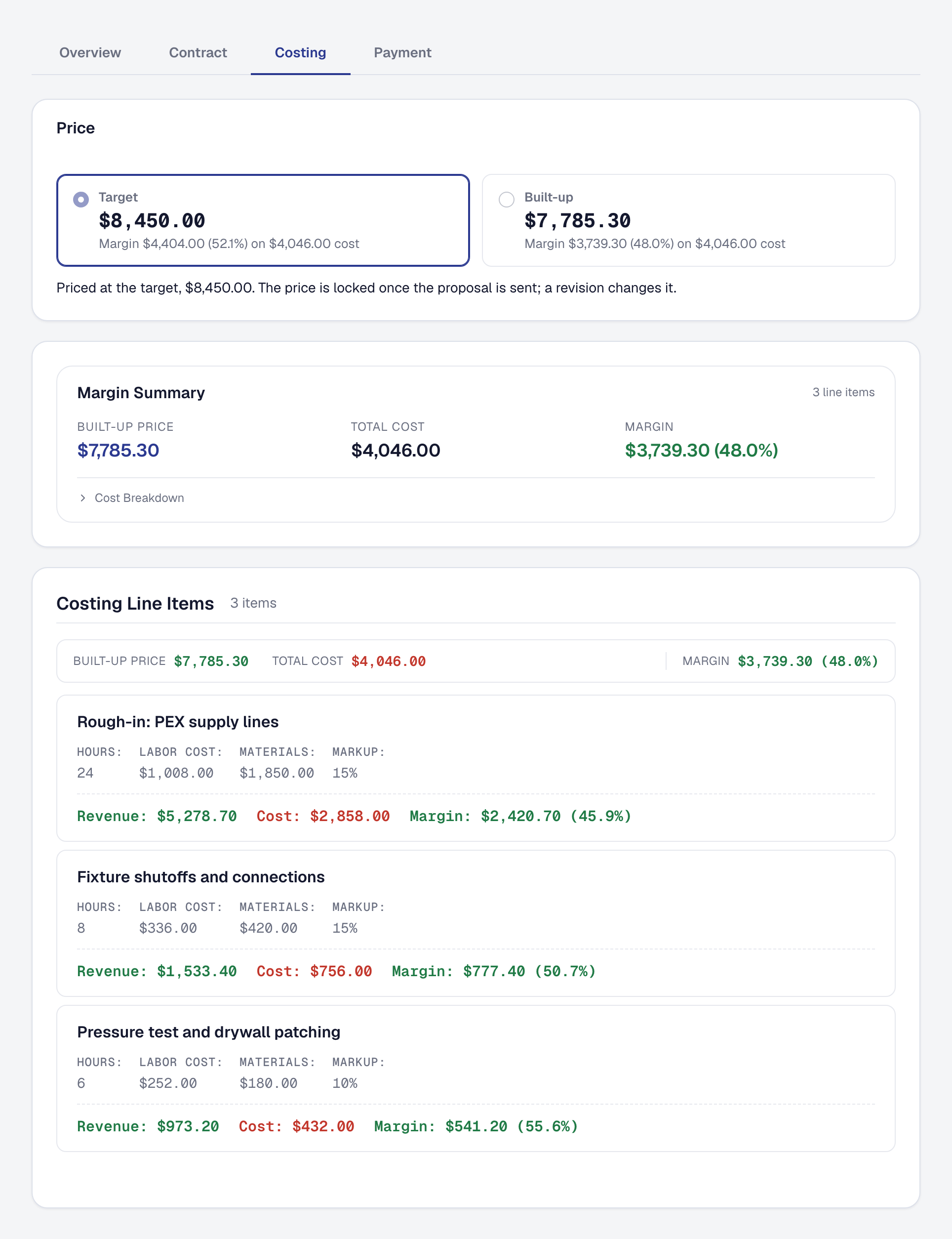
An item line comes from your Price Book: how many of an item at its price, with the item’s hours, labor rate, materials and equipment carried behind it as its cost. It shows its margin rather than a markup, because its price is the price you set, not a markup on the cost.
From those, the product works out the cost, the revenue and the margin for each line and for the proposal as a whole — so you see what you are making before you send it, not after the job is done. A line under the proposal’s target margin is marked with what its cost needs it to sell for.
Save the work you quote over and over
Work you quote the same way every time is a bundle in the Price Book: the items it takes, how many of each, and one package price. Adding it to a proposal adds a line for each of its items, priced to add up to the bundle, and each carries its cost — so the job that follows is costed line by line exactly as if you had built it by hand.
Watch a running job against its estimate
When a proposal is accepted, its line items transfer onto the job as a baseline. That estimate is what everything is then compared against. Hours logged are matched to a line by the labor rate they were logged at, whichever kind the line is.
One agreed price. A proposal priced at a target — or an option sold at its package price — agrees a figure its lines do not add up to, so the lines’ revenue is shared out to come to it as the job is made. The job’s estimated revenue, its margin, what is left to bill and its payments then all read the same price.
Change orders count. When your client accepts a change order, its lines join the baseline — its revenue, cost and hours counted in the estimate, the margin and the labor forecast — so it never shows as costs that blew the margin with its revenue left out. Voiding it takes its lines off again.
Estimates by hand are for jobs made by hand. A job made from a proposal is estimated by it: change what was agreed with a change order or a revision. On any other job, Add estimates on the Financials tab sets an estimate of your own, and the job’s accepted change orders are added to it.
The job’s financials show three columns:
- Estimated — from the baseline.
- Actual — hours logged at the rate they were logged at, non-void expenses linked to the job and what you ordered for the job from a supplier, equipment usage at its recorded rate, and parts used from stock at what they cost when used.
- Variance — actual minus estimated. A positive cost variance means you are over budget.
While a job is still in progress there is also a projected figure: what you have spent so far plus what is left of the estimate. That is the number that tells you a job is going wrong while you can still do something about it.
A finished job’s figures say Final job financials once nothing is owed on it. While an invoice is still unpaid, a draft is waiting or some of the agreed price is not yet invoiced, they say the work is done and what is still owed counts as revenue when it is paid: the actual figures are the money that came in.
Equipment appears as its own cost row, and only where one side or the other actually has a figure. So does Parts from Stock, if you count your parts with Inventory: its estimate is the materials on the quoted lines for parts you count, which come out of the expense estimate so they are not counted twice, and its actual is the parts recorded on the job, less any leftovers returned. What you ordered for the job and never had in stock — cabinets delivered to the site, a part you don’t count — is an expense, beside the estimate’s materials for the same things.
By milestone. With Projects on, a job with a plan also shows By milestone on its Financials tab: for each stage of the work, what it sold — the lines in its tasks — what it was estimated to cost and take, what it has cost and taken so far, and its margin. Time counts against the stage of the visit it was worked at; an expense, a part or a purchase order against the milestone it names. Whatever names none is one row, Not tied to a milestone, so the rows always add up to the job: nothing is spread across the stages by guess. A stage with nothing recorded yet shows its estimate and says nothing recorded yet rather than a margin.
Know what “revenue” means here
Two definitions in this product are worth being precise about, because they are the ones people assume wrongly:
- Revenue is cash collected — invoice payments plus income records, without the sales tax your customer paid with them, which is the state’s. Not what you invoiced, and not what the milestones add up to. A job is not profitable because you sent a bill. So until your customer pays, a job shows its costs against nothing. Under the table, a job with an agreed price says what the costs so far leave if that price is paid in full — the figure to read before the money arrives. It reads high while costs are still coming in, and it goes once the agreed price has been collected.
- Job cost is only what is tied to that job. No overhead is spread across jobs. When this screen says a job cost you $4,200, that is $4,200 of labor, materials and equipment on that job and nothing allocated to it from somewhere else.
Both are deliberate. A margin figure mixed with allocated overhead cannot be traced back to anything you can act on.
This page describes Cost Modeling & Job Costing. It is written from that feature’s record and covers what has shipped, never what is planned.