Purchases matched to jobs
Tie each business card to the worker who carries it, and every purchase on it is matched to the job they were on that day, for them to confirm with one tap.
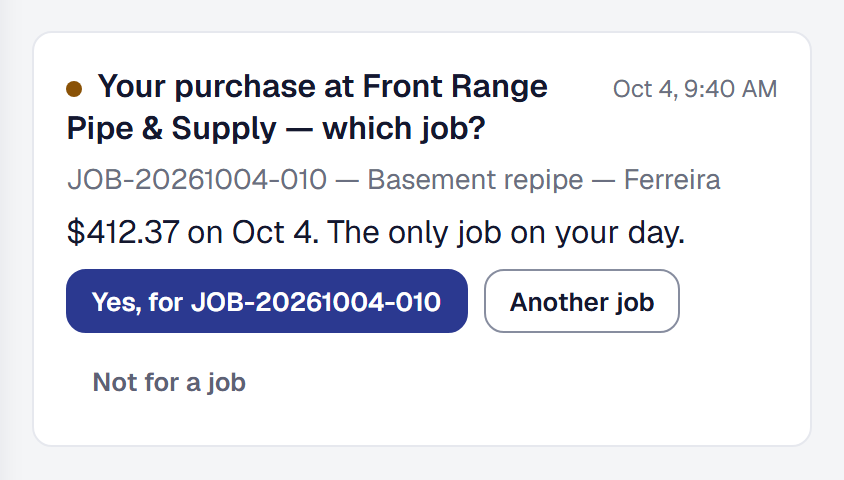
A purchase on a business card belongs on the job it was for, and the person who made it is the one who knows which job that was. Purchases matched to jobs puts each card purchase in front of that person the day the bank reports it, already matched to the job they were on, so the job’s costs are right while the work is still going on.
Add Purchases matched to jobs
Purchases matched to jobs is a tool your business adds on the Tools page. It needs the Bank Feed and Workers, and adding it adds them. It is on Professional, as the bank feed is, and it does nothing until a bank is connected on Bank Accounts (see Connect your bank).
Only purchases dated on or after the day you add the tool are matched. Remove the tool and its pages go, and nothing new is matched; who carries which card, and every purchase already matched, are kept for when you add it back.
Say whose card it is
Open Tools → Purchases matched to jobs → Cards. Each credit card on a connected bank is listed by the bank’s name for it and its last four, and next to each you choose the worker who carries it, or Shared — the office confirms. A worker can carry several cards; a card is one worker’s or nobody’s. Only the owner changes this; a manager can read it.
A purchase on a worker’s card is theirs to confirm. A purchase on a shared card — or on a card your bank reports as one account for every employee card — is matched the same way and waits for the office.
A debit card is not listed: it draws on the checking account the whole business pays from, so its purchases stay with the office. Each worker’s page shows the cards they carry under Business cards. When a worker is archived, their cards go back to shared and say so — Back to shared when Dana Whitfield was archived — until you tie them to somebody else.
Know how a purchase is matched to a job
When the bank reports a purchase on a card, it is matched by arithmetic, not by guessing: who carries the card, the day of the purchase — and its time, where the bank gives one — and the jobs that person was on that day. A job counts if they were clocked into it, arrived at it, logged hours on it, had a visit there, or had it on their route plan.
- One job that day is the match.
- On a busier day, the job they were clocked into at the time of the purchase; else the one they arrived at next, since a supply run is usually on the way; else the one they were on last.
- With no time from the bank, or nothing to place it by, there is no single match and every job of their day is offered in the order the day went.
Each purchase says how it was matched — Clocked into JOB-0142 at 9:40 AM, when you bought it, The only job on your day — and each other job of the day says what placed them there. If somebody already entered an expense by hand for exactly the bank’s amount, within a week, on a job, the purchase offers it as possibly already recorded, so nothing is recorded twice.
Money coming back to a card, transfers, payments to the card and bank fees are never matched. A purchase that shows as pending and then posts stays one purchase, at the amount the bank settles on.
Confirm a purchase from your phone
A purchase on your card appears in your For you, and its count is on the menu: Your purchase at Front Range Pipe & Supply — which job?, the amount, the day, and the job it was matched to. Answer it there:
- Yes, for JOB-0142 records it as an expense on that job — the bank’s amount, the store as the vendor, your business’s category for that store, else Supplies — and the job’s costs and margin show it straight away.
- Another job offers the rest of your day’s jobs, then your other open jobs; choose one and Record it there.
- Already recorded links it to the expense you entered by hand, when the match found one.
- Not for a job sends it to the office, with nothing recorded.
The same purchases are on your visit to the job they were matched to, under Purchases on your card for this job. You only ever see purchases on your own cards — never the card account, its balance, or anybody else’s purchases.
A purchase you confirm leaves the list. What you confirmed this past week is listed after it, and it cannot be undone from there: if one went on the wrong job, the office fixes it. If the office sorted a purchase while it was waiting on you, tapping it says so.
Settle purchases in the office
Owners and managers have Purchases in the Money menu. It opens on what waits on the office — a shared card’s purchases, one a worker sent back as not for a job, one whose expense was undone, and one whose worker is archived or does not sign in — each saying which. Waiting on workers, Decided and All are beside it, with the waiting ones counted. A purchase that has waited on its worker for three days is marked Waiting long, so you can chase it or settle it yourself.
Record on any waiting purchase opens the choice: the matched job, another of that day’s jobs, Another job… to search for any job, or No job — overhead; or Link to it instead when it may already be recorded. It is recorded exactly as the worker’s confirm would be, by you, and the decided purchase says who recorded it.
Managers reach Purchases and nothing else of the bank feed: the bank accounts and the transactions stay the owner’s. In the owner’s transaction review, a transaction that is a matched purchase says so under its name, and settling it there settles the purchase too.
Put a wrong one right
Change the expense — its job, its category — and the purchase stays decided with the change. Void the expense and the purchase waits again, on the office, to be recorded the right way.
What it does not see
A purchase put on a supplier’s account — put it on my account — never reaches the bank until the statement is paid, so it is not matched here. A purchase on a personal card is your reimbursement process, not a bank transaction.
This page describes Purchases Matched to the Job. It is written from that feature’s record and covers what has shipped, never what is planned.