Assigning work and the Day Board
Put people on jobs, see the whole day as a lane per person, and move work between them without a group text.
Watch it

The product already knows who works for you and what work exists. Assignment connects the two, so the day is planned inside the system that holds the job rather than on a whiteboard, in a group text or on a spreadsheet.
Put somebody on a job
A job carries a set of people. Assign one or several from the job itself.
You assign to a worker, not to a login. A worker is your record of somebody you pay — employee or subcontractor — and that matters for two reasons:
- A subcontractor who will never sign in can still be dispatched. Your crew is not limited to people who hold accounts.
- The assignment and the hours land on the same person, with no translating between two records. Time entries, subcontractor payments and service agreement visits already key on the worker.
Set each person’s hours and time away
Every person on your roster has Hours and Time away on the Schedule tab of their page under Workers. Online booking, the Day Board and the calendar all read them, so a day off is known everywhere at once rather than by whoever was told.
- Hours. Until you set their own, a person works the business’s hours. Set their own hours ticks the days they work and the times — Split the day for a break in the middle — and Use the business’s hours puts them back.
- Time away. Add time away records a day off, a holiday or an appointment: whole days, or Part of one day with its times, and a reason if you like — seen by the office and by them, never by anybody else. If they already have a visit in that time, the page lists it to open and move; nothing is moved for you. With Timesheets added, it also asks the kind of time off and the hours it counts, for payroll — see Count time off. With Shifts & time off added, the crew can also ask for time off themselves — see Let the crew ask for time off.
The Day Board shows each lane’s hours for the day, Away all day or Not working today, and shades a lane whose person is off. Dropping work on somebody outside their time asks first — Dana Whitfield is away 1:00 PM–3:00 PM. Assign it to them anyway? — and never refuses. The calendar shows time away as an entry naming the person, and opening it opens their page.
A person reads their own on their profile, Your hours and time away, and My Day says their hours for the day. Only the office sets them.
See the day on one board
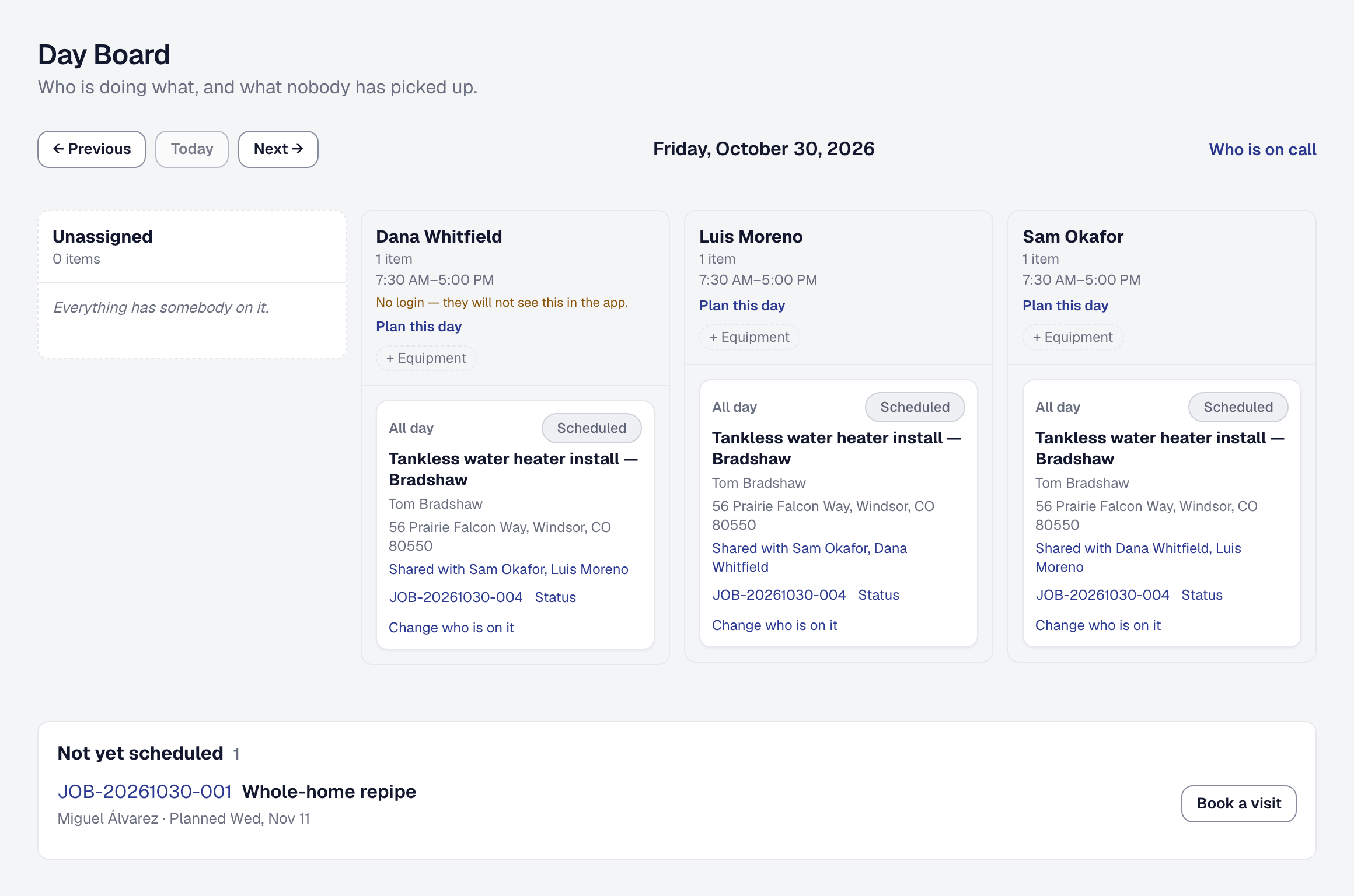
The Day Board lays out a day with a lane per person and the visits booked for them, after a first lane, Unassigned, of the work nobody has picked up yet. It is the answer to “who is where today”, and it is the screen to open when somebody calls in sick.
Move a visit from one lane to another to reassign it. Nobody has to be told twice, and nothing depends on a text message being read.
The visits are the schedule. A job’s dates put nothing on a day; a visit does. A job you have taken on with no visit booked yet, dated or not, is listed once under Not yet scheduled, below the lanes, with Book a visit — the visit form on the day you are looking at, filled with the job, its client, its address and its people. A job on hold, finished or closed is never there. A day with nothing booked says so, and still shows each person’s lane, hours and time away.
If you count your parts with Inventory, a lane whose person drives a van also shows what the van needs to load for that day’s visits, and anything they asked the office for — choose where it comes from and press Fill to send it.
Spot a day going wrong
The board shows when somebody is running behind, so you find out from the screen rather than from the customer who has been waiting since two. How far behind counts is On the way’s Running behind setting, fifteen minutes until the owner changes it; the Day Board’s page shows it under Works with, beside its own setting, the Default stop length a planned day allows for a stop nothing else says the length of.
That is the difference between dispatching and just recording: you can move the last job of a falling-behind day to somebody who is clear, before the phone rings.
Let the product suggest who should go
With Scheduling & dispatch added, the person picker suggests who should do a job or a visit — the people with the skills it needs who are free then, nearest first, each with why — and Suggest appears on an Unassigned card on the board. See Scheduling and dispatch.
Plan the driving
Where a day has several stops, the route planner puts them in a sensible order rather than the order they were booked — see Route planning.
What the crew sees
An assigned person sees that job on their own day, on their phone — see The crew’s phone. They do not see the board, the other lanes or anybody else’s day.
This page describes Work Assignment & The Day Board. It is written from that feature’s record and covers what has shipped, never what is planned.