Everything you said to a client, in one place
A Communication section on every client's page: every text, email, quote, invoice, call, note and reply — and every message consent stopped, with the reason — filterable and downloadable.
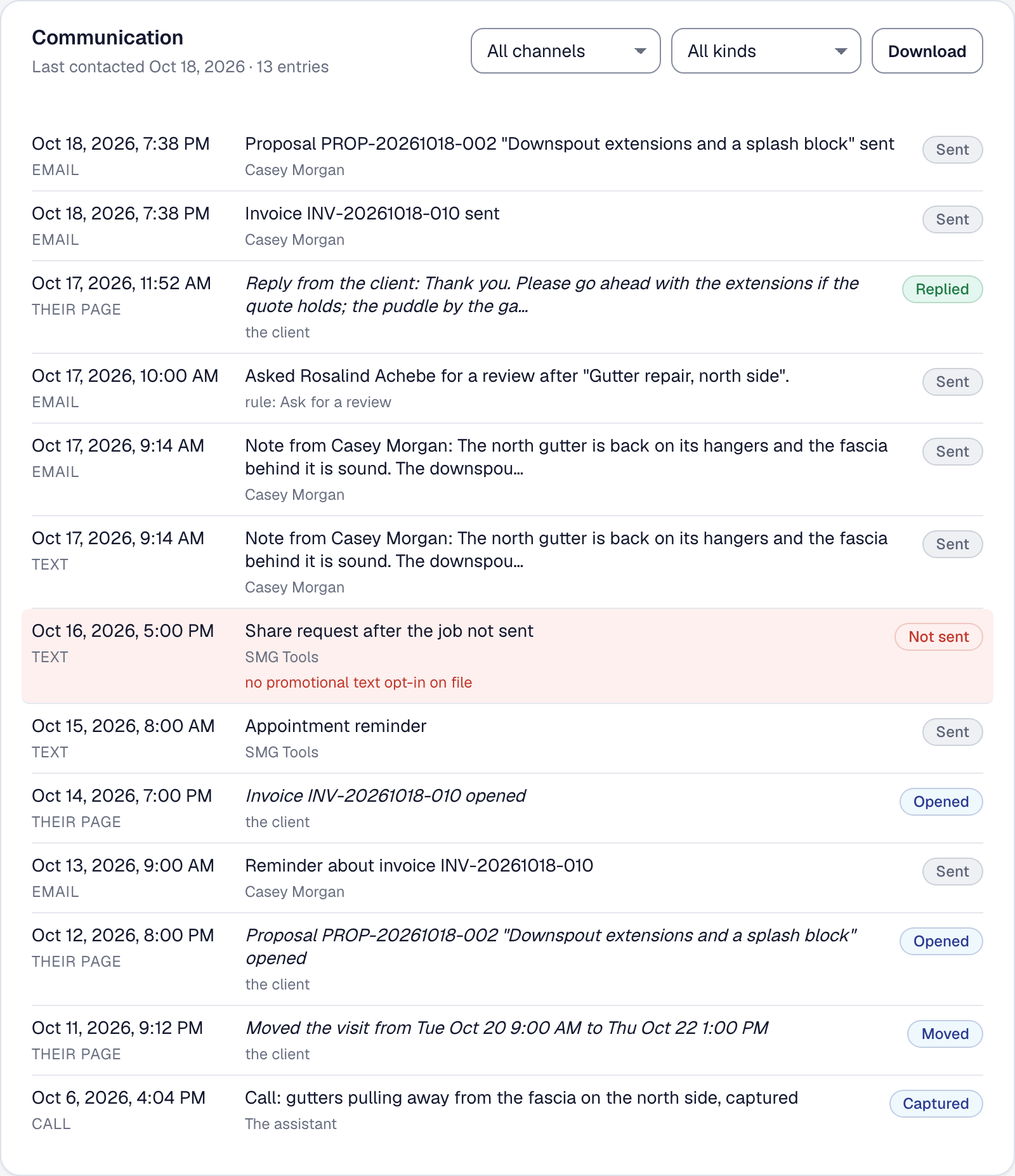
A client rings and says nobody told me the visit moved. You know a text went out — one goes out for every rescheduled visit — but proving it meant opening the appointment, then the job, then the client’s settings, then guessing. Now it is one section on the client’s page.
Communication lists, newest first, everything you and SMG Tools have said to that client and everything they said back: appointment reminders, booking confirmations and on-my-way texts; invoices sent, sent again, reminded about, opened and paid; quotes and change orders sent, opened, signed or declined; agreements sent, signed and renewed, and an automatic payment that failed; the review request an automation sent; the calls and text conversations the assistant took from them; every note you sent from a job, and every reply they wrote. Each row says when, by which channel — email, text, a call, their own page, or in person for a payment you recorded by hand — one line saying what it was, who sent it (a person by name, a rule by its name, the assistant, SMG Tools, or the client), what came of it, and a link to the record.
The ones that did not go are on it too. A text the consent rules stopped is a row, marked, with the reason in plain words — client opted out of service texts, no phone number on file — because we tried and could not is half the answers the office needs.
The header says how many and when the client was last reached. Two filters narrow it by channel and by kind — billing, quotes, scheduling, notes, calls — and compose. Download gives you the same rows as a CSV, narrowed the same way, for the dispute, the chargeback, or the client who asks what you hold about them.
Nothing is recorded twice to make this work: the section reads the records that already exist, so a send that happens after you open it is there on the next look. Owners and Managers see it on every plan.