Invoice the finished jobs together
Select the completed jobs nobody billed, make their invoices in one action and send them together — and the reminder about unbilled work now opens that list with the job already selected.
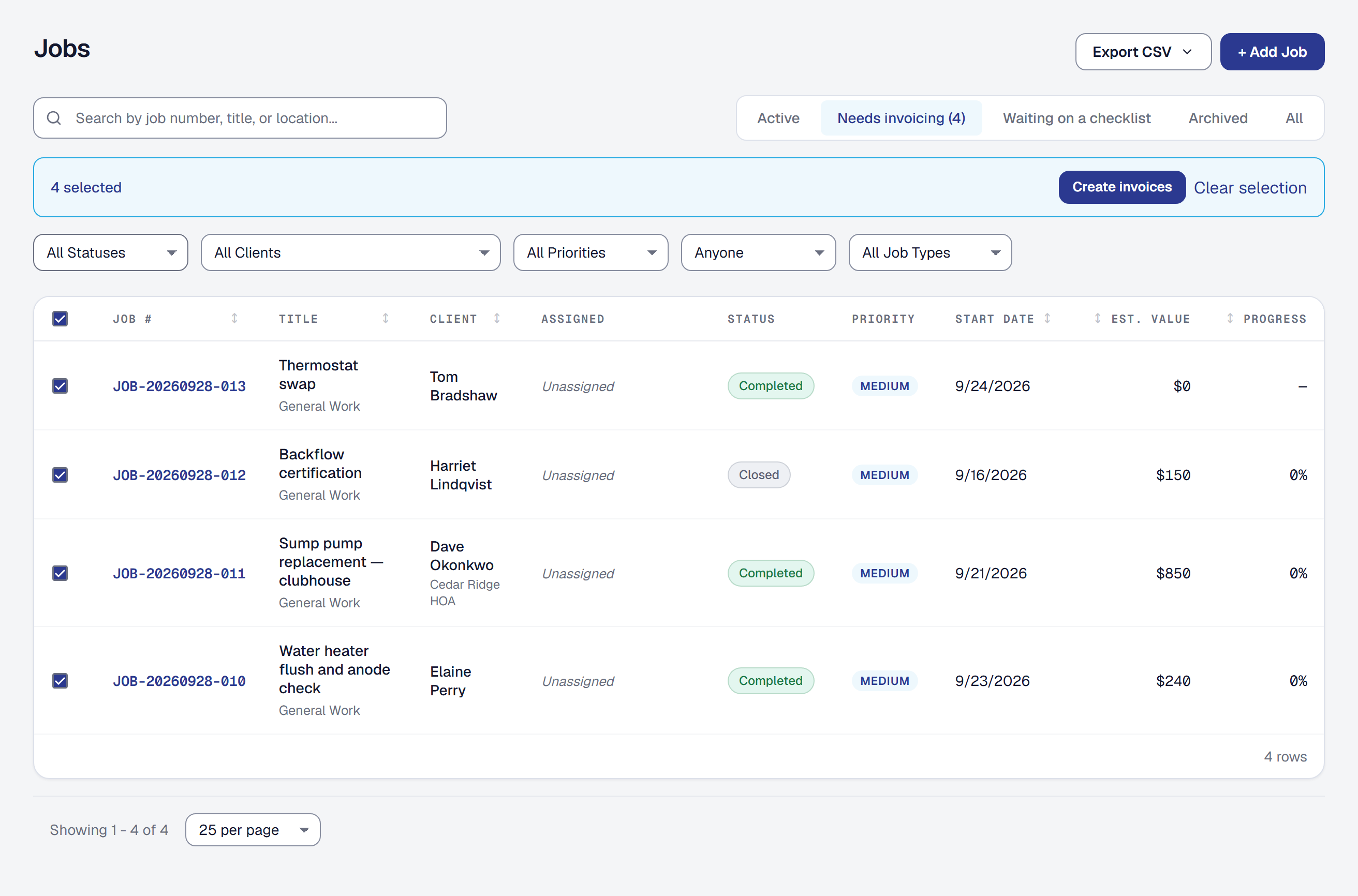
Friday afternoon, eleven finished jobs, eleven trips through the New Invoice form. Now it is one.
A Needs invoicing filter on the Jobs list. Every completed or closed job with no invoice of any kind, with the count on the tab. When it is empty, the list says so: every completed job is billed.
Select them, create the invoices. Check the rows — singly, or every job on the page — and Create invoices asks for a due date and makes one draft per job, carrying exactly the lines the New Invoice page would have offered for it: the job’s uninvoiced milestones and the change orders the client accepted. Each draft is created the way a single one is, so afterwards nobody can tell them apart. A job with nothing to bill, one that is not finished, or one somebody has already started invoicing is skipped and named with the reason, and the rest go ahead. Up to fifty at a time, with progress as it runs. Hours and expenses are never added by a batch — whether to bill logged time, and at what rate, is a decision the New Invoice page leaves to you.
Then send them together. The result page lists what was made and what was skipped, and Send all sends each draft the way a single Email to client does — the same email, the same link, the same record on the invoice and in the client’s history — one at a time, so one problem is one invoice’s problem and the others still go. A client with no email address on file is skipped and named. The same Send all is on the Invoices list, filtered to drafts, for the ones made earlier.
The reminder points here. Tell me about uninvoiced completed jobs — the first ready-made rule — used to name the job and stop. Its email now opens the Jobs list on the Needs invoicing filter with that job already selected, so the nudge and the fix are one click apart.
Owners and Managers, on every plan.
Later: on September 30 a job gets an agreed price, and the list and the batch follow it. A finished job billed to an agreed price is on Needs invoicing while any of that price is on no invoice yet, so a deposit invoice no longer takes it off, and the batch makes its final invoice — the same one Bill the rest makes on the job, for whatever of the price and its accepted change orders is still to bill. A job billed as it goes is on the list until it has an invoice of any kind, and gets the lines described above. From October 11 the batch is for anybody whose role changes invoices: Owners, Managers and bookkeepers, and on Scale a role you build with invoices in it.