The list they work, and the proof you send
Write down how a kind of work is done, once. Every job of that kind carries it, will not close until it is answered, and sends the customer a branded record of what was done.
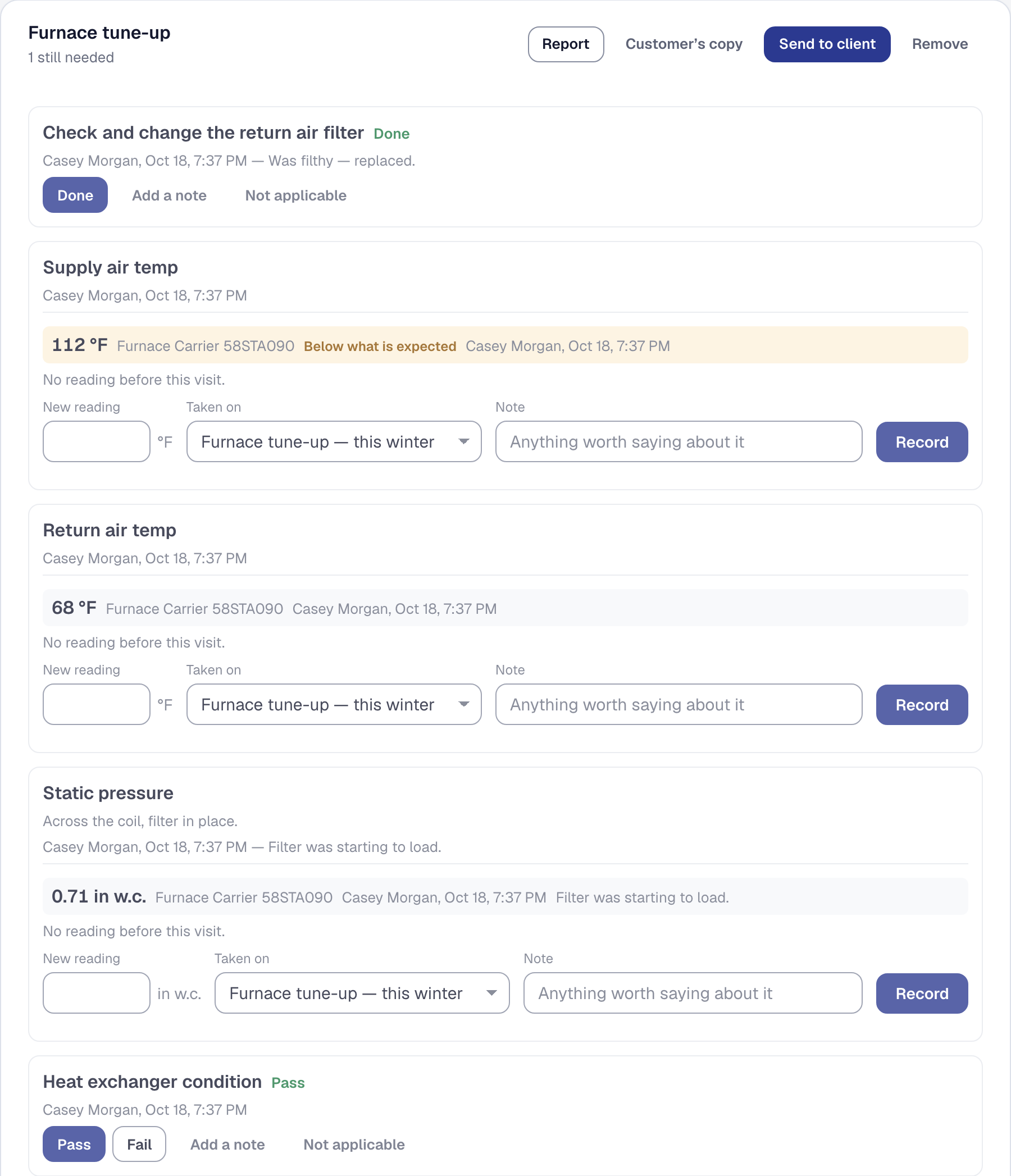
Every business has the list. It is in somebody’s head, on a laminated card in the van, or in the part of the job somebody always forgets. Now it is written down once, it arrives on every job of that kind, and the job will not close until it is answered.
Write it once, under Organization → Checklists. A step can be a tick, a number, a choice you wrote, pass-or-fail, a photo, a signature — or one of your measurements, in which case answering it records the reading against the furnace it came off rather than against the paperwork. Drag the steps into the order the work is actually done in. Mark the ones that matter required. Then tell each kind of work which lists it carries: a furnace tune-up gets three; a drain clear gets none.
Nothing closes until it is done. A job with an unanswered required step refuses to be marked complete, from the office and from the crew’s phone alike, and the refusal names the steps rather than saying the list is unfinished — a technician told “the checklist is not done” has to go hunting for which part. On a phone the Work is complete button is simply not there, with the reason in its place, because a button that appears should be a button that works.
An owner or manager can finish it anyway, with a reason. The reason lands on the job beside what was still outstanding, and the list is not quietly ticked: what was actually done is the point of having asked. A Jobs list tab shows everything the gate is holding, so nothing sits stuck without somebody seeing it.
And the customer gets the proof. A finished checklist becomes a branded document — your name and logo, the job, the day, who was there, every step with its answer and note, each reading with the range it was judged against and a mark where it fell outside, and the photographs at the back, full width. Download it, email it to the client as an attachment, or let them read it on their own page. It is the first document this product sends that carries a picture of the work.
A step you mark internal — quoted them for a replacement, on the same list as the work because the technician is standing right there — is on your copy and not on theirs, and it comes off silently: no gap, no count, nothing to ask about. Before you send, there is a second download of exactly what the customer would receive, so you read the redaction rather than trust it.
Do not want to write twenty steps from a blank page? Describe the kind of work in a sentence and the steps are proposed — in your trade’s words, in the order the work is done, each with a line saying why it is there. Every bit of it is a draft: nothing is saved until you save it, a suggested measurement exists only once you create it, a suggested range says to check it, and required is shown as a suggestion because that is the flag that stops a job closing. You can ask from a job that has no list, too, and put the answer on that job alone.
Checklists, the gate and the customer’s report are on every plan. A photo step still works on Starter — it is required, the crew ticks it and says what they saw — but keeping the picture needs photo storage, and a plan change is never what stops a job closing on a driveway. Suggesting the steps is Professional and spends the same AI allowance as drafting a proposal.
None of this certifies anything. A completed checklist is a record of what a person answered, on the day they answered it, and a reading inside the range you typed in is not a finding that anything is serviceable.
Later: checklists are written under Tools → Checklists, and the crew’s button reads The job is finished. From October 11, anyone whose role changes jobs and the schedule — a dispatcher too — can finish a job anyway, with a reason. The Waiting on a checklist tab lists every unfinished job held by a required step still unanswered on its own lists — a stage’s or a visit’s list holds those instead. And on October 16 photo storage came to every plan, so a photo step keeps its picture on Starter too.