Your day as a route
Plan anybody's day from the board: the stops in the order to drive them, the drive between each, a planned time at every door, and when they are back — a plan of its own that moves no visit.
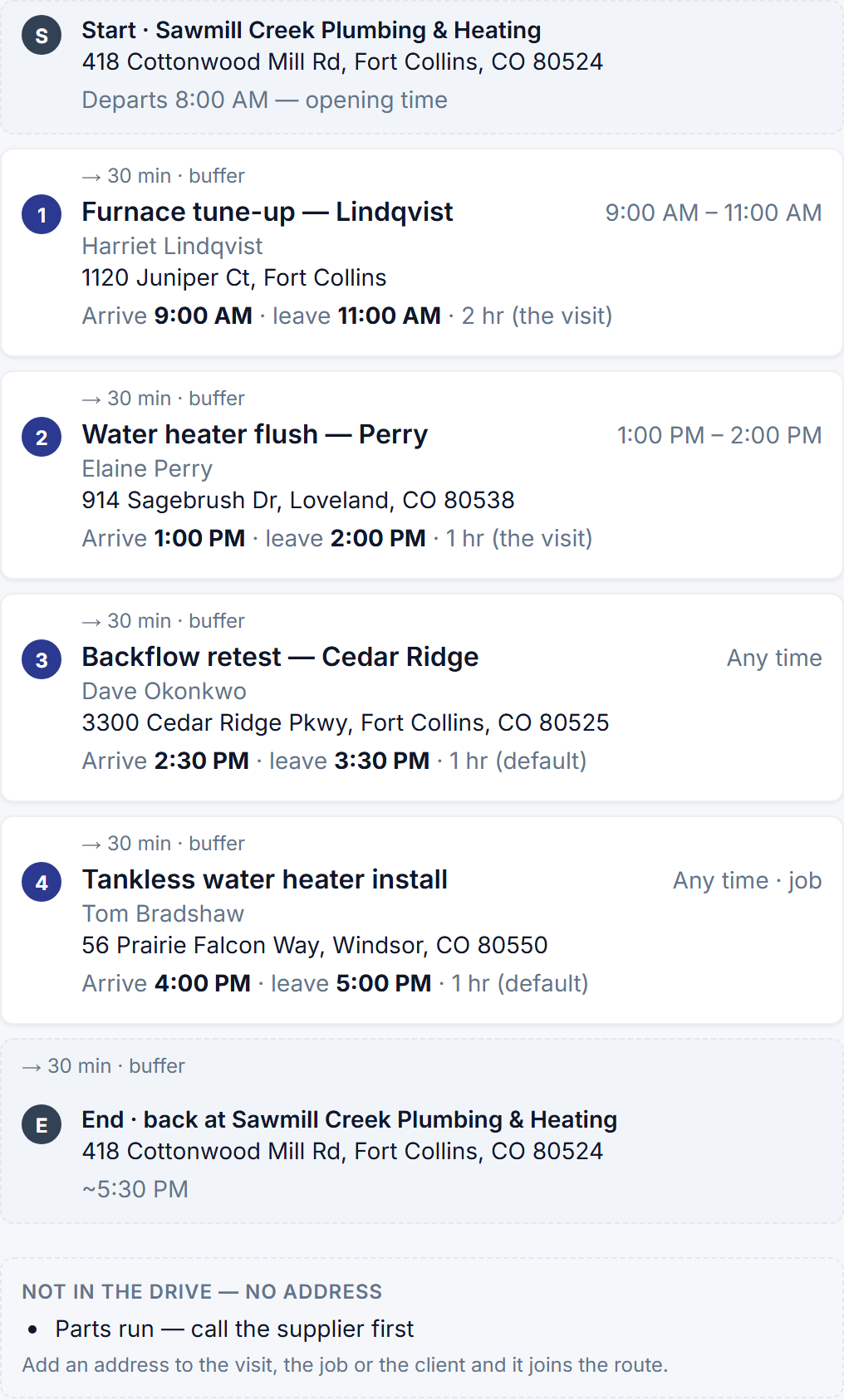
The day board has read the day as a lane per person for a while. Now a lane can be planned as a route: Plan this day on any lane opens the day as a list of stops in the order to drive them, with the drive between each, a planned arrival and departure at every door, where the day starts, and when the van is back.
A plan of its own. The plan is a record beside the calendar, never a change to it. Trying an order moves no visit and tells no customer anything; the appointment stays the promise you made, and the plan is how the crew keeps it. Drag a stop and every time after it recomputes; a stop planned to arrive after the time its customer was told says so in red rather than being quietly planned late. Save it, and the lane on the board shows the day’s driving and when they are back; change the day — a visit moved, a job added — and the plan says it is out of date until you bring it up to date.
Later: since October 18 every stop is a visit, so what puts a plan out of date is a visit added, moved, reassigned or canceled.
Where the day starts. From the business address by default, or a person’s own address if they leave from home, and back to the start or ending at the last stop — set on their record. The business’s opening time is when the day departs, or the time you set for that person. A stop whose visit has a length uses it; a booked service uses its duration; a job uses the labor it has left; everything else uses a default stop length you set once on the Team page.
Later: since October 18 a stop’s length is never the job’s estimate. A visit booked for an exact time uses its own length, one booked into an arrival window its service’s duration, and anything else the Default stop length — since September 28 the Day Board’s setting, shown under Works with on Route planning’s page.
The drive. On Professional the drive between stops is measured by Google’s road network — the minutes and the miles — and the day is drawn on a map. On every plan the fixed travel buffer from your booking settings stands in, and the plan says which it is. Nothing here reads where a phone is; the plan is made from the schedule and the addresses on it.