Approving hours and sending them to payroll
Review a pay period person by person, approve it, and export a file for your payroll provider instead of retyping a week.
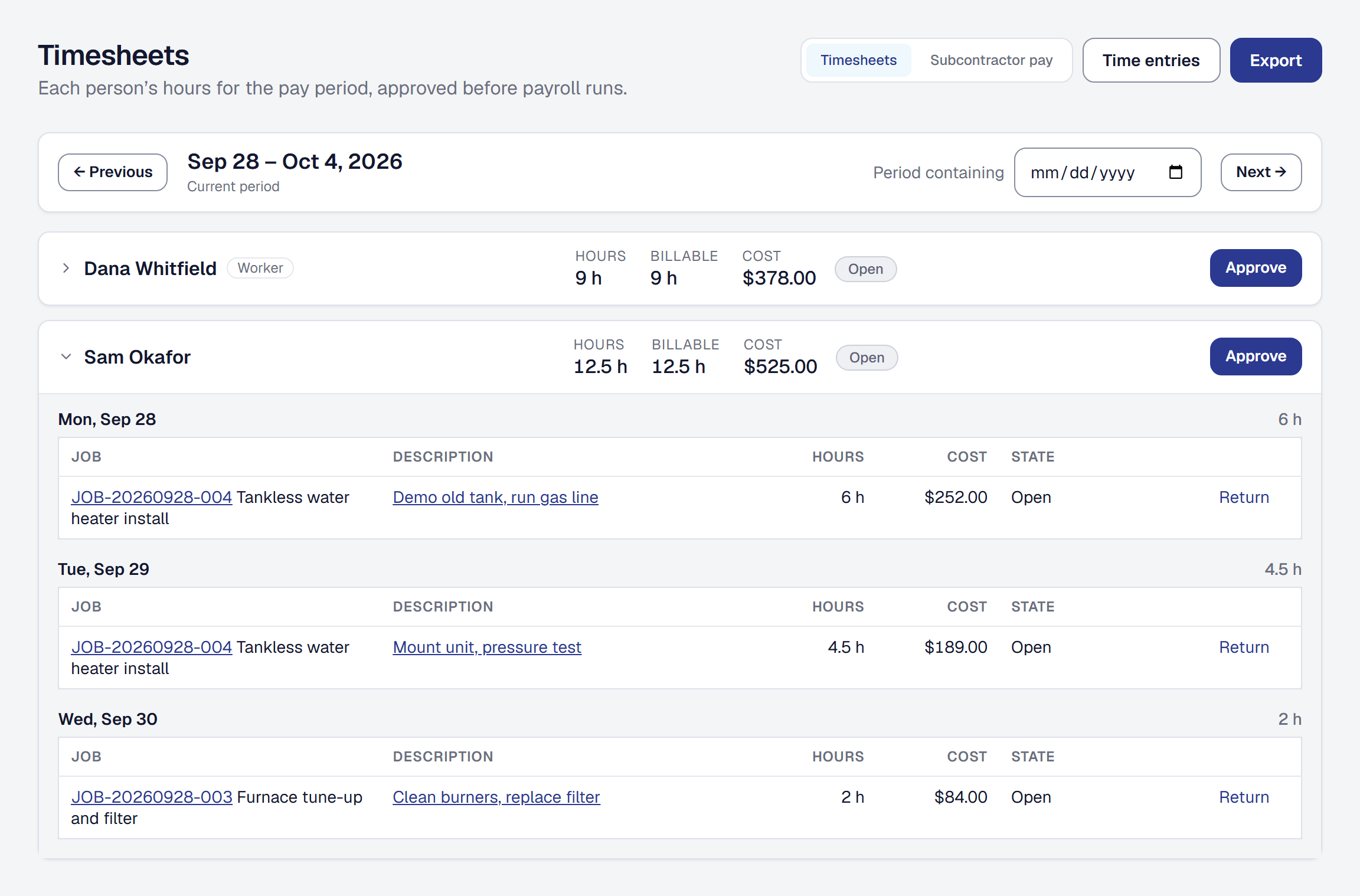
Your crew’s hours are already in the product — logged against jobs and costed at each person’s rate, which is what makes the margin figure true. What they were not doing was getting anybody paid.
Every Friday somebody opens the time entries list, filters by person, adds up a week and types it into the payroll provider. This is the last step.
Set your pay period
Your business chooses how it pays on Timesheets’ own page — Tools → Timesheets → Settings — where the pay period is. It is the owner’s to set; a manager sees what is chosen and cannot change it:
- Weekly, from a given weekday.
- Every two weeks, from a date.
- Twice a month.
- Monthly.
Everything else on this page follows from that choice. What each subcontractor is owed is counted over the same periods, so the pay period is also on Subcontractor pay’s page, under Works with — one setting, and a change on either page is the change on both. See What you owe each subcontractor.
Review a period
Timesheets shows one period at a time: each person with hours in it, their total, and the entries behind it.
Open somebody’s total and you see what it is made of — which jobs, which days, what was billable. If something looks wrong, it is one click to the entry rather than a conversation.
An entry somebody else recorded for the person — a crew lead clocking them in and out on a visit, or entering their hours — says Recorded by and who, under its description. It is still that person’s time, at their own rate.
Count time off
With Timesheets added, recording time away on a person’s Schedule tab also asks its Kind of time off — Vacation, Sick, Holiday or Unpaid, starting as Unpaid — and shows the hours each day counts, worked out from their day: a whole day its working hours, part of a day the part they would have worked, a day they do not work none. Change any of them before you save, in quarter hours. The hours are kept as saved, so changing somebody’s hours later never changes a figure payroll already had.
A subcontractor’s time away is only ever unpaid: paying a contractor for time off is a mark of employment, and the product will not put it on a payroll file.
Time away recorded before you added Timesheets has no kind and counts nothing. Give it one with Change while it is still ahead — the form asks its Kind of time off — or with Kind on its row once it has ended, as long as none of its days is in a pay period already approved. Kind also changes the kind of time away that has one.
Timesheets shows each person’s time off in the period beside their hours — Vacation 16 h · Sick 4 h — and opening them lists each day with its kind and hours. Somebody away the whole period still has a row, to approve like any other. Time off adds hours, never cost: what a job cost is unchanged. Unpaid is shown so the absence explains itself, and is paid nowhere.
The kind is as private as the reason: the office and the person see it, and the rest of the crew see only that they are away.
See commissions and tips beside the hours
With Commissions & pay rules added on the Tools page, a period anybody earned in shows each person’s Commissions, Tips and Revenue credited beside their hours and cost. Select a figure and the row opens on what is behind it: each line’s day, the job, the invoice whose payment it came from, and what it was — earned under a pay rule, taken back by a refund or a void, or a tip credited to the crew. Revenue credited is each person’s share of what customers paid on the jobs they worked, without the tax, by the same share their commission is worked out on, whether or not they have a pay rule.
Earnings count on the day the customer paid — or the day a refund or a void took some back — whether or not the hours are approved, because the money was collected either way. While a person’s hours wait, their row says the earnings are shown before the hours are approved. A refund this period of a payment from an earlier one takes back from this period, so a period’s commission can come out below zero; your payroll provider decides how to recover it.
Somebody who earned in the period without logging hours — a tip on last week’s job, say — has a row of their own, with no hours to approve. A period nobody earned in shows hours alone. Remove the tool and the page is hours alone again; what was earned is kept. Setting the rules, and how each figure is earned, shared and taken back, is on Commissions and pay rules.
See what you earned this period
On My Day, This pay period tells each person where their own hours stand — open, approved, or returned with the reason. With Commissions & pay rules added, once there is something to show it also says what they earned this period in commissions and tips, and Show what it came from lists each one with its day, what it was, and the job it came from, which opens with a tap. Their own time off in the period is there too, by kind. It is their own and nobody else’s, and nothing on it can be changed; a question about one is a question for whoever runs payroll, asked while the job is fresh. Somebody who earned nothing sees nothing new. How a job’s pay is shared is on Commissions and pay rules.
A subcontractor’s earned there counts their commissions and tips as well, as Subcontractor pay does, so the two never disagree.
Approve it
Approving a person’s timesheet marks that period reviewed. It is the record that somebody looked before the money went out, which is the whole point of an approval step.
It covers their time off in the period too: once approved, time away in it that has a kind cannot be changed, removed or given another kind until the timesheet is unapproved, as their entries cannot. Time away with no kind counts nothing, so until it has ended it can still be removed; it cannot be given a kind until the timesheet is unapproved. With Shifts & time off, approving first says when the period still holds time off they asked for that nobody has decided — see Decide a request.
Export for payroll
Export the approved period as a file your payroll provider can take, so the last step is an upload rather than a calculator and a keyboard.
With Commissions & pay rules added, the files carry each person’s earnings for the period too, whatever is left
out of the hours. Summary adds commission, tips and revenue_credited after the columns it always had, so a
sheet that reads it by position still reads it. Gusto hours import adds Gusto’s own Commission and Paycheck
Tips columns, left blank where there is nothing, as its hour columns are — a blank leaves alone what payroll already
has. Somebody with a commission or tips and no hours to export is on the file for those, with their hours blank;
revenue credited alone is not pay, and puts nobody on the file.
Time off goes on the files too. Summary adds vacation_hours, sick_hours and holiday_hours after every
column it already had. Detail lists each day of time off as a row of its own, with its kind under time_off, its
hours, and no job — unpaid included. Gusto hours import fills Gusto’s Vacation Hours, Sick Hours and
Holiday Hours, blank where somebody has none of a kind.
What approval does not change
Approving hours does not change what they cost a job. The costing has been using them all along, at the rate each entry carried when it was logged — see Time tracking.
Approval is about paying people. The job costing was already true.
This page describes Timesheet Approval and Payroll Export. It is written from that feature’s record and covers what has shipped, never what is planned.