Your team and what each person can do
Invite people by email and give each a role — and each gets a product shaped by that choice.
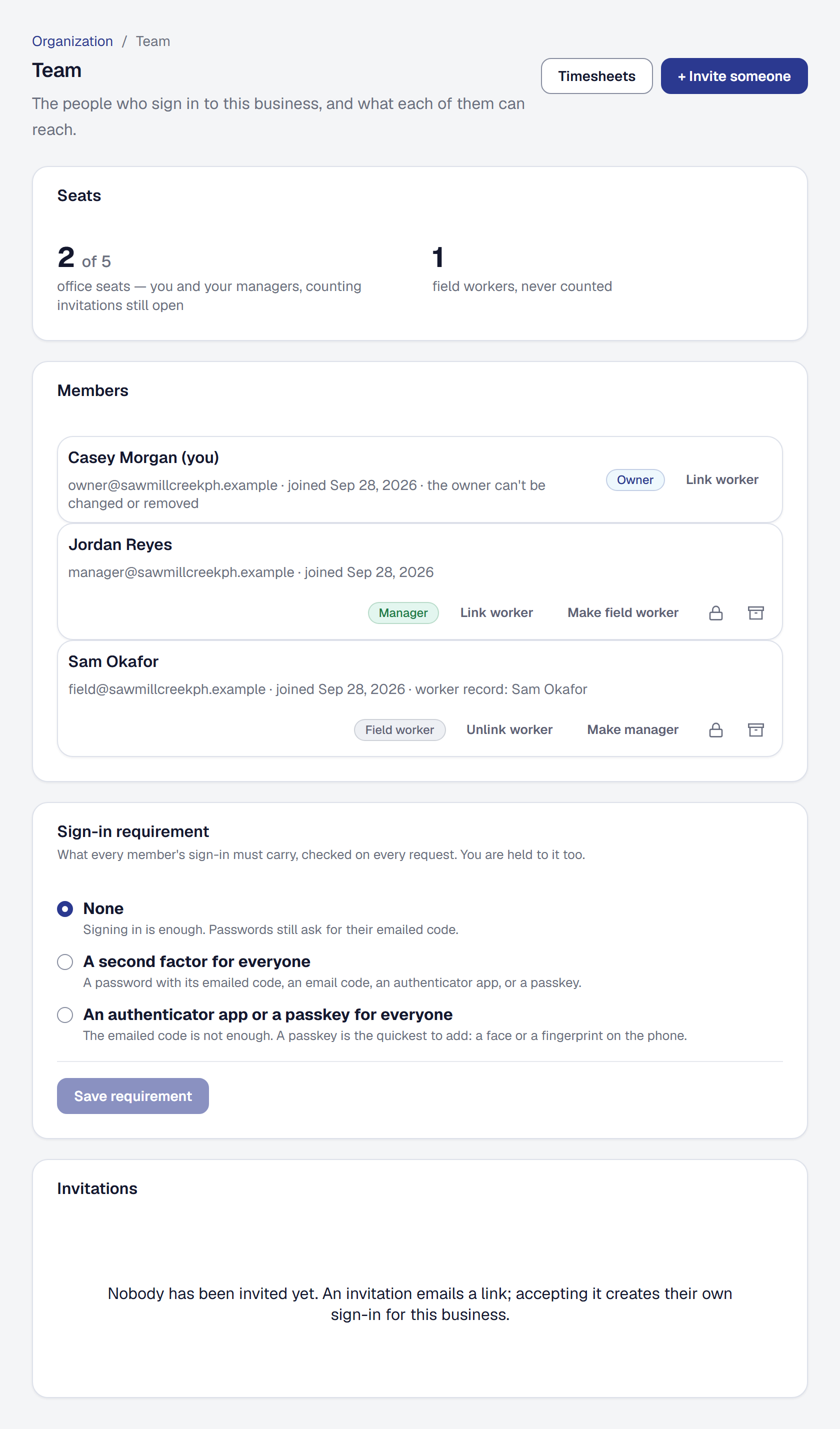
A business here can have more than one person in it. You invite somebody by email, choose what they are, and they accept, create their own sign-in, and see a product shaped by that choice.
Invite somebody
Open Team, enter their email address and pick their role. They get an invitation, set up their own sign-in, and they are in.
They can finish joining with a passkey and never set a password at all — see Passkeys. A password nobody chose is a password somebody writes on a sticky note.
A person belongs to one business at a time, so somebody already in another one leaves it first. Remove somebody from the team and the automations they switched on stop at once, until somebody switches them back on.
Choose the right role
There is one Owner — you — and everybody else gets a role that matches their work: Manager, Dispatcher, Estimator, Bookkeeper, Crew lead or Field worker, and on Scale a role you build yourself. What each one reaches, who sees prices, and how to build your own are on Roles.
What is the Owner’s alone is short and deliberate: the subscription, the team, the business’s details, payments setup, connecting a bank, tools, keys, the accounting connection, exporting or deleting everything, and handing the business to someone else — the things that decide who owns the business and where its money goes.
Understand what a Field member sees
A field worker — and a crew lead — does not get a smaller console. They get a different product — one day at a time, sized for a thumb, three or four taps to record a fact.
That is why they are blocked from console routes rather than shown a cut-down version. An office user sits at a desk answering questions about many jobs; a field member is standing in a yard with one hand free and one question.
Know the difference between a member and a worker
Two records, and the distinction matters once you start assigning work:
- A member is somebody who signs in.
- A worker is somebody the business pays — employee or subcontractor.
Most people are both. A subcontractor who will never log in is a worker without a member, and you can still assign work to them and record their hours. See Assigning work and the Day Board.
If you do the work yourself, you need a worker record too — see Putting yourself on the roster.
What it costs
Inviting people needs the Crew plan, which includes office seats — you and everyone whose role works in the office — and unlimited field workers and crew leads, who are never counted. See who takes an office seat.
Add an office user when the seats are full
On a Crew or Scale subscription, when every office seat is taken, inviting somebody into the office offers to add an office user instead of refusing — a trial does not sell them. Before anything is charged you see its monthly price, what is charged now for the rest of the billing period, and your new monthly total. The invitation goes once it is paid for; if the card does not pay, nothing is added, nothing is charged, and you are told how to update the card.
Billing shows the office users your plan includes, the ones you added and what they cost, and how many are in use. Remove an added one there: it comes off your next invoice and stays usable until the end of the period you have paid for, and nothing is refunded. A seat cannot be removed while every seat is in use — remove someone, or change somebody in the office to a field role, first.
Only the owner adds or removes office users. A manager sees on Billing how many are in use, and whom to ask when they are all taken.
Moving to a one-person plan, or canceling, takes the added office users off with it. Nobody is removed: the people beyond the plan’s seats are paused until there is a seat for them. Where SMG Tools provides seats or field workers itself, your Billing page lists them under Provided by SMG Tools.
See Plans and billing for what each plan includes.
Hand the business to a new owner
Selling the business, or passing it to a partner? Offer it to them from Organization → Your data, under Hand this business over. It can go to someone on your team or to anyone by email, on any plan; an address that already has a business of its own can’t take it. Nothing changes until they accept.
Before you send the offer you see what ends when you hand over. Stripe, your bank feeds and QuickBooks or Xero were connected with your own sign-ins, so they end and the new owner connects their own — card payments pause until they connect Stripe, so nothing is paid into your account after you hand over. The plan stays with the business: its billing emails go to the new owner, who can change the card on file. The team, the settings, API keys, webhooks and the business phone number all stay.
You also choose what you become:
- Stay on as a Manager, whom the new owner can change or remove. This needs an office seat: handing over to someone already in the office frees theirs for you; otherwise you need a seat to spare, counting invitations still open, or you can choose to leave.
- Leave, and your account is deleted once they accept — your sign-in, passkeys and devices. What you recorded stays with the business.
You confirm it’s you, unless you signed in within the last five minutes, and the offer is emailed to them. One offer is open at a time. It stays open for seven days; you can withdraw it until they answer, and you’re told if they decline or it lapses.
Taking a business on. The email’s link shows who is offering which business and what happens if you accept. If you already have an account at that address, sign in with it; if not, create one on the page with a password — Google, Microsoft, Apple and passkeys can be added from your Security page afterwards. Either way, type the business’s name to take it. The moment you accept, you are the owner everywhere — the team, the settings, the billing — and the page lists what to connect again, each with a link. The former owner, you and everyone on the team are emailed. Decline the offer tells the owner, and nothing changes. A link that was withdrawn, answered or has lapsed, or whose business has since closed, says only This offer is no longer open — ask the owner to offer it again.
This page describes Teams & Roles. It is written from that feature’s record and covers what has shipped, never what is planned.