Importing and exporting your data
Bring your client list, price book and equipment in from another system, and get any list back out in the same columns.
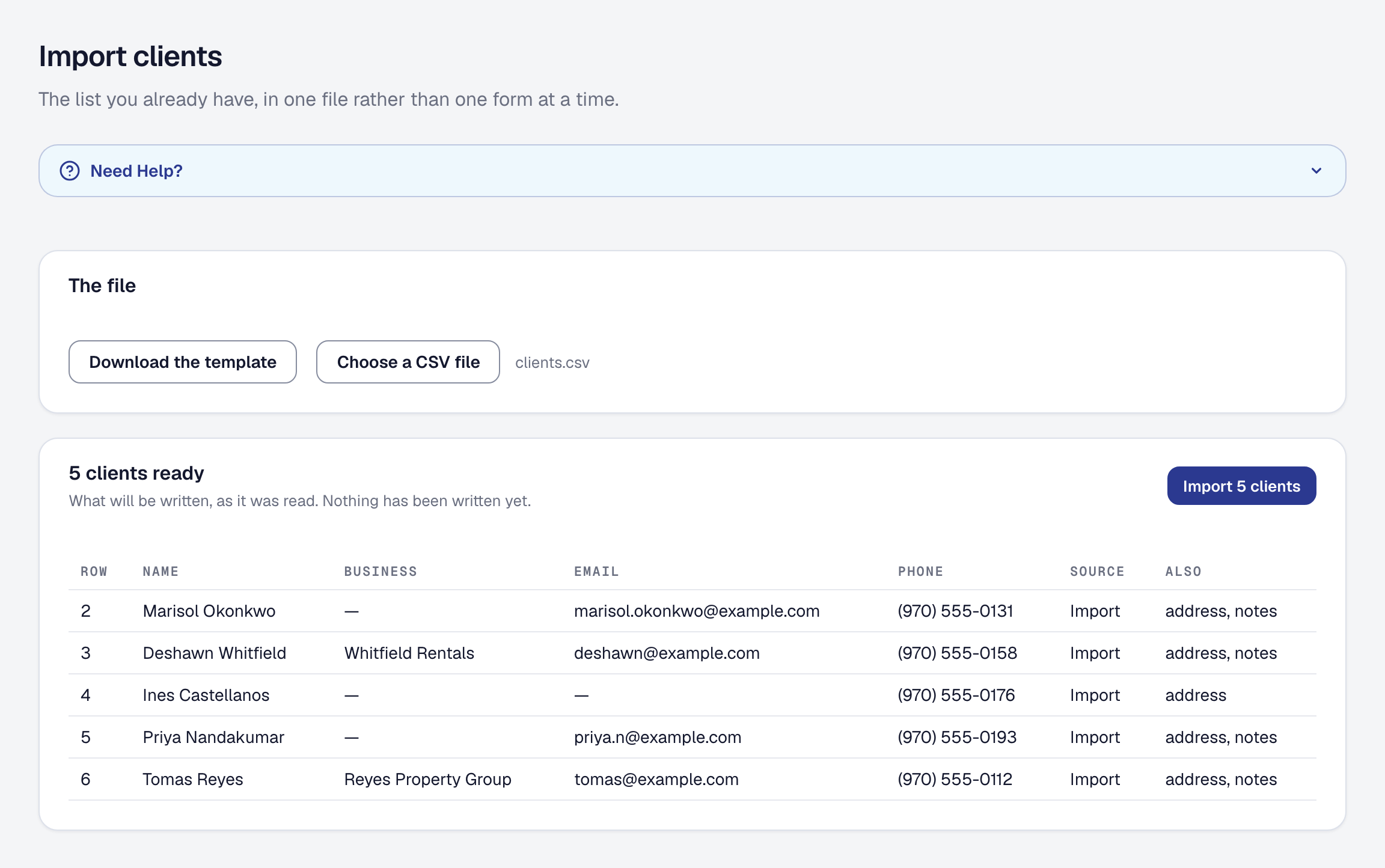
The thing that stops a business switching systems is the filing cabinet — the client list, the units at their properties, the vans, the price book. Nobody is retyping that. Import & export is one page, under Your data, listing every way information comes in and goes out.
Import in three steps
Every import has the same shape, so learning one teaches you all of them:
- Download the template and fill it in. The columns are named and in order, so there is no guessing what the file should look like.
- Upload it. The whole file is checked before anything is created, and if something is wrong you are told the row and the reason — not “import failed”.
- Preview, then commit. You see what is about to be created before it is.
Nothing is created until you say so, and a file that is half right is never half imported. Rarely, a row passes the check and is still refused as it is written. The import stops at that row and says so: how many rows before it were written, and which row stopped it. Take the written rows out of the file, fix that row, and choose the file again.
A units file can name a category your business does not have yet — Pool heater — and it is added when you commit. The preview says which categories it will add, spelled as your file spells them, and marks each row that names one, so a misspelling is caught before it becomes a category. A category you archived is not brought back by a file: that row is refused, and you restore it under Tools → Client equipment → Settings instead.
What you can bring in
- Clients — the list itself, which is usually the thing worth switching for.
- Client locations — a customer’s buildings: each one’s name and address, how to get in, and the site contact there. The client is matched by name or email exactly as it is on the record; a building the client already has, or one named twice in the file, is refused with its row. The preview says a row has getting-in details without showing them. See Keep a client with several buildings.
- Units — the equipment at your clients’ properties, with their serial numbers, install dates and warranties. A unit whose address is one of its client’s buildings is put at that building.
- Equipment — your own vans and machines.
- Price Book — everything you charge for, with its price and what it costs you, bundles included, and a material’s maker and regulated details — the list a separate Materials file brought in before the catalog folded into the Price Book. The template’s columns are on the Price Book page.
- Job types — the kinds of work you do.
- Bookable services — what customers can book online.
The page lists the imports and exports of the tools your business has. Remove a tool — Equipment, say — and its import and its exports leave the page with it; add it back on the Tools page and they return, and nothing you imported or recorded was deleted in between. The client list, job types, jobs, invoices, time entries and the whole-account archive are there whatever you have removed.
Each row is offered as far as your role goes. One your role does not include — the invoices file, for a role built without invoices — stays listed, so the page still shows everything there is, and reads Not in your role where its button would be. The whole-account archive reads Owner only for anybody but the owner.
What deliberately cannot be imported
What comes in as records is what exists, not what happened. Clients, units, equipment, prices, materials, job types and services are things your business has. Jobs, invoices, payments and logged hours from another system are things that happened — and bringing those in as jobs and invoices would fabricate a history this product would then treat as real, with margins, tax summaries and reports built on top of it.
So what happened elsewhere comes in as your old system’s history instead: kept beside your records, marked as from your old system, and counted in nothing. This product’s own figures start from the day you switched, and everything they tell you is something it actually saw.
Your old system’s history
Your old system’s history on the Import & export page takes the old system’s own export as it is — there is no template to copy years of invoices into.
-
Say what the file holds — jobs, invoices, payments, time, or several kinds with a column saying which kind each row is.
-
Choose the file. A CSV of up to 20,000 rows and 10 MB.
-
Match the columns. Each column is shown with three of its values, beside what it will be kept as — the client’s name, email and phone, the date, the number, the title, the amount, the balance, the status, the address, the worker, the hours, the notes — each guessed by the column’s name. Change any that are wrong, or set it to Not used: a column not used is kept with its row as it was. Next time you bring in a file with the same columns, it is matched the way you confirmed.
On Professional, Read it for me has the AI read the file’s header and each column’s first five values and match them, for a file whose column names say little (Svc Dt, Amt Billed). The page says how many AI tokens you have left before you ask, and asking spends some whether or not you keep its matches. Each match it makes is marked Read by the AI until you change it; check each before you check the file.
-
Check the file. The whole file is checked before anything is kept: a date that cannot be read, an amount that is not a number, a row whose kind is not said — each with its row. Then you see how many rows of each kind it brings, how many are on a client and how many are not, the dates they span, and a few of the rows.
-
Import.
Each row is put on the client it names — by email first, then phone, then the exact name or business name. A row two of your clients answer to is left unmatched rather than guessed, and a customer you no longer have stays a row of its own: history never creates a client, a job, an invoice or anything else.
None of it is counted: no report, no Getting paid, no sales tax figure, no accounting push and no figure on any page reads it, because none of them reads your old system’s history. The file you brought in is kept with its import and counts against your storage as a document does. Remove this import takes every row it brought, and its file, after saying how many rows that is; bring the file in again to have them back. Removing just the file from the Storage page frees its space and keeps the rows.
It is on every plan, and bringing it in is for the owner and anybody whose role changes how the business works.
History archive, linked from Import & export, searches every row by number, client — as your old system named them, or as they are named here — title, address or date, narrowed by kind and by import. Below it, Not matched to a client lists the rows the import could not put on a client, grouped by the name your old system gave, however it was written. Match files a group, or one row, under the client you pick, and Undo takes it back; a row that was matched by hand says so, and can be unmatched from the row itself. Everyone who sees jobs, invoices or hours sees the archive’s rows of those kinds; matching is for the people who bring history in.
Clients here are archived, never deleted, so a client’s history stays with them; deleting the whole account deletes it all, its files included, and your data export carries every import and every row.
Get your data back out
Every list exports in the same columns its import template uses, so a round trip works: export, edit in a spreadsheet, import back.
Beyond the lists, the page offers your accounting exports and the whole-account archive, which the owner builds on Your data beside it. Getting everything out is not a support request — it is a page.
Your data is yours. It is on the pricing page and in the privacy policy, and this page is what makes it a fact rather than a claim.
Where to start
Bring your client list is on the Get Started checklist, which is the right first move for a business setting itself up without talking to anybody. Import the clients, and everything else you do afterwards has something real to attach to.
This page describes Import & Export — Switching in an Afternoon. It is written from that feature’s record and covers what has shipped, never what is planned.