Angi
Give Angi your address and key, and each lead Angi sells you is on your Leads page within seconds, with Angi's numbers, the homeowner's answers and what the lead cost.
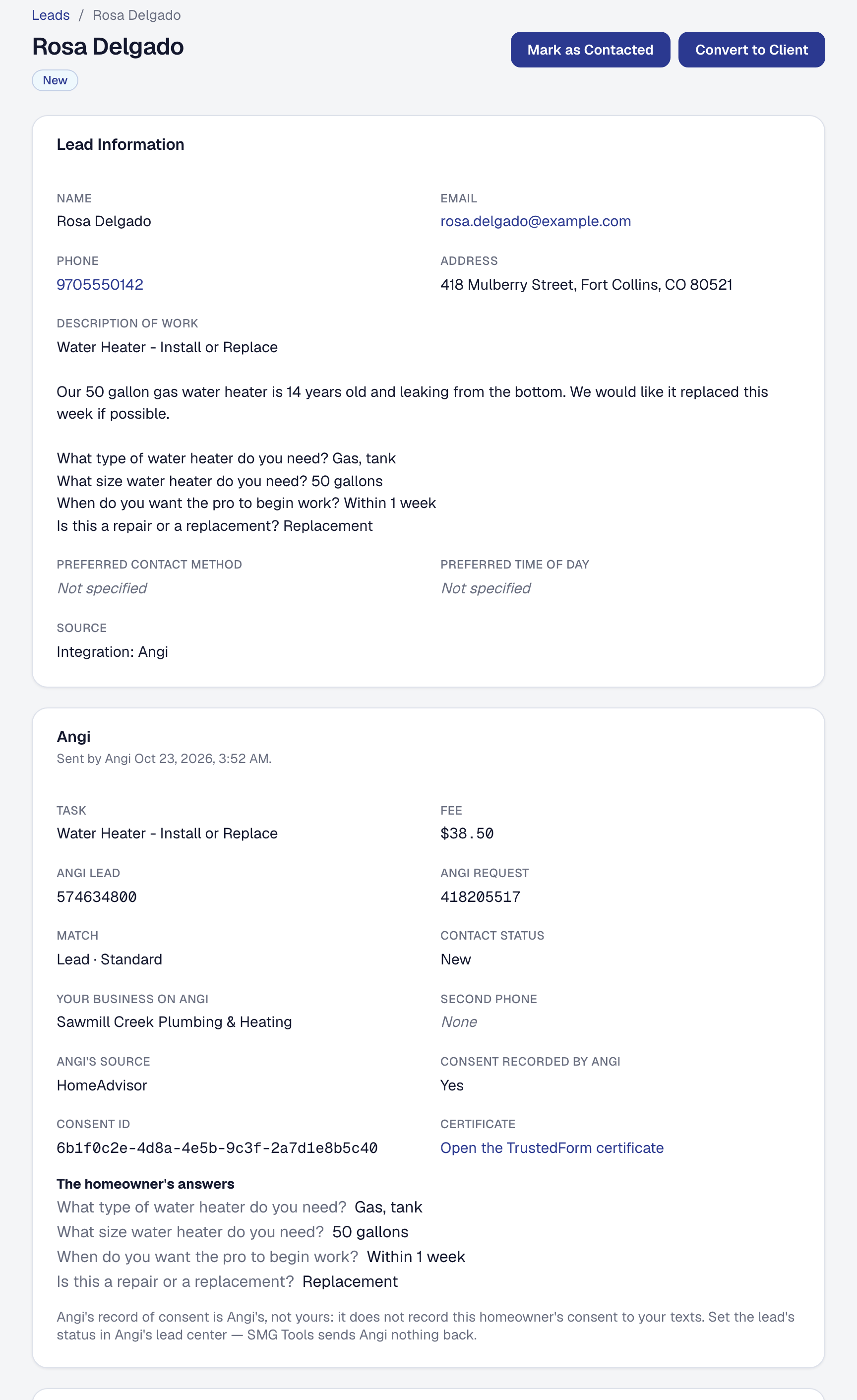
If you buy leads from Angi — the marketplace that was HomeAdvisor and Angie’s List — you stop reading them in Angi’s lead center and retyping them. Angi sends each new lead straight to SMG Tools, and it is on your Leads page within seconds, with the job in the homeowner’s words, their answers to Angi’s questions, and what Angi charged you for it.
It is on Professional. On Starter, Angi’s page shows Compare plans.
Connect Angi
Angi’s own team connects your business, once you send them two things from SMG Tools: an address and a key. The Owner does this:
- On the Tools page, open Angi. The Connection tab shows the Address Angi sends leads to and your business’s own Key, each with a copy button.
- Press Email Angi. It opens a message to crmintegrations@angi.com in your own mail, with the address, the key, your email and a line saying SMG Tools takes Angi’s JSON already written.
- Fill in your Angi ID where the message marks it. It is at office.angi.com, beside your city.
- Send it. Angi’s team connects your business on their side; they may reply first with a question.
The email to Angi under the buttons shows the same message, to copy if your mail does not open.
From Angi’s first lead on, the tab shows Taking leads and counts them. Until then it says Waiting for Angi’s first lead.
Send a test lead posts Angi’s own sample lead through the same address and key, so you can see one arrive before Angi’s team has finished. It is Test lead: Jane Doe, with phones and an email nobody answers, and its source is Integration: Angi test so it is never counted as one of Angi’s leads. It records no cost. Archive it when you have looked.
Only the Owner sees the key and changes the tab. Anyone else who can open the page sees the address and the log.
See your Angi leads arrive
Each lead Angi sends is on Leads, under Sales, within seconds, with its source shown as Integration: Angi. It is a lead like any other: the new-lead email goes out, it is on the pipeline, and it converts to a client the same way, its source going with it. It carries:
- the homeowner’s name, phone (with its extension) and email;
- their address, street, city, state and ZIP together;
- the job: Angi’s name for the task, then the homeowner’s own comments, then each question Angi asked with their answer, one to a line.
The lead’s Angi panel shows what Angi sent with it: Angi’s lead and request numbers, the fee, the kind of match and lead, the contact status when Angi gives one, your business’s name on Angi, the homeowner’s second phone, Angi’s own source when it names one (HomeAdvisor), and Angi’s record of the homeowner’s consent with its TrustedForm certificate. Whoever cannot see prices and costs does not see the fee.
Angi sometimes sends the same lead again. It is still one lead: SMG Tools knows it by Angi’s lead number.
Angi’s record of consent is Angi’s, not yours. It does not record the homeowner’s consent to your own texts: record that as you always do.
See what each lead cost
Angi charges per lead and sends the fee with it. With Record what each lead costs on — it is, from the start — each lead’s fee is recorded as an expense: Angi lead and the homeowner’s name, vendor Angi, in Advertising, tagged to Angi as its lead source, paid, on the day Angi sent the lead. One lead is one expense, however often Angi sends it.
Where your profit comes from then shows Angi’s row whole: how many leads, what they cost, what each lead and each job won cost, and what you kept after them.
- A lead Angi credits is not reported by Angi, so void that lead’s expense by hand on the Expenses page.
- Switch it off on the Connection tab if your card statement or bank feed already brings Angi’s charges in, so nothing is counted twice. Off records nothing more and leaves what was recorded. It counts as it stood when Angi sent the lead: a lead sent while it was off is never recorded.
When the business is on Starter
Nothing Angi sends is lost. On Starter, a lead Angi sends is kept, and the Connection tab shows Paused — leads are kept with how many are waiting. Move back to Professional and, within the hour, each one comes into your pipeline dated when Angi sent it, with its fee recorded as it would have been.
Read the log
The Log tab lists what came from Angi in the last 90 days, newest first:
- each lead that arrived, with its fee when it was recorded, linking to the lead;
- each lead kept while Angi was paused;
- each delivery refused, and why: no name, no phone or email, no lead number, not readable, sent with a key that was replaced, sent while Angi was switched off, or more than 60 in an hour.
Angi tries a refused lead three more times, fifteen minutes apart, then gives up. Each refusal is on the log once, however often Angi tries it. When the cause is yours to fix — the switch, or a key Angi does not have yet — fix it, and Angi’s next try brings the lead in.
Make a new key or switch Angi off
New key makes a new key after you confirm it is you. The old key is refused at once, so send Angi’s team the new one straight away: Email Angi writes it out again.
Take Angi’s leads, on the Connection tab, stops taking Angi’s leads when you switch it off: each delivery is refused, and the tab says so. Switch it back on and the same key works.
What Angi does not do
Angi sends new leads and nothing else, and SMG Tools sends Angi nothing:
- No status back. Set each lead’s status in Angi’s lead center, as you do now.
- No messages. Call, text or email the homeowner from SMG Tools; Angi passes no replies.
- No credits or refunds. Void a credited lead’s expense by hand.
- Only new leads, from the day Angi’s team connects you. Leads from before stay in Angi.
What SMG Tools receives from Angi and keeps is in the Privacy Policy, in its section on Angi.
This page describes Angi — Leads In, with What Each Cost. It is written from that feature’s record and covers what has shipped, never what is planned.