Thumbtack
Connect Thumbtack and each lead arrives on your Leads page within seconds with its conversation, Thumbtack hears how the work went, and each lead's price is counted.
Connect your Thumbtack account and you stop retyping Thumbtack leads: each one is on your Leads page within seconds, with the customer’s request and their messages, and you reply from SMG Tools. Thumbtack hears when the work is booked, finished and paid, and each lead’s price is recorded, so you can see what Thumbtack really earns you.
It is on Professional. On Starter, Thumbtack’s page shows Compare plans.
Connect Thumbtack
The Owner connects it:
- On the Tools page, open Thumbtack, and press Connect Thumbtack on its Connection tab.
- Confirm it is you, as with any change to what can reach the business’s data.
- Sign in to Thumbtack and choose Allow. SMG Tools never sees your Thumbtack password.
- If your Thumbtack account has more than one business, choose the ones whose leads belong to this business, and press Connect. With only one, it is chosen for you.
The Connection tab shows Connected with each business’s name. A Thumbtack business already connected to another SMG Tools business cannot be chosen: disconnect it there first. The others still connect.
Connecting brings in no leads from before it: those are probably already in your hands.
See your Thumbtack leads arrive
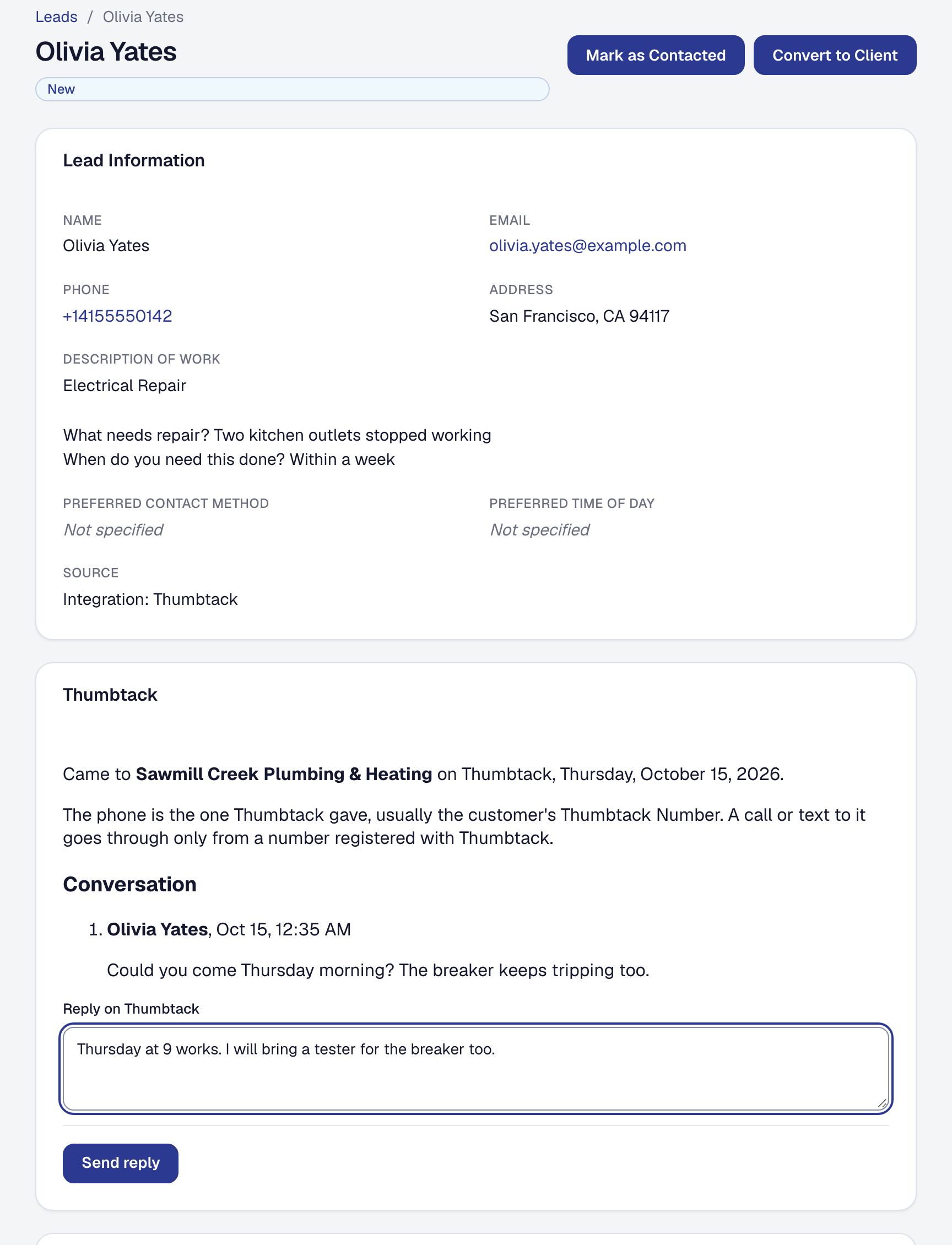
Each new Thumbtack lead is on Leads, under Sales, within seconds, with its source shown as Integration: Thumbtack. It is a lead like any other: the new-lead email goes out, it is on the pipeline, and it converts to a client the same way. It carries what Thumbtack shares:
- the customer’s name, and their phone and email where Thumbtack gives them;
- their city, state and ZIP;
- the kind of work, then each question Thumbtack asked with the customer’s answer, one to a line.
The lead’s Thumbtack panel says which of your Thumbtack businesses it came to and when, with Open it on Thumbtack where Thumbtack gives the lead’s address. The phone is usually the customer’s Thumbtack Number: a call or text to it goes through only from a number registered with Thumbtack (below).
Behind the instant delivery, SMG Tools checks Thumbtack every hour and brings in any lead that did not arrive. If Thumbtack cannot be read when a lead arrives, it is tried again, and then entered from what Thumbtack’s notice carried; the panel says so.
On Starter, the Connection tab shows Paused — on Professional. Leads wait in Thumbtack and nothing is sent to it. Move back to Professional and the leads from the paused time come in, up to 30 days back.
Register your phone with Thumbtack
A customer’s Thumbtack Number accepts calls and texts only from numbers registered with Thumbtack. Registering makes no call and sends no text.
- The business’s own numbers — its SMG Tools number and the phone on its profile — are registered when you connect, and kept in step when they change.
- Each person’s own phone, by their choice only. Anyone who works leads opens Profile → User Details, turns on Register my phone with Thumbtack, checks The phone you call and text from, and presses Register with Thumbtack. It goes to Thumbtack under their name. Turning it off takes it off. Nobody else can turn it on for them.
The Numbers tab lists every registered number: Registered, Being registered, or Refused with Thumbtack’s reason. The Owner can Try again on a refused number and Remove any of them. One of the business’s own that was removed stays off until the Owner chooses Register again.
Reply to a Thumbtack customer
The conversation is on the lead’s Thumbtack panel, under Conversation: the customer’s messages, your replies, and replies sent from Thumbtack’s own app, in order. Write in Reply on Thumbtack and press Send reply. The reply goes through Thumbtack, as the business, so the customer reads it where they asked.
If Thumbtack cannot be reached or refuses it, the reply stays in the box with the reason and nothing is shown as sent.
Once the lead becomes a client, the same conversation is on the client’s Communication tab, and on their history. Anyone who can work leads can read and reply.
Know what Thumbtack is told
As the lead’s work moves, Thumbtack hears the step and the time it happened:
| What happens here | What Thumbtack is told |
|---|---|
| The lead’s job is made, with no visit booked | Not yet booked |
| The job’s first visit is booked | Visit booked |
| The job is completed or closed | Job done |
| Every invoice on the job is paid in full | Paid in full, with the amount |
| The lead or its job is called off | Called off, by the customer or by the business |
Only the job the lead became is reported: the one made from the lead, or the first one made for its client after the lead came in. Nothing else about the job or the invoice leaves.
Called off. Archiving a Thumbtack lead before it has a job, archiving its job before it is done, or canceling its last booked visit asks Who called it off? — We did or The customer — because Thumbtack credits the work differently. Cancel stops the archive. When it ends some other way, nobody said why, so nothing is sent: a guess could credit or blame you wrongly.
The lead’s panel lists what Thumbtack has been told under Told to Thumbtack, each Sent, Waiting or Refused. A step Thumbtack refused has Send again on the Log tab.
See what each lead cost
Thumbtack charges per lead. With Record what each lead costs on — it is, from the start — each lead’s price is recorded as an expense: Thumbtack lead and the customer’s name, vendor Thumbtack, in Advertising, tagged to Thumbtack as its lead source, on the day the lead arrived.
- A price Thumbtack gives later is recorded within a day: SMG Tools reads each lead’s charge again daily for 90 days.
- A lead Thumbtack refunds has its expense voided, and it reads Voided — Refunded by Thumbtack. A lead refunded before its price was recorded is never recorded.
- A courtesy credit is listed on the Log tab and changes nothing: the cost stays what Thumbtack charged.
Where your profit comes from then shows Thumbtack’s row whole: what the leads cost, what each lead and each job won cost, and what you kept after them.
Switch it off on the Connection tab if your card statement or bank feed already brings Thumbtack’s charges in, so nothing is counted twice. Off records nothing more, including the price of a lead that arrived while it was off, and leaves what was recorded. If you see Thumbtack’s charges twice, switch it off and void the duplicates.
Read the log
The Log tab lists what happened between SMG Tools and Thumbtack, newest first: each lead that arrived, each step Thumbtack was told, each number registered or removed, each refund and credit, and what Thumbtack answered — Done, Refused or Failed. A step Thumbtack refused has Send again. Replies are not on it: they are in their conversation.
Reconnect when it says Needs reconnecting
If Thumbtack refuses SMG Tools’ access — it was removed on Thumbtack’s side, or a renewal was refused — the Connection tab shows Needs reconnecting with the reason, and the Owner who connected it is emailed once. Nothing arrives from Thumbtack or is sent to it until then, and nothing is lost. The Owner presses Reconnect Thumbtack and signs in again; everything is kept, and what waited catches up.
Disconnect Thumbtack
The Owner presses Disconnect Thumbtack on the Connection tab, confirms it is them, and confirms. A business on Starter can always disconnect. The tab shows Not connected, and:
- nothing more arrives or is sent;
- SMG Tools removes its notices and your registered numbers at Thumbtack and hands back its access. If Thumbtack cannot be reached, the tab says it is still finishing and tries again every hour;
- nothing is deleted here. Leads stay, the conversation stays readable with replies off, and recorded lead costs stay;
- jobs, visits and invoices in progress carry on, and Thumbtack stops hearing how they go;
- calls and texts from the removed numbers to a Thumbtack Number stop going through.
What is on Thumbtack stays on Thumbtack. Reconnecting the same Thumbtack business picks up where it left off.
What SMG Tools receives from Thumbtack, keeps and sends is in the Privacy Policy, section 4.24.
This page describes Thumbtack — Leads In, Replies, Status and Cost, Connected. It is written from that feature’s record and covers what has shipped, never what is planned.