Webhooks and an inbound lead address
Have other software told when something happens in SMG Tools, and let a form or a lead service outside it create a lead here.
Watch it

Everything that happens here is a recorded fact — a job finished, an invoice paid, a stranger booked a visit. This is the door out and the door in: a way for other software to be told about those facts, and a way for something outside the product to put a lead into it.
Have other software told what happened
A webhook is a web address you give us. When something happens that you subscribed to, we send the details there.
Set one up on the Tools page under Webhooks & API, on its Webhooks tab. Point it at a Slack channel, a Zapier or Make account that ties your other software together, a spreadsheet, or anything else that accepts a web request.
Webhooks are part of Professional and the plans above it. On Starter, every webhook you or a program made is kept and shown as paused, and nothing is sent to it — not later either. On Professional again, each one is sent the next thing that happens. Taking one away still works on Starter: you can delete any of them, and a program can remove one it made, so turning off a Zap takes its webhook with it.
The value is that you stop having to be the integration. A job finishing can update the whiteboard app your office already watches without anybody retyping it.
A program you gave a key that may manage webhooks — Zapier, for one — can subscribe itself to the events it needs and remove its subscription when you disconnect it, under the same rules. SMG Tools’ own app in Zapier’s directory does this for every Zap with an SMG Tools trigger: see Connect SMG Tools to Zapier. Each webhook on the Webhooks tab says who made it: the person’s name, or {the key’s name} (API key). A program sees and removes only what it made. Revoking its key leaves its webhooks sending until you delete them.
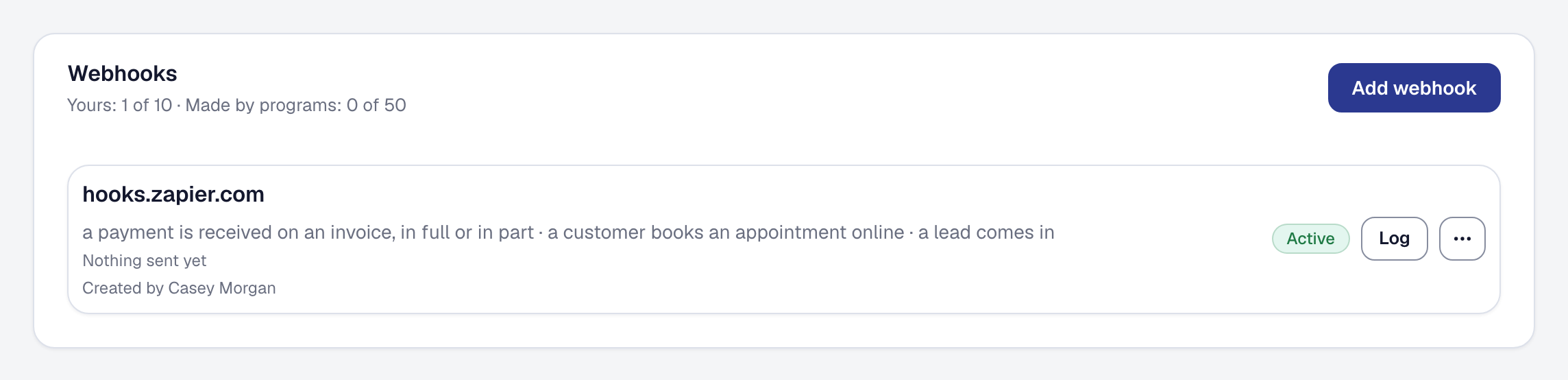
You can make ten webhooks of your own. Programs have fifty between them, counted apart, because Zapier makes one for each Zap: the top of the Webhooks list shows both counts, such as Yours: 2 of 10 · Made by programs: 14 of 50. Neither takes room from the other.
If an address does not answer, it is tried again for about a day. If it answers that the webhook is gone — what Zapier says once a Zap has been deleted — nothing is tried again. A webhook a program made is removed at once, with its log, as if the program had removed it itself. One you made is paused and you are emailed, so you decide whether to delete it or resume it. A test send that gets that answer shows it in the log and changes nothing.
Get leads in from elsewhere
Your business gets an inbound lead address — a web address of its own that turns what is posted to it into a lead here. It is on every plan. Find it on the Tools page under Inbound leads: its page shows the address to copy, what has come through and what was refused, and an example request with every field it may carry. The owner can switch it off, send a test lead through it while it is on, or regenerate it — the old address stops working the moment a new one is made.
Put the form its page gives you on your website — see the next section — or give the address to a form builder’s webhook setting, a lead service or a Zap that can post to a web address, and those leads arrive in the same place as the ones from your own public page. They are then attributed, converted and reported on exactly like any other — see Client referrals and where your leads come from.
The address takes the request its page’s example shows, as JSON or as a web form’s fields under the same names:
name and at least one of email or phone, and any of address, descriptionOfWork,
preferredContactMethod, preferredTimeOfDay, preferredDate (today or later, as 2026-10-01),
preferredTimeWindow (Morning, Afternoon or Evening) and source — your own label for where the lead came from,
up to 40 characters, shown on the lead as Integration: Website. A name may be 200 characters, an email 320, a
phone 20, an address 500, a description 2,000, and a contact method or a time of day 50. A lead is answered with
201 and its id, a problem with 400 naming every field at once, an address that is unknown, replaced or switched off
with 404, and more than sixty leads through it in an hour with 429 and a Retry-After. A web form’s fields are
answered with a page for the visitor instead. Only the address’s own leads count toward the sixty, its test leads
and your website form’s with them: a lead a program posts with an API key, or one from Thumbtack or Angi, never
uses them up.
Put a form on your website
Inbound leads’ page has A form for your website: a plain HTML form with your address already in it. Copy form and paste it into a page of your website as it is; whoever looks after your site can style it to match. It asks for everything a lead can carry, in the words your public page uses, and labels each request it sends Website, so the lead shows as Integration: Website.
When a visitor sends it, they see a page in your business’s name saying their request was sent, with a link back to the website on Business Details — no website there, no link. If something is missing, such as a name, or both the email and the phone, the page says what to put right, and nothing is made until they send it again. If the address is switched off or has been replaced, the page says the form is not taking requests. Requests from the form count toward the sixty an hour like any others through the address.
The form carries one field people never see. A program that fills in every field it finds fills that one in too, and what it sent is dropped without a lead; the page counts it as caught by the spam trap, apart from what was refused. Leave that field as it is: a form post that fills it in is dropped.
Your website’s own script can post to the address too, as JSON or as a form’s fields: the address answers any website, and asks for no sign-in.
Before this existed, the only ways a lead could get in were the doors the product owns: your public page’s form, the directory, the booking page, the phone agent, and typing.
Let a program read and write your records
A program you choose — Zapier, the booking on your website, a script a developer writes for you — can also work with your clients, jobs, leads and appointments directly, with an API key you give it on Webhooks & API’s API keys tab. Making one, choosing what it may do, seeing what it has done and revoking it are on their own page: Connect a program with an API key. Keys are part of Professional, as webhooks are.
See whether you are connected
On the Tools page, Inbound leads reads Connected once your address has taken a lead, a test lead included, and while it is switched on; an address you have only looked at does not count. Webhooks & API reads Connected while a webhook is not disabled — a paused one counts — or a key has not been revoked.
Why it matters
Most businesses run on more than one piece of software, and the gaps between them are filled by a person copying things across. Every one of those hand-offs is a place work gets lost.
This does not make SMG Tools your only system. It makes it one that can be told things and can tell other things — which is the difference between software you build a business around and software you work around.
This page describes Open Platform — Webhooks and the Inbound Lead Door. It is written from that feature’s record and covers what has shipped, never what is planned.