Where your profit comes from
One report grouping your finished work by how each customer first came in, against what each source cost you, so you can see which sources send the customers who make money.
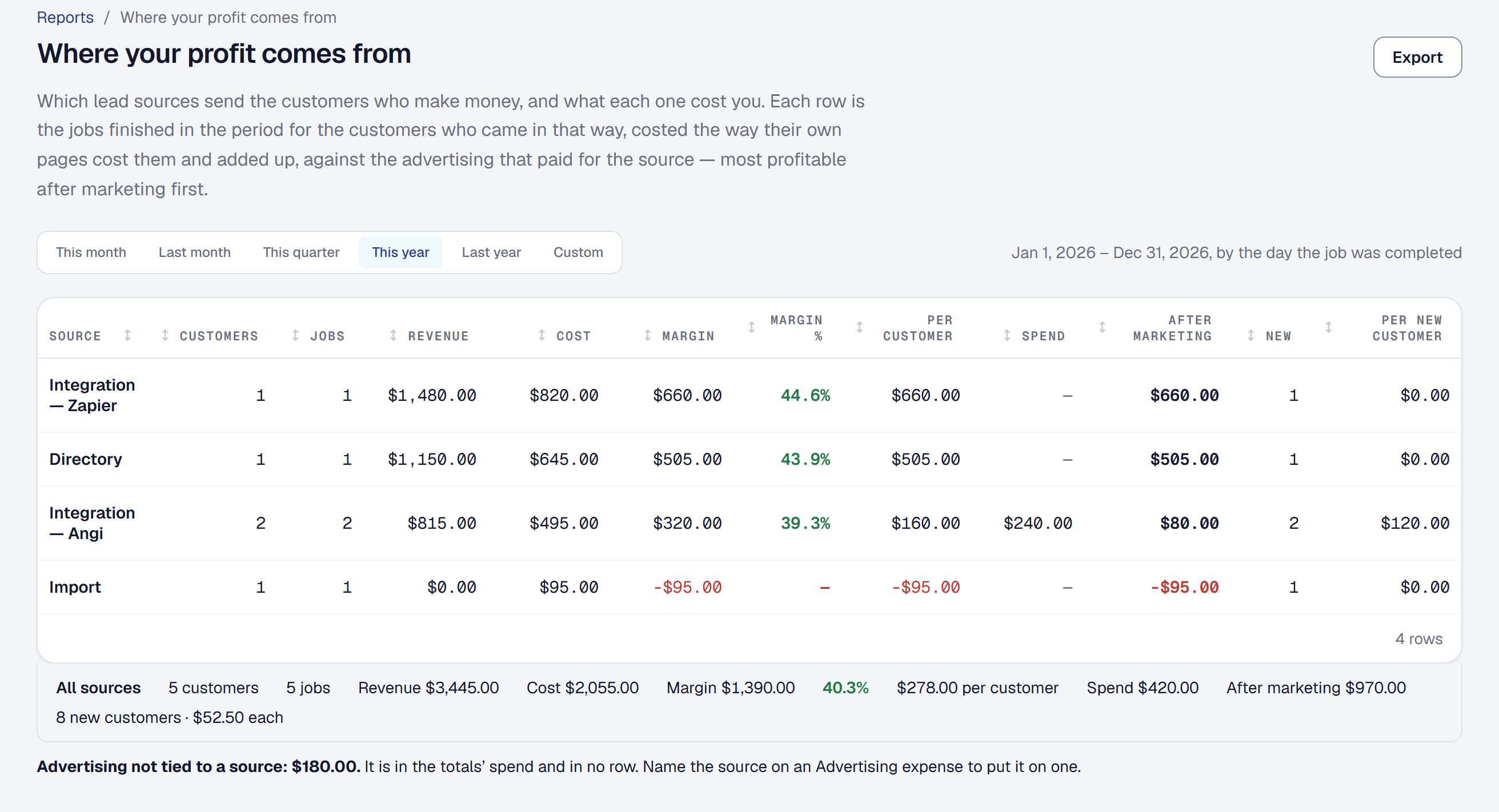
The Leads page tells you how many leads each source sends. This report tells you what the customers from each source actually earned you, after their jobs’ costs — which is often a different answer:
Angi keeps me busy, but my referrals make me four times as much per customer.
Read the report
Reports → Where your profit comes from, for a period. One row per source — Public page, Referral, Directory, Phone call, Online booking, Import, Added by hand — with:
- Customers — how many different clients from that source had a job finished in the period.
- Jobs finished in the period.
- Revenue — what has been paid on those jobs, as each job’s own Financials tab counts it.
- Cost, broken into labor, expenses (materials included) and equipment.
- The margin in dollars and as a percentage.
- Margin per customer — the margin over those customers. This is the column that compares a source sending lots of small jobs with one sending a few big ones.
- Spend — what you paid for the source in the period (below).
- After marketing — the margin less the spend.
- New customers — the clients added in the period from that source — and what each one cost.
The source that made the most after marketing is first, and the period’s totals sit under the table. Export gives you the same table as a spreadsheet, with the labor, expenses and equipment behind each source’s cost; on the page, hover over a cost to see them.
See what each source cost you
Name the source on an Advertising expense — Angi’s bill, the yard signs, the directory listing — and the report counts it as that source’s spend, by the expense’s date. See Expenses.
- After marketing is the margin less what the source cost. A paid source can make money on its jobs and still lose it once its bill is counted; this is the column that shows it.
- Cost per new customer is the spend over the customers added in the period from that source, whether or not they have had a job yet. It is a rough figure, and the page says so. A source that brought nobody new says none new.
- A source you paid for that sent nothing still has a row — its spend, no margin and a figure below zero — because it is the row most worth seeing.
- Advertising that names no source is shown as its own line under the table. It is in the totals and in no row, rather than spread across sources it may not have paid for.
The period counts the jobs finished in it, by the day each was completed — this year unless you pick another.
Integrations are split by name
Leads that arrive through an integration carry the name of where they came from — Angi, Thumbtack, Zapier — and each gets a row of its own: Integration — Angi, Integration — Thumbtack. Which paid service is worth it is usually the question you opened the report to answer.
For every other source, the note beside it on a client’s page (yard sign, Next door) is just a note: those clients are counted under their source’s one row.
See it beside your leads
The Leads page’s Where Leads Come From panel shows each source’s margin beside its lead count, over the panel’s own range, and links here on the same range. There, every integration is one figure — the panel counts leads by source — and the report is where they are split by name. See Referrals.
See the jobs behind a row
Click a row. The job costing comparison opens on exactly those jobs — the same period, finished, that source — so you can see which jobs made the figure.
Where a customer’s source comes from
A customer’s source is the way they first came in: your public page, a referral link, a call, an online booking, an integration, an import, or typed in by the office. Every job of theirs is counted under it, including repeat work years later — the report answers which doors bring customers worth having.
If a source is wrong, correct it on the client’s page under Where they came from. The report follows the next time you open it, history and all. Customers typed in without a source are under Added by hand. See Clients.
What it counts
- Finished and closed jobs with something recorded against them — hours, costs, a payment or an estimate. A job finished with nothing recorded yet is not counted until something is, and a job billed but not yet paid shows its costs with no revenue until the payment comes in.
- Only jobs. Service agreement billing and invoices not tied to a job are not in a job’s margin, so they are not here.
Ask instead of opening it
On Professional, ask the assistant: where do my best customers come from? gives you every source this year with the best one named; is Angi worth it? gives you that source’s margin, what it cost, what it kept after marketing and what each new customer cost. Each answer links this report on the period it used. See Ask about your own business.
Who can see it
Owners and managers. It is part of Margin Intelligence, which is on every plan — if the tool is off, the report says so and links you to it.
This page describes Profit by Lead Source. It is written from that feature’s record and covers what has shipped, never what is planned.