Commissions and pay rules
Say what each worker earns from a job — a percentage, a flat amount or so much per item sold — and the pay report works it out when the customer pays.
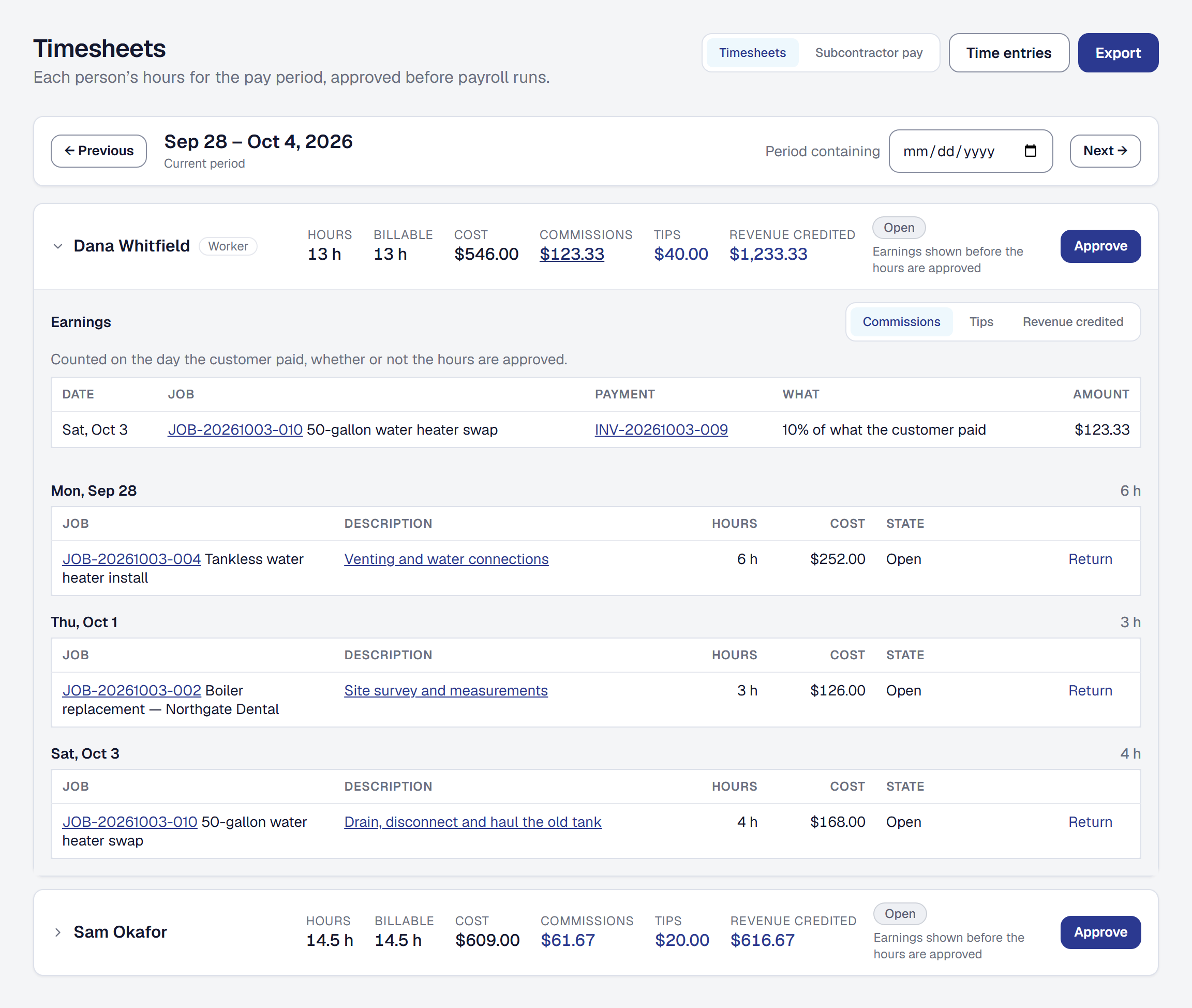
A pay rule says what a worker earns from a job: ten percent of what the customer paid, fifty dollars for every water heater sold, a share of what the job made after its costs. Set the rules once, and each payment works out who earned what, so payroll runs from the Timesheets page instead of a spreadsheet kept beside it.
Add Commissions & pay rules
Commissions & pay rules is a tool your business adds on the Tools page. It needs Workers and Timesheets, and adding it adds them. It is on every plan.
The owner and managers set rules and read everybody’s earnings, the way they set rates and approve timesheets. A field member never sees the rules; they see what they earned themselves (see See what you earned this period).
Nothing is earned on a payment dated before the day you add the tool. Remove the tool and its pages go, and nothing new is earned; the rules and everything already earned are kept for when you add it back.
Set the business’s default rules
Your default rules are what every worker without rules of their own earns. Set them at Tools → Commissions & pay rules → Pay rules, with Add a rule. A rule Pays on one of four things:
- A percentage of what the customer paid — earned on every payment.
- A percentage of the job’s gross profit — earned once, when the job is finished and paid.
- A flat amount per job — earned once, at the same moment.
- For each Price Book item sold — an amount for each one sold, or a percentage of its line.
A percentage is more than 0 and at most 100, to two decimal places. An amount is in dollars and cents, more than $0.00. The defaults hold one rule of each kind, because two would pay the same work twice; a second is refused, and the message says to change the one there is. Each Price Book item is a kind of its own, so $50 for each water heater and $20 for each softener sit side by side.
A rule added, changed or removed applies from the moment you save it. What was already earned stays as it was earned, under the rule as it was then. With no rules at all, nobody earns anything.
Give a worker their own rules
Open the worker under Workers. Their Pay rules section shows what they earn. Give them their own rules replaces the business’s defaults for that worker: once they have any rule of their own, they follow only their own. A worker can carry several at once — ten percent of what was paid, and fifty dollars for every water heater.
An archived worker keeps their rules, read-only, and earns nothing new until they are restored.
Pay the person who sold the work
The same section has Seller’s rules: what a worker earns from the jobs that came from proposals they wrote, beside the crew who did the work. They are of the same four kinds, and they belong to the worker — there are no default seller rules, because earning on a sale is a choice made person by person.
A seller earns on the whole of what each rule pays on, not a share of it. Somebody who sold a job and also worked it earns both, as two lines. A job that did not come from a proposal, or came from one written by somebody who is not on your roster, earns no seller anything.
Pay for Price Book items sold
With the Price Book tool added and items in it, a rule can pay For each Price Book item sold: choose the item, then Paid as an amount for each one sold or a percentage of the line. An item that is archived, or a bundle — which is sold as its items — cannot be chosen.
An item’s rule is earned when its invoice is paid in full, on the lines that sold it: by quantity for an amount each, by the lines’ total for a percentage. The rule keeps the item’s name as it was when you saved it.
Know when pay is earned
Pay is earned when the customer pays, not when you send the invoice:
- A percentage of what was paid is earned on each payment as it comes in — by card, by check, from the bank feed or by AutoPay — on the payment without its share of the tax. A tip is never part of it.
- A Price Book item is earned on the payment that pays its invoice in full.
- Gross profit and a flat amount are earned once, when the job is complete and every invoice on it is paid, whichever comes last — from the job’s revenue and costs at that moment. A cost recorded afterwards changes nothing already earned. A job that lost money earns nothing on its profit; its flat amounts still earn. A job finished and never billed earns nothing at its end.
Each is dated on the day of the payment — or of the job’s end — and counts in the pay period that day falls in.
Know how a job’s pay is shared
When several people worked a job, each person’s share is their hours on that job over everyone’s, counted when it is earned, and their own rule applies to their share. A helper who came for an hour earns on an hour’s share, and two techs on ten percent never pay out twenty. Hours logged by somebody not on your roster count toward the whole, and their part is nobody’s.
A job nobody logged hours on is shared equally among the workers assigned to it. A job with neither earns nobody anything, and the job says so. A time entry corrected afterwards does not re-split what was already earned.
Know what happens when money goes back
- A refund takes back its part of what the payment earned, in the pay period of the refund.
- A payment voided — by hand, or lost to a dispute — takes back everything it still holds. If the invoice is no longer paid in full, what its items and the job’s end earned goes back too, and is earned again when it is paid in full.
- A refund that fails, or a void undone, gives back what it took.
A refund this period of a payment from an earlier one takes back from this period, so a period’s commission can come out below zero. Nobody has to remember to claw anything back.
Credit tips to the crew
A tip a customer adds is credited to the workers on the job by the same hours share, whether or not they have pay rules, and follows the tip if a refund trims it. The Tips page has the rest.
See what a job earned
The owner and managers see What this job earned on a job’s Financials tab: what each person holds from the job, then every line behind it — who earned it, under which rule, on which invoice, their share and their hours, the day and the amount. A refund or a void reads as what took it back, a seller’s line says they sold the work, and a job nobody could share says why.
Pay your crew from the pay report
The Timesheets page sets each person’s Commissions, Tips and Revenue credited beside their hours for the period, each opening onto the payments behind it, and the payroll file carries commission and tips to Gusto. See See commissions and tips beside the hours. A subcontractor’s commissions and tips count in what Subcontractor pay says they are owed.
What it leaves to payroll
Overtime, withholding and how a commission is taxed are your payroll provider’s, as they are for hours. A one-off bonus or a correction is recorded in payroll; the product says what was earned and why, and payroll pays it.
This page describes Commissions and Pay Rules. It is written from that feature’s record and covers what has shipped, never what is planned.