Tips
Let customers add a tip when they pay an invoice online, kept as your income rather than folded into the job's revenue.
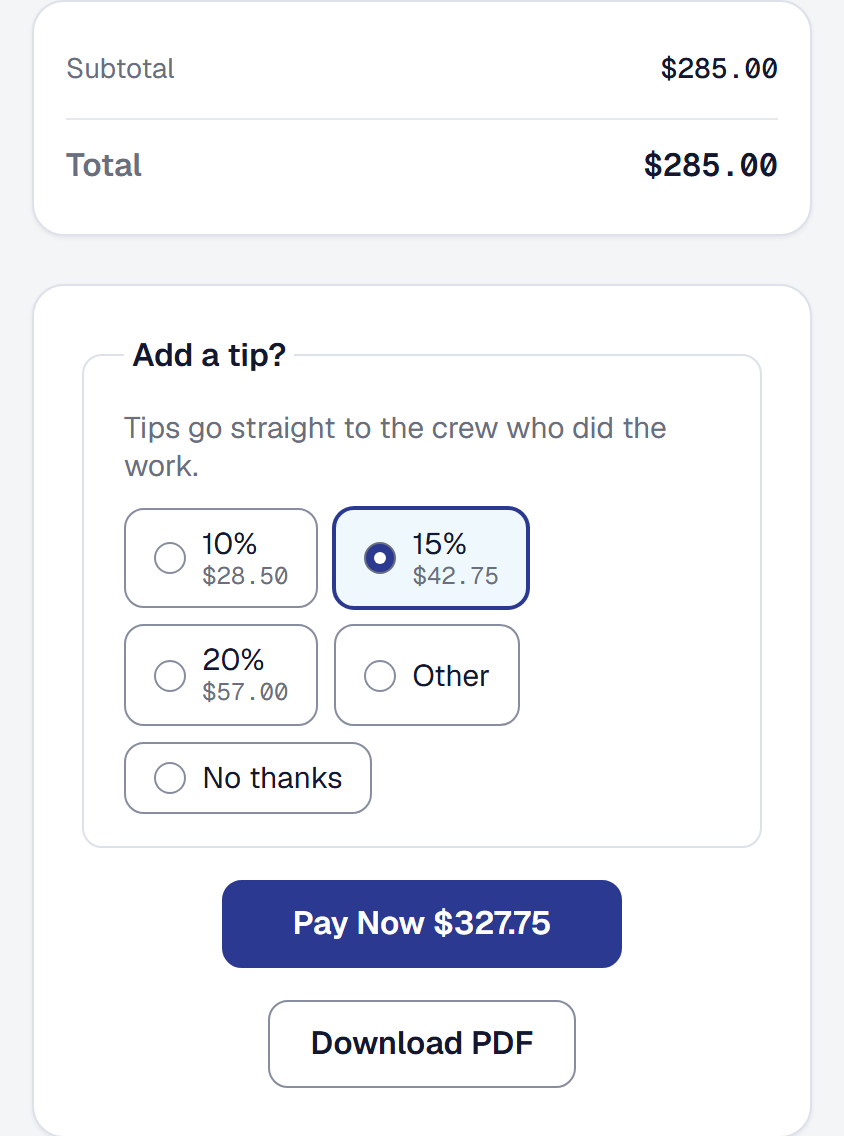
Customers of cleaners, detailers and handymen tip, and until now the only answer was “cash is fine”. If you turn it on, a customer paying an invoice online is asked whether they want to add something before they reach the card page.
Turn the tip prompt on
It is off by default, and it should be. A tip prompt under a $4,000 invoice reads as presumptuous, and the businesses that want tips already know they do.
Tips is a tool your business adds on the Tools page, or with Add at the head of its own page — that is its only switch, the owner’s. While it is on, a customer paying online is asked. In its settings, Tools → Tips → Settings, which belong to whoever holds Pay and accounting settings — you as the owner, and a bookkeeper — and can be set before you add it, you set:
- Three percentages your customers see as buttons.
- A short line explaining the ask, in your own words.
An invoice for a price agreed up front never asks: a deposit, a payment due as a stage of the work is done, the balance, or the job’s final invoice from Bill the rest. A tip belongs on a service call, not on the third payment of a remodel.
Removing Tips stops the question at once, and keeps its percentages and its line for when you add it back. A customer who had the page open before you removed it is not charged a tip they chose afterwards; they can still pay the invoice.
What your customer sees
One question on the invoice page, before the card page:
Add a tip?
Your line sits beneath it, then three percentage buttons, each showing what it comes to, Other for an amount they choose, and No thanks, which is chosen until they pick something else. That is the whole interaction. Their choice travels with the payment, the card is charged once for both, and their receipt shows what they paid and what they added, separately.
Where a tip goes
A tip is your income, not the job’s revenue. This is the part worth understanding, because it is what stops your reporting quietly lying to you.
- The invoice is paid in full by the invoice portion, and shows the tip beside the payment — $150.00 + $20.00 tip.
- The tip lands as income of its own category, linked to the job and the client. It shows up in your income list, on your tax summary and in your accounting export as what it is.
- It never inflates the job’s revenue or its margin. A tip is what the customer thought of your crew, not the price of the work — and a job that looks 13% more profitable because somebody was generous is a job you would go on to quote wrong.
When a tip is refunded or disputed
A refund takes the invoice’s part of the payment first and the tip last. One that gives back part of a tip trims its income to what you kept; one that gives back all of it voids the tip. If the customer’s bank disputes the payment, the tip is voided while the bank decides and comes back by itself if you win.
Either way, the customer’s invoice page shows what of the tip still stands — what is left of it, or tip refunded, or tip reversed — and thanks them only for that.
A tip taken back like this cannot be restored by hand: its page says why, because the money is the customer’s or the bank’s. A tip you voided yourself is yours to restore, and stays voided whatever happens to the payment afterwards — if a refund gave back part of it in the meantime, it comes back at what you kept.
Credit tips to the crew
With Commissions & pay rules added on the Tools page, each tip is credited to the workers on its job by the hours each logged there — shared equally among the workers assigned when nobody logged any — in the pay period of the payment it came with. You need no pay rules for it: a tip is the customer’s, given to whoever did the work.
The credit follows the tip. A refund that trims it, a dispute that takes it, or a tip voided takes the crew’s credit back on the day it happens; a tip restored is credited again. On a job with nobody on it the tip stays your business’s income, and the job’s Financials tab says so beside what the job earned. Either way, the tip is still never the job’s revenue. How a job’s share is worked out, and the rest of what the tool does, is on Commissions and pay rules.
What it costs you
No platform fee is taken on a tip. Our fee is a percentage of what you billed, and a customer’s thank-you is not billing.
Stripe’s fee still applies to the whole charge, as it does on any payment, and Stripe takes it from your Stripe account rather than adding it to your customer’s total.
Tips taken at the door
The question is asked only when a customer pays an invoice online. A tip handed to you in cash is yours to record: on Income, choose Add income, pick the Tips category and the job, and it counts exactly as an online tip does — your income, on your tax summary and in your export, outside the job’s margin.
This page describes Tips on Online Payment. It is written from that feature’s record and covers what has shipped, never what is planned.