Client referrals and where your leads come from
Give each client a link to pass on, credit the work it brings back to them for thirty days, and see which sources actually turn into money.
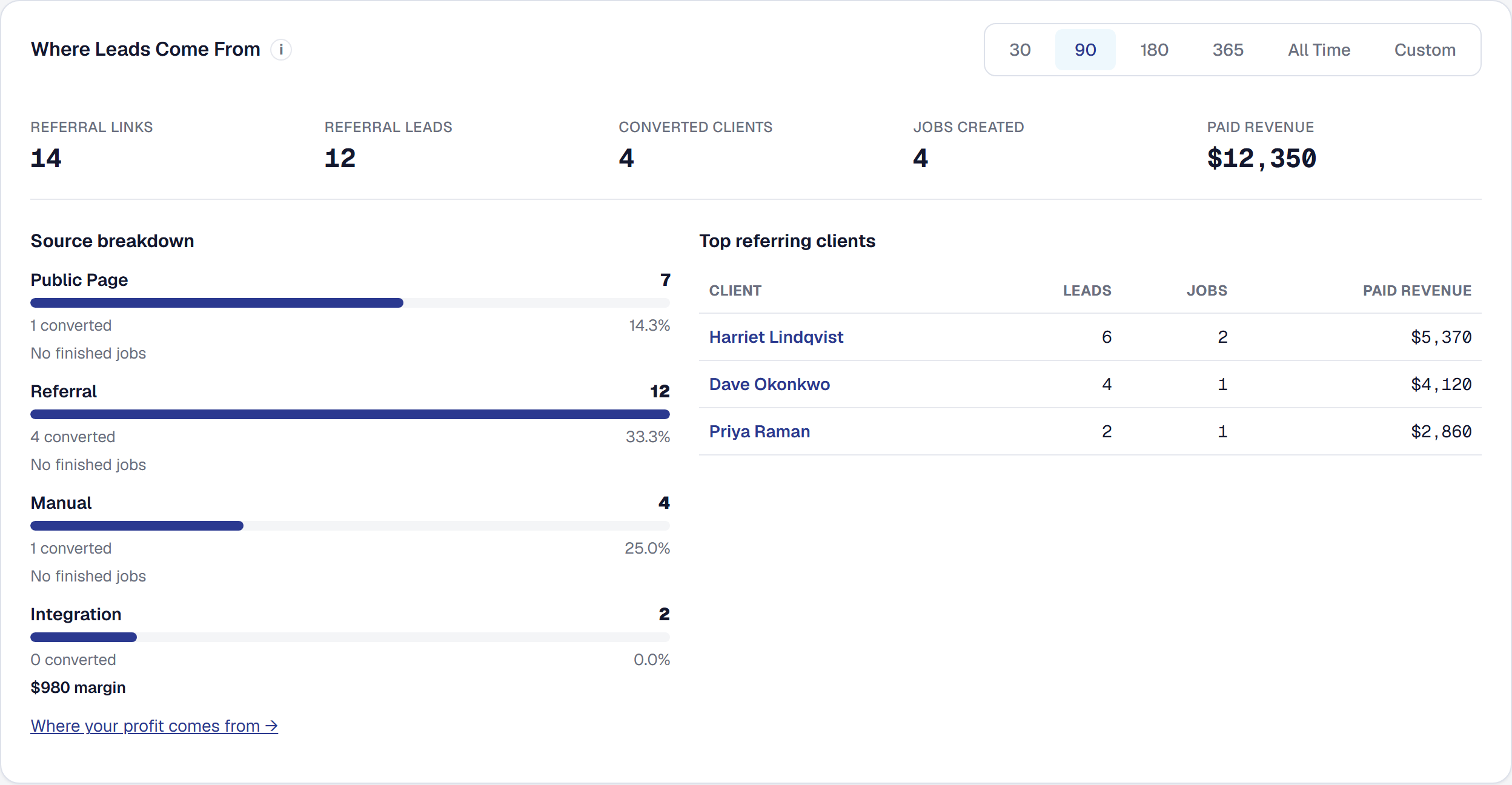
Your best lead source is the customer you just finished working for. This turns that into something automatic and, more usefully, something measurable — so you can stop guessing which of your marketing is working.
Give every client a link to pass on
Each client on your books carries their own link to your public page — on their page’s Communication tab, in the Links panel, with Copy. When a job wraps up, the same follow-up message that asks for a review invites them to pass that link on.
Nothing about it looks like a tracking code to the person receiving it; it is a link to your business.
Get the credit thirty days later
Anybody who arrives through a client’s link is remembered for thirty days. If they fill in your quote form a fortnight after first looking, it is still credited to the client who sent them.
That window matters more than it sounds. Almost nobody hires a contractor in the same session they first hear about one, and a referral system that only credits same-visit conversions reports that word of mouth does not work.
See what is actually bringing you work
Your Leads page shows:
- Which sources bring work — where your leads are actually coming from.
- Which past clients bring the most of it — the handful of people quietly building your business.
- How much of it turned into money received, not just leads counted.
That last one is the column that changes decisions. A source producing twenty leads that never book is worse than one producing three that all do, and only revenue tells you which is which.
With Margin Intelligence on, each source also shows what its customers’ finished jobs earned over the same range — its margin — so the busiest source and the most profitable one sit side by side. A source whose customers have nothing finished yet says so. Where your profit comes from → opens the full report on the same range, with what each source cost you. See Where your profit comes from.
Say what you do and where you work
Two things on your business profile drive this and are used well beyond it:
- Service categories — what your business does.
- Service areas — the towns customers see you working in, validated against real places rather than typed freehand. (Whether a job is actually in range is a separate, private setting: the service zones, on the same page.)
The categories, the areas and the zones are together on Organization → Where you work, with your hours, which the directory listing, the public page and Online Booking show on their own pages under Works with.
They shape your public page, they decide whether a stranger can book online, and they are what the contractor directory lists you under.
Add it, or put it away
Referrals is one of the tools your business chooses: the owner adds it, or removes it, under Tools in the main menu — see Your tools. The prompt to share your business, sent after a paid invoice, goes out while it is on — that is its only switch. Whether it goes by text as well is on Referrals’ own page, Tools → Referrals → Settings; the review link it can carry is your business’s, on Business Details, and shown there under Works with. Removing it deletes nothing you have recorded; add it back and everything is where you left it, its settings included.
This page describes Referrals & Attribution. It is written from that feature’s record and covers what has shipped, never what is planned.