Units at a client's property
Keep a record of the equipment you service at each property — what it is, when it went in, and everything you have done to it.
Watch it

A technician arriving at a house should know what is in the attic before they climb into it. A unit is the record of a piece of equipment you service at a client’s property — the furnace, the water heater, the rooftop unit — with its details and everything that has ever been done to it.
Units belong to your client, not to you. Your own vans and machines are tracked separately as equipment, which is a different thing on purpose.
Add a unit to a client
Open a client and add a unit to their property. Record what it is: the make, the model, the serial number, where in the building it is, when it was installed and by whom, and what servicing it needs.
You do not have to fill everything in at once. The serial you took a picture of today is worth recording even if the install date is a guess nobody has made yet.
Written down from a job or from the day’s visit, the form starts on Already there when we met the client — most of what a technician finds was there first. Choose Us, on a job in SMG Tools for one you put in, and the job is already picked. Leave Address blank and the unit takes the address the box names: the job’s or the visit’s from there, the client’s own from their page.
For a client with more than one building, Building asks which one the unit is in, starting at the one the form was opened from, and the client’s Units are listed under each building’s name (see Keep a client with several buildings). A unit the crew writes down on a visit is at that visit’s building.
A unit you fitted from your own stock can be added without typing it. With Inventory on, a part you keep by serial — a water heater, say, with a category and warranty months set on it in the Price Book — is offered under Used in the job’s Parts and materials panel once it is used there, as the unit it would be: its category, make, model, serial, the day it went in, and when the maker’s warranty ends. Add to their equipment writes it down for the job’s client, installed by that job. A serial the client already has a unit for is not offered again.
With Inventory on, Parts it takes on a unit names what a service visit uses — the furnace’s 16x25x1 filter, a blower belt — and how many. An agreement visit coming due then counts them toward the stock levels Inventory suggests, so the filters are on the shelf before the visits are.
Every unit has a category — furnace, backflow preventer, whatever you work on. Your business starts with none: name the first one right on the form, and add another the same way with + Add new category… at the end of the list. Rename them, order them, and give each an expected life that a unit’s age is measured against under Tools → Client equipment → Settings. Bringing units in from a spreadsheet adds the categories the file names — the preview lists them before you confirm; see Importing and exporting.
Replace or remove a unit
Replace records the new unit in the old one’s place; both are kept and point at each other. Remove marks a unit taken out, with a reason if you give one — taken out when the kitchen was redone — which its card and its page show. Nothing on it is lost, and Put back in service undoes a removal made by mistake.
Label a unit
A QR label on the cabinet gives a unit a way back to its record, and to you. On a client’s Units panel, Print labels lists the units in service, all ticked, with All and None. Print them on an Avery 5160 sheet — thirty to a page, with Start at label so a part-used sheet is not wasted, counting across and then down — or one at a time on a label printer, 2 × 1 in (Zebra, Rollo) or 62 × 29 mm (Brother). Each label shows the QR, the unit (Furnace — Carrier 59SC5A), Serviced by your business and your phone, Scan for service, and its code under the QR so a scuffed one can still be typed. No client, no address, no serial.
A unit’s page has a Label line: Not printed yet with Print a label, or its code with Print again and Retire this label. The code is given on the first print and stays the same on every reprint. Retire it when the house is sold or the label is painted over: scans of the old label say it is no longer in use, and the next print gets a new code. A replaced or removed unit gets no label.
The crew print one at a visit, from the unit’s sheet on their day: Print a label, on either label printer’s size. In the SMG Tools app the PDF goes to the phone’s share sheet, and on to the printer’s own app.
Printing and retiring are for whoever changes clients and leads; a role without that does not see the buttons.
What a scan of a label opens
Your own people scan it with Scan in the SMG Tools app, or any phone camera, and press Open it in SMG Tools on the card. Whoever reads clients lands on the unit’s page; the crew see its sheet — its facts and the last three things done to it — when they are on a job at that client, and are told to ask the office when they are not. Somebody from another business is told That label is not one of ours.
Anybody else — the homeowner, a tenant, the property manager’s maintenance person, the house’s next owner — sees a card with your business, the unit, your phone and email, and:
- Request service — your request form, opened at the form with Service on the furnace (Carrier 59SC5A) already started. Where your form is off, Call {your business} on {your phone} stands in its place.
- Book a visit — where you take bookings online.
- See its service history — for the client on record only. It sends the code their client page sends, to the contact you hold for them, and opens their client page on that unit: what it is, where, when it went in, its warranty, when it is next due, and every visit that touched it. Offered only while you have the Client Hub.
The card names nobody: no client, no address, no serial, no amount. A replaced or removed unit reads This unit is no longer in service; a retired label reads This label is no longer in use, with your name and number; a code you never printed names nobody.
A request from a label
A request or a booking made from a label reaches you as a lead that names the unit — Which unit on the lead and in the new-lead email: From the label on Harriet Lindqvist’s Furnace — Carrier 59SC5A, linked to the unit.
It is filed under the client when the email or phone the person gave is the client’s own. Anybody else’s is theirs until you decide: Convert to Client asks Whose request is it? — the person’s, as a new client, or the unit’s client’s, for a tenant or a property manager asking about their unit, which files it on that record and makes nobody new. A job made from it for the unit’s client names the unit, so the visit lands on its history.
A booking from a label by somebody else is booked as them, with the unit’s client named as the possible existing client on the appointment; Use existing client moves it there and names the unit.
Arrive knowing what is there
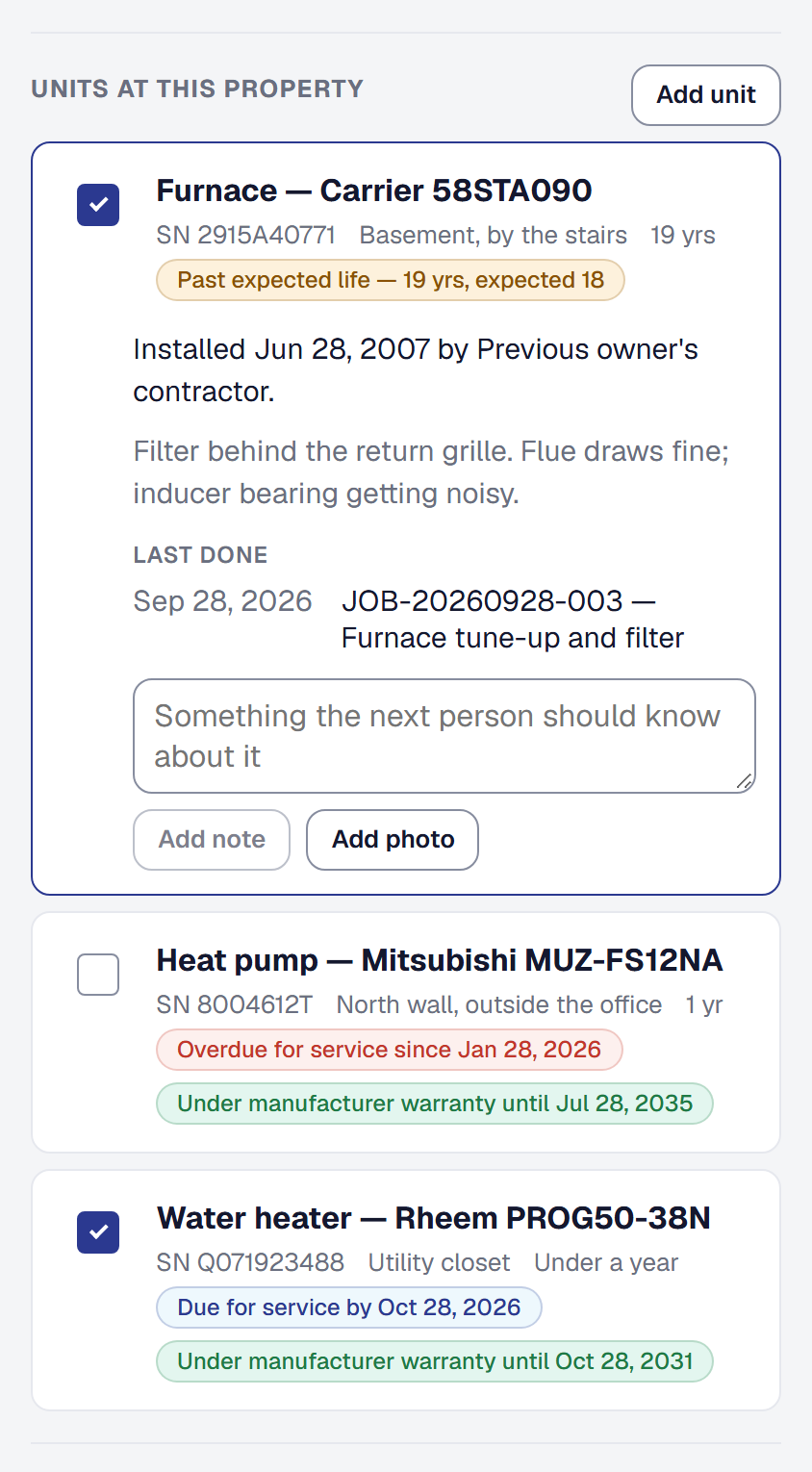
The day’s visit lists the units at that property with their make and model, serial, age and flags — for a client with several buildings, the units at the building the job is at. Tap one for its photos, specs and notes, and the last three things done to it.
That is the difference between “there’s a boiler somewhere in the basement” and knowing you are looking at a nine-year-old unit you replaced a pump on eighteen months ago.
Build the history without extra work
A unit’s history accrues from the work you were doing anyway:
- A job names the units it touched, so the visit lands on the record. Whoever changes jobs ticks them on the job — the owner, a manager, a dispatcher — and the technician on it can name them from their day; anyone else who opens the job sees which were.
- A compliance entry’s serial number links to the unit it was taken on, rather than being typed into a box and lost.
- A measurement taken on a unit is kept against that unit, so next winter you can see what it read last year.
The unit’s page is then the service history a customer asks for and a technician needs, and neither of you had to assemble it.
Is it covered?
On a job, the units it touched sit over Warranties: the maker’s warranty on each unit, and yours — this job’s, and the warranty from the job that installed the unit, each naming the job it came from. A repair on a water heater you put in two years ago shows the install’s workmanship warranty beside the maker’s date, which is the question the client is asking.
Find the work that is due
Units due on the Clients page pulls together every unit across every client that is due for service. It is the list to work from when you are filling a quiet week, and it is built from equipment you already recorded rather than a reminder somebody had to set.
A unit with a service interval is due soon a number of days before its date — 30 unless you change it under Tools → Client equipment → Settings, in Reminder window below the categories. Until you save a figure there, the units use the one Compliance’s license reminders use, so a business that set that keeps its timing; once saved, each has its own. Whoever can change clients sets it.
Hear before a maker’s warranty ends
Each morning SMG Tools emails the owner and everyone who works with clients about the units whose manufacturer warranty ends within that same window, and again on the day it ends — worth a word with the client before a repair becomes theirs to pay for. One email a morning lists them all. A warranty that already ended before the email could go is not sent late.
Bring your units in from somewhere else
Import units on the Clients page takes a file of equipment against your existing clients, so moving from another system does not mean re-keying a decade of serial numbers. See Importing and exporting.
Add it, or put it away
Client equipment is one of the tools your business chooses: the owner adds it, or removes it, under Tools in the main menu — see Your tools. The reminder when a unit is due for service goes out only while it is on and switched on in Automations — the same switch as under Works with on Client equipment’s page. It asks the client to book, so it goes by email only, with your postal address and a link to stop reminders to book; see Reminders to book. Switch it on later and every unit already due is reminded once. A new job asks which of the client’s units it touched only while it is on.
The maker’s-warranty email needs Client equipment, not the Warranties tool. Removed, Client equipment takes its units with it everywhere they show — Units due and Import units, the units on your clients’ own page and the booking page, a refrigerant entry’s unit, and the warranty email — and deletes nothing you have recorded; add it back and everything is where you left it, its settings included. While it is removed, your printed labels read This label is not in use right now and name nobody; add it back and they work again.
This page describes Client Equipment — The Units at a Customer's Property. It is written from that feature’s record and covers what has shipped, never what is planned.