Equipment readings, service and cost
Track hours and readings on a machine, know what it is due for, and see what it actually cost a job.
Equipment started as a note of which van somebody has today. This is the rest of it: the hours on the backhoe, when the van’s oil was last changed, what the compactor cost to run last quarter, and the six hours it spent on the Henderson job that the margin figure never saw.
Record readings on a machine
A machine has one meter — miles, kilometers, hours or cycles — set from its kind, and readings of it come from the office, from the crew’s end of day and from the trip form. Each is kept against the machine, so what did this read last time is a question with an answer. A meter only goes up; a reading out of order with the readings around it asks why — a meter replaced, a typo last time — and keeps the reason.
Changing a machine’s meter converts nothing. The readings already taken keep their own unit and are marked Earlier meter on the Readings tab, which says why the meter changed; the new meter starts with nothing read on it, so its first reading is the first and asks no reason.
Other readings, such as a pressure, are measurements: see Measurements.
Know what it is due for
Set what a piece of equipment needs and when — by date or by usage — and the product tells you what is coming up rather than leaving you to notice.
That is the difference between servicing a machine and repairing one.
Inspect it before it goes out
An inspection is a template of lines, and any line can be marked critical. A check is answered Pass, Fail or N/A. A line can instead ask for one of your measurements — a tire pressure, a tread depth — and take a number, which passes or fails against its expected range rather than on the crew’s say, or N/A where it could not be read. See Ask for a number instead of pass or fail.
A critical line that fails takes the machine out of service, a number outside its range included, and the failure raises a defect that carries photos — while your storage is on and has room; when it does not, the line says so and the defect is written down without one. That consequence is the point: an inspection exists to judge whether a machine is fit to use, so finding a problem has to stop the machine.
An inspection also records one meter reading for the machine as a whole.
See what it costs a job
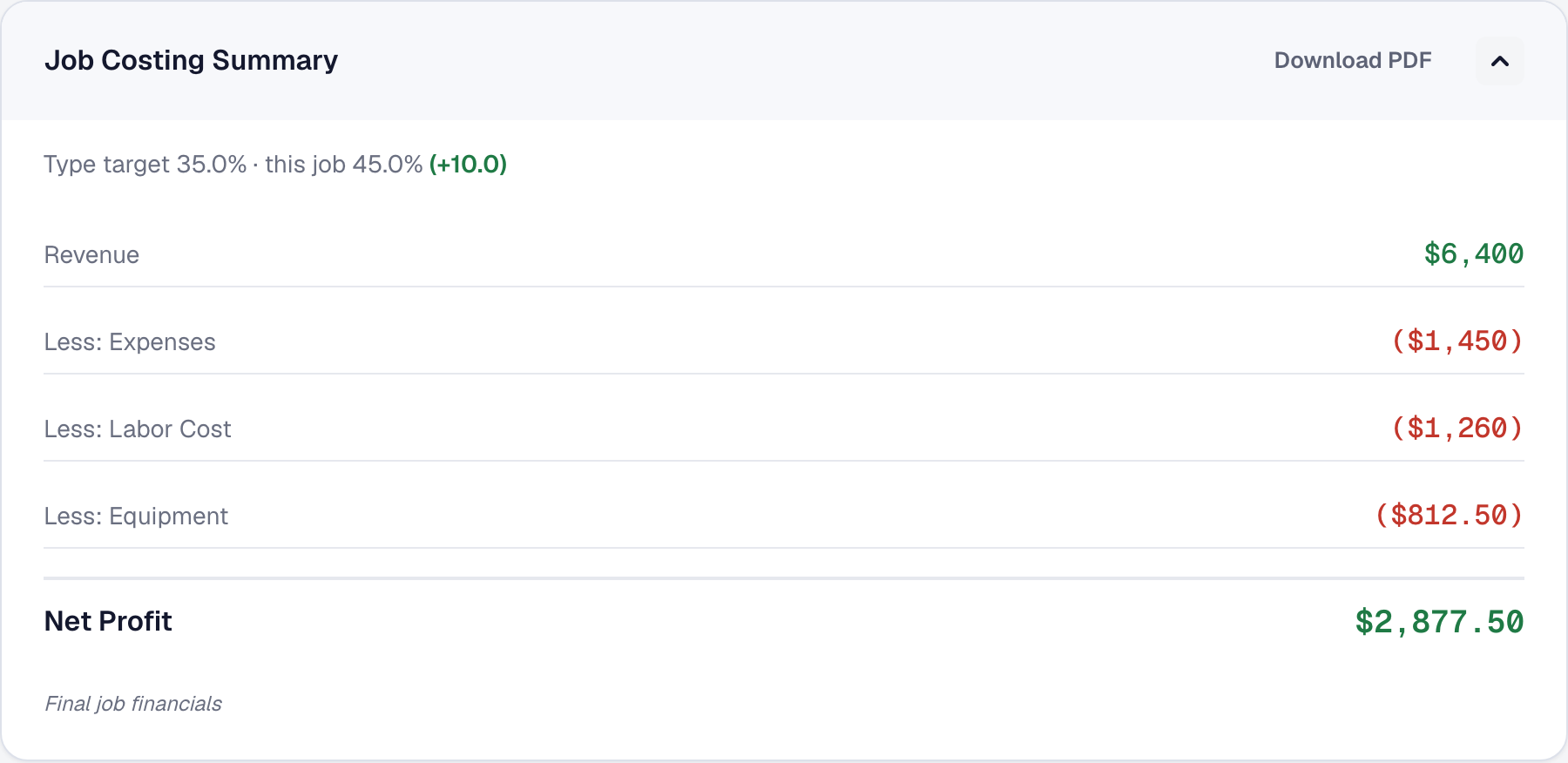
Record a machine’s usage against a job — hours or days — and it becomes a real cost column on that job’s margin, at the machine’s own cost rate.
Before this, a job that used a machine for six hours showed a margin that quietly pretended the machine was free. Equipment now sits beside labor and materials in the costing — see Job costing and margins — and appears on a job only when one side or the other actually has a figure.
You can also estimate equipment cost on a proposal line, typed as a figure or worked out from a machine’s hours or days at its cost rate.
See what it costs you overall
Reports cover equipment cost and equipment utilization, which together answer whether a machine is earning its keep or sitting in a yard depreciating.
Scan hand and power tools out and back in
The core drill, the pipe threader, the laser level: add each under Equipment with the kind Hand & power tools. A tool is only worth cataloging if the record stays true, so each one gets a printed label and the crew scans it rather than remembering to update anything.
Print labels on the Equipment list makes a sheet of QR labels, thirty to a page on standard 2⅝ × 1 inch label stock. It starts with your hand and power tools ticked, but any item can have a label — a van with one is a van the crew can point a phone at to report a problem. A reprint prints the same code, and the code is printed under the QR so a scuffed label can still be typed. The label carries a code, not your business’s name, so a lost one gives nothing away.
These labels are for your own people. A label on a client’s furnace is a different thing: it names your business on purpose, for whoever stands in front of it — see Label a unit.
On the crew’s day, Scan opens Scan a label. Open the camera reads the label — in the SMG Tools app with the phone’s own scanner, in a browser with the browser’s own reader where it has one. Where it has none, as on an iPhone’s browser, type the code printed under the QR. Pointing the phone’s own camera at a label works too: it opens the crew’s day with the tool already looked up. Scanning a label offers Take or Return, depending on who holds it. If somebody else has it, the screen says who and offers Take over from them, which records their return and your checkout in one step.
The office can do the same without a label: Check out on the item’s page, naming the person. The Equipment list and the item show who holds each tool and since when, and its Assignments tab keeps the history. A tool that is out of service or archived cannot be checked out, and the screen says why. A tool somebody holds cannot be left on a job until it is returned, and archiving a tool somebody holds returns it.
A tool held longer than Checked out longer than (days) — under Tools → Equipment → Settings, seven days unless you change it — shows under Needs attention, as does one held by somebody no longer on your team, with the reason on the row.
Who has it today
Giving equipment out for the day, and seeing it on the Day Board, is Who has which van today.
Add it, or put it away
Equipment is one of the tools your business chooses: the owner adds it, or removes it, under Tools in the main menu — see Your tools. The service-due reminder goes out only while it is on and switched on in Automations — the same switch as under Works with on Equipment’s page. Your crew’s day shows the van and kit you gave them, its checks, its end-of-day reading and Scan only while it is on. Removing it deletes nothing you have recorded, what you gave people included; add it back and everything is where you left it, its settings included.
This page describes Equipment Enhancements — Readings, Service, Cost, Inspections and Tools. It is written from that feature’s record and covers what has shipped, never what is planned.