Your pipeline on one board
Every lead, captured call and open quote as cards in columns you drag between — one answer to what is in the pipe and what is stuck.
Watch it

Work arrives through several doors — your public page’s form, the directory, online booking, the phone, a referral, somebody typing it in — and then lives on three lists: Leads, Captured requests and Proposals.
At the start of every week the question is what is in the pipe and what is stuck, and answering it used to mean opening all three and holding them in your head. Pipeline, beside Leads in the menu, is one place that answers it. The Leads and Captured Requests pages each have a Pipeline board button that opens it.
Read the board
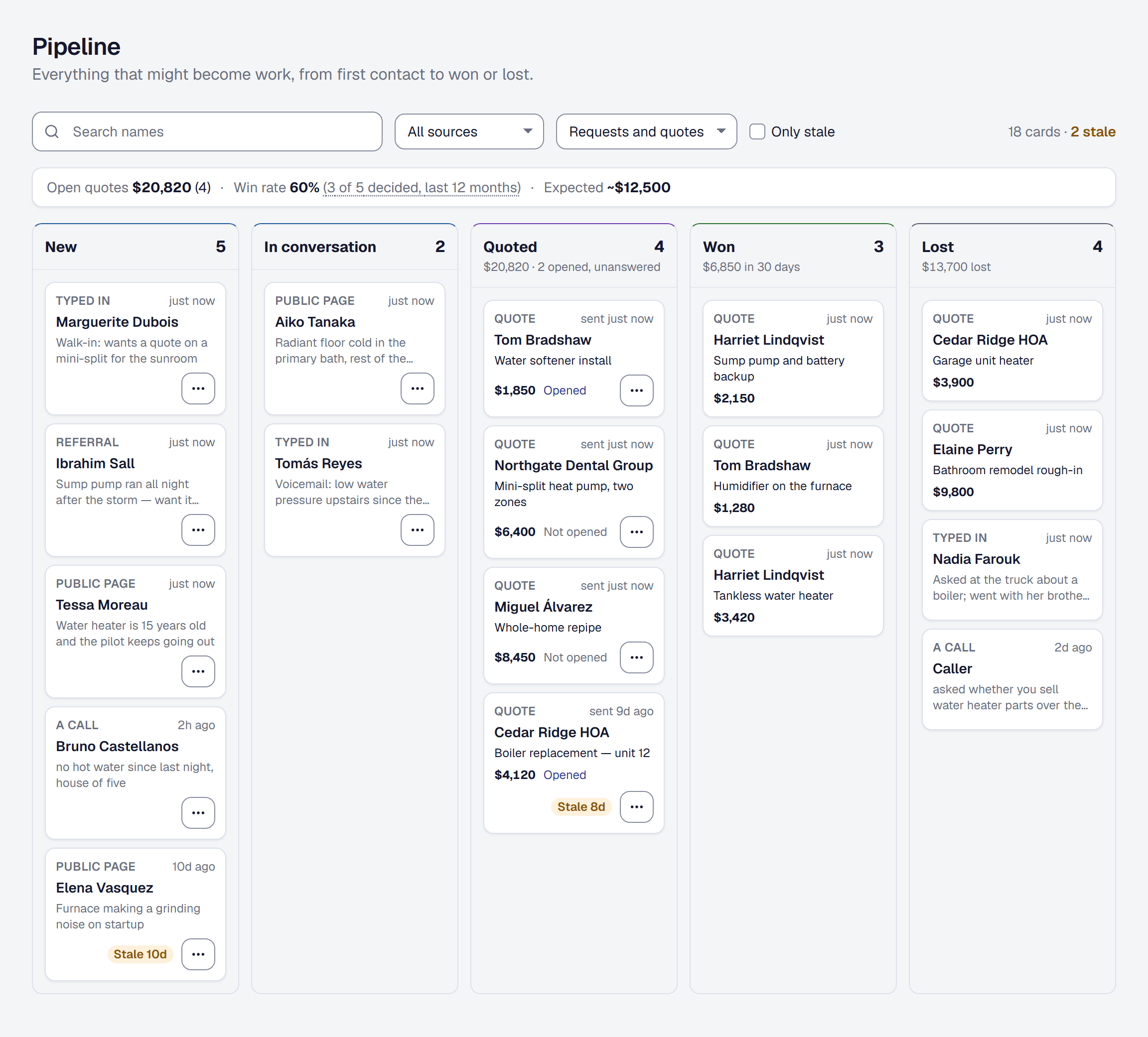
Columns are the stages:
- New — leads nobody has contacted yet, and calls your phone assistant took that are waiting.
- In conversation — leads you have marked contacted.
- Quoted — proposals you have sent that are waiting on an answer.
- Won — proposals accepted in the last thirty days.
- Lost — proposals declined or expired, leads archived and calls dismissed, in the last thirty days.
Cards are the opportunities, newest first, and there are two kinds:
- A request card — a lead or a call nobody has converted, whether or not it has been quoted: the name, the door it came through (Public page, Referral, Typed in, A call, A reminder…), how long ago it arrived, and the first line of what they need. A request from a client you already have stays on the board beside its quote until somebody converts, archives or dismisses it.
- A quote card — a proposal out for a decision: the client, its title and value, how long since it was sent, and whether the client has Opened it.
They look different because they need different things from you. A request needs quoting; a quote needs chasing. Click a card to open its lead, call or proposal.
Move work along
Drag a card to move it. The board is a view over the records you already have, not a fourth list to keep up to date — moving a card changes the lead or proposal itself, exactly as its own page would, and changing one of those elsewhere moves its card. That is why nothing here can drift out of step with the Leads or Proposals pages.
- A lead to In conversation marks it contacted. Drag it back to New if that was a mistake.
- A request to Quoted opens the page where its quote is written — a quote is written, not dragged. A lead opens ready to become a client, and goes straight on to a new proposal for them; once that proposal is sent, its quote card takes the request’s place. A lead from a client you already have, or a call the assistant recognized, opens a new proposal for that client, and its request card stays where it is until somebody converts, archives or dismisses it.
- A quote to Won records that the client said yes by phone, in person or on paper. The board says the client did not sign online, and Record acceptance makes the job, the same job recording it on the proposal makes.
- Anything to Lost asks first, naming it: a lead is archived, a call is dismissed with what the assistant got wrong, and a quote is recorded as declined, with what the client said if you want to note it. A Thumbtack lead that has no job yet then asks Who called it off?, as the lead’s own page does, because Thumbtack is told how it ended.
Any other move is refused, and the card goes back with a sentence saying what that move needs. Lost is one way on the board: restore an archived lead from the Leads page, or revise a declined quote from its proposal.
Use a card’s menu
Every card in New, In conversation and Quoted has a menu (…) with its next step, opening the same thing its own page would:
- On a request: Write a proposal for a lead, or a call from a client you know; Convert to client (a lead) or Convert to lead (a call); and Book a visit when there is a phone number or a client to book.
- On a quote in Quoted: Follow up, Resend, Mark accepted and Mark declined. A quote your client signed that is waiting on its deposit offers only Mark accepted.
A card in Won or Lost has nothing left to do and no menu.
See what the board is worth
Three figures sit above the columns:
- Open quotes — the total and count of what is out for a decision.
- Win rate — of the quotes decided in the last twelve months, the share accepted, with the count behind it (3 of 5 decided).
- Expected — the open total at that rate.
Each column’s header says what it holds: Quoted its total and how many were opened but not answered, Won its total for the thirty days, and Lost what was lost. See What your open quotes are worth for what those numbers mean and what they deliberately do not.
Find what is stuck
A card in New, In conversation or Quoted that nobody has touched for seven days is marked Stale, with the days (Stale 10d), and the count above the board says how many are stale. Touching it means anything you or your client did — a status change, an edit, a view of the quote — and every send, the automatic follow-up included. What SMG Tools notes by itself does not count: a quote it flags as gone quiet stays stale until somebody acts on it. A quote sitting in the same column for three weeks is either dead or one phone call from closing, and both are worth knowing. Tick Only stale to see just those.
Won and Lost are outcomes, so nothing there is ever stale or counted as stale.
The dashboard’s Needs attention counts stale quotes too, with a link to the board showing them.
Automatic follow-ups handle some of that on their own — see Proposals and Automations.
Narrow the board
Search names finds a lead, a caller’s name (or their number, if they gave no name), or a proposal’s client or title. All sources narrows the board to one door, and Requests and quotes to one kind of card. The board keeps your filters in its address, so a narrowed board can be bookmarked. Two people with the board open see each other’s moves within a minute.
Who sees it
Anyone whose role includes Clients and leads sees the board. Your field crew does not.
Moving a card takes a role that can change clients and leads; a role that can only see them reads the board without dragging. Write a proposal and a quote’s actions — its menu, and its moves to Won and Lost — are there for a role that changes proposals; someone whose role changes leads but not proposals moves the request cards, and the quote cards stay where they are. Book a visit is for a role that changes the schedule. A role without Prices and costs sees the cards without their money.
This page describes Sales Pipeline Board. It is written from that feature’s record and covers what has shipped, never what is planned.