How a remodeling business runs on SMG Tools
One remodeling business and one kitchen, from the walk-through to what the job made, in pictures from the product.
This is one remodeling business set up and run in SMG Tools, following one kitchen in the order the work happens: what the business does at each step, why it matters on a job of many days, and a picture of it in the product. The business is Larkspur Remodeling — a sample, with made-up clients — and the kitchen in its photos was drawn for this page. Every figure is one the product worked out from the business’s records.
Setting up
Start from your website
The first screen asks for the business’s website. Larkspur Remodeling types its address and chooses Read my website: SMG Tools reads the homepage and the pages behind it — the kitchens, baths and basements the business builds, where it works, how to reach it — and lays out what it found to check before anything is saved. A business with no website chooses I’ll describe it and writes a sentence or two, or Answer the questions myself.
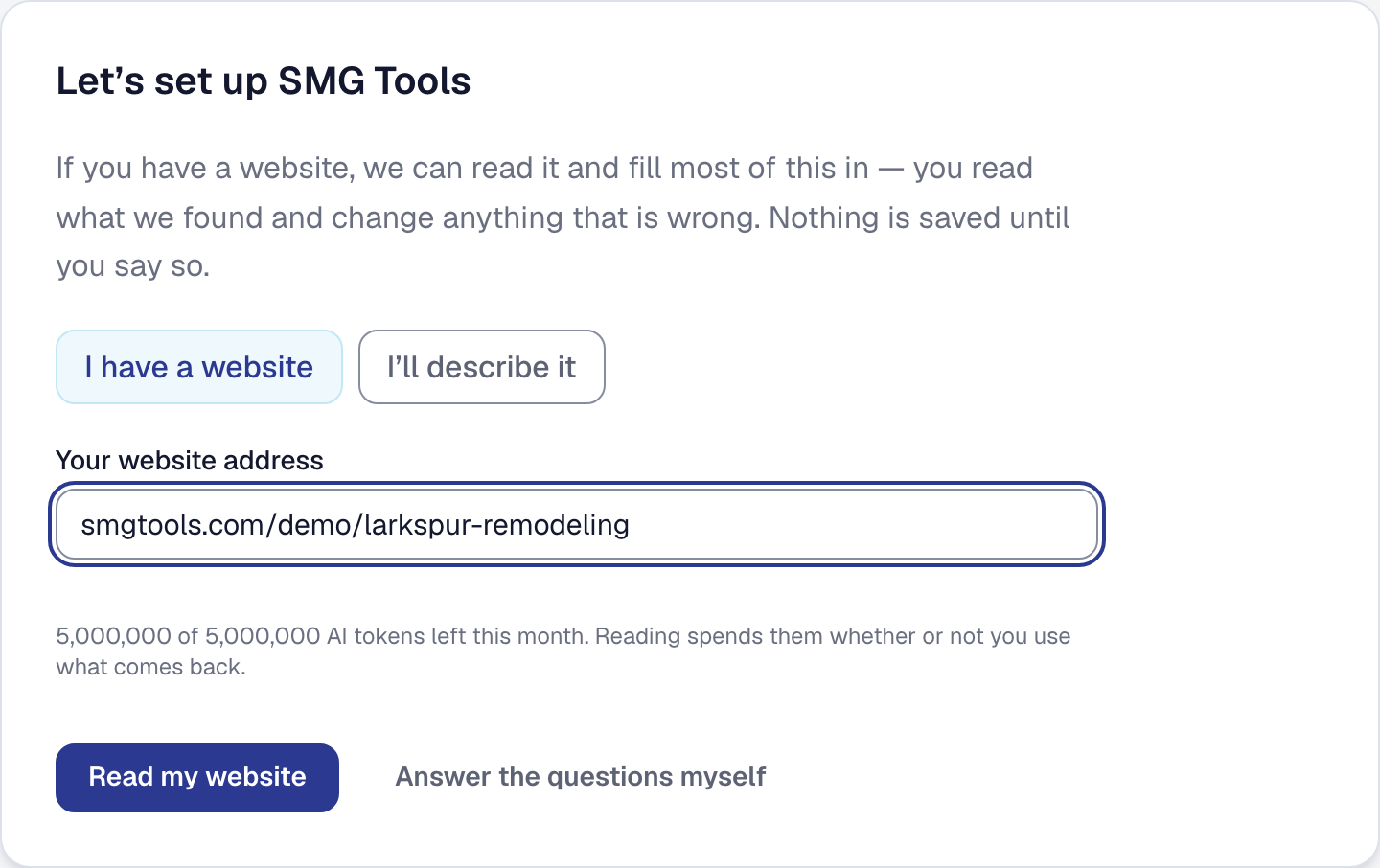
In full: Setting up from your website — Choose how you want to start
Take the remodeling kit
With the trade known, setup offers the remodeling kit with every line ticked: the tools, the kinds of work, and what a remodeler starts from — plan templates laid out in stages, a kitchen in six and a bath in five, Price Book items sold by size, and calculators that turn a room’s few measurements into every line it takes. Larkspur Remodeling took it whole, so the same sheet opened again from the Tools page shows every line as already the business’s.
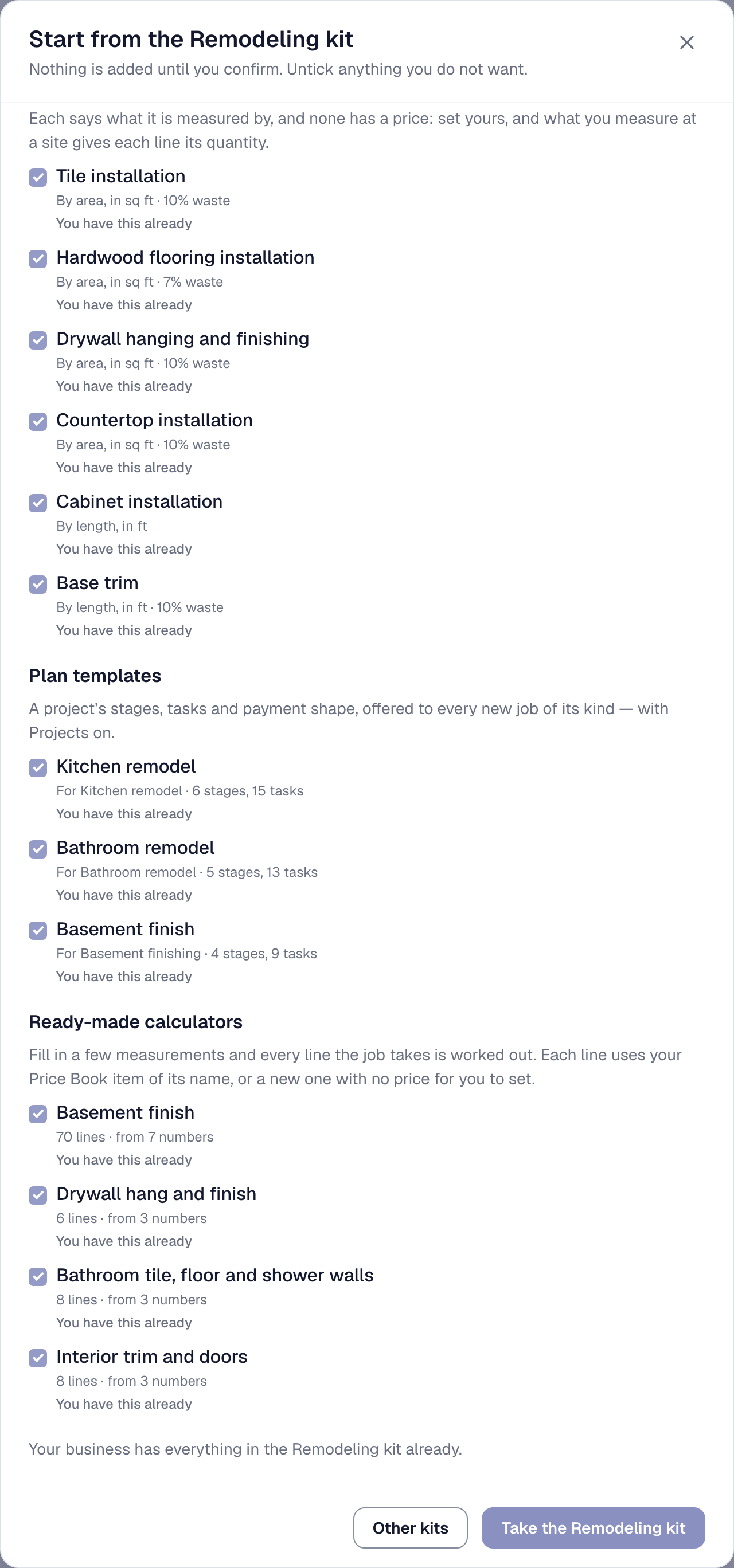
In full: Setting up and hiding what you do not use — Start with the tools for your trade
Put what you install in the Price Book
A remodeler sells what goes in as well as the hours to put it in, so the Price Book holds both: the cherry shaker cabinets at $420 a foot, which cost the business $290, beside their installation at $85 a foot. Each line says what it makes against the 30% target. A drafted quote is priced only from what the book has a price for, so what is in the book is what a walk can quote.
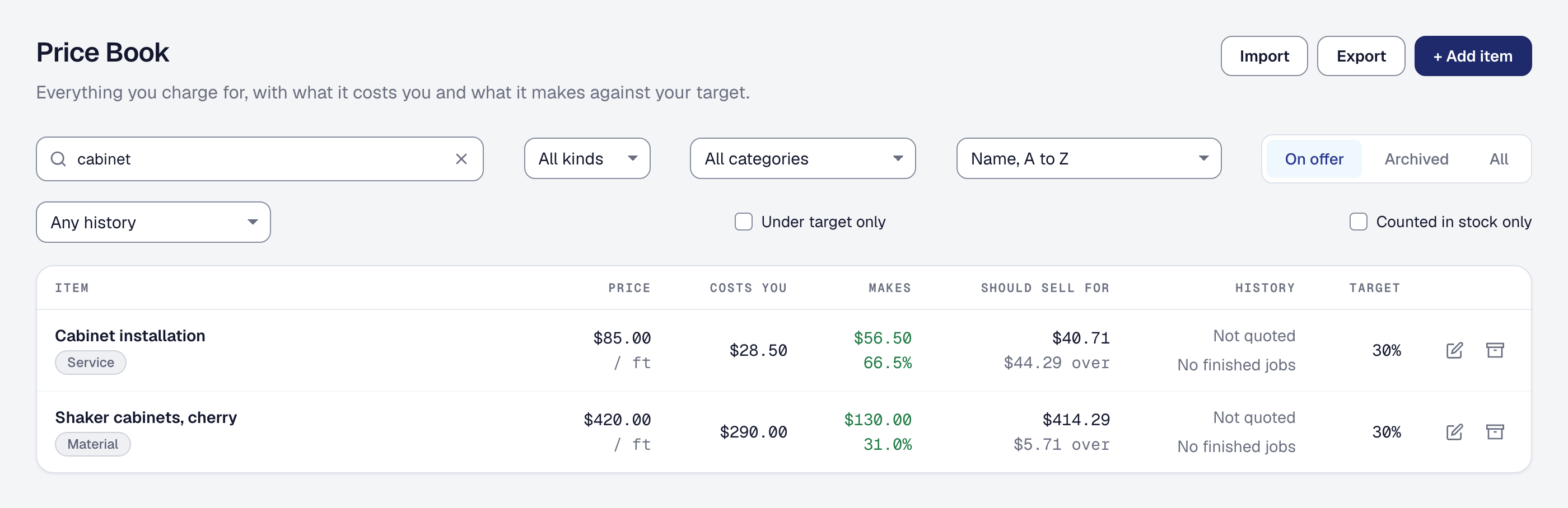
In full: The Price Book — Add the Price Book and your first items
A customer asks
Walk the kitchen with your phone
The project manager walks the kitchen with a phone: three photos, and a few words about what the client wants — new cabinets on both runs, butcher block, a farmhouse sink, a plank floor in a room about 12 by 14. The photos are read before anything is drafted, and the reading sits on the walk under What the photos showed: what each one shows, which shows the work best, and what could be measured from them. The kitchen in these photos is a sample, drawn for this page.
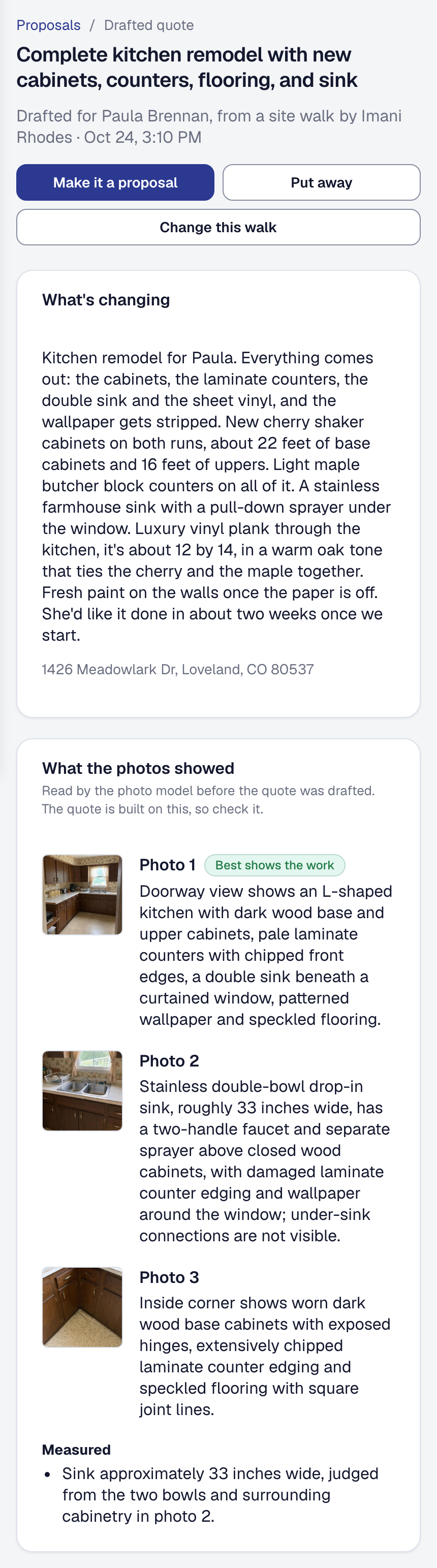
In full: Drafted for you — Take a site walk
Priced and quoted
Let the walk price itself
By the time the project manager is back at the office, the walk is a drafted quote: ten lines from the Price Book at the business’s own prices — the cabinets and their installation, the butcher block, the sink, the plank floor and its laying, the paint, the demolition and the dumpster — $29,966 at a 41% margin against the 30% target. Beneath them is what the book has no price for, the wallpaper’s stripping and the sink’s plumbing among it, estimated and marked as estimates. The office checks it and corrects what is wrong — here the counters’ installed area, 27 square feet where the base run makes 44 — before it goes anywhere.

In full: Drafted for you — Check a drafted quote and make it a proposal
Show what it could look like
A remodel is sold on what the room will be, so the walk draws it: a concept of the kitchen finished, made from the photo that best shows the work, beside the room as it is. It is labeled a concept wherever it is shown, and the client sees it only if the office chooses Put on the proposal.
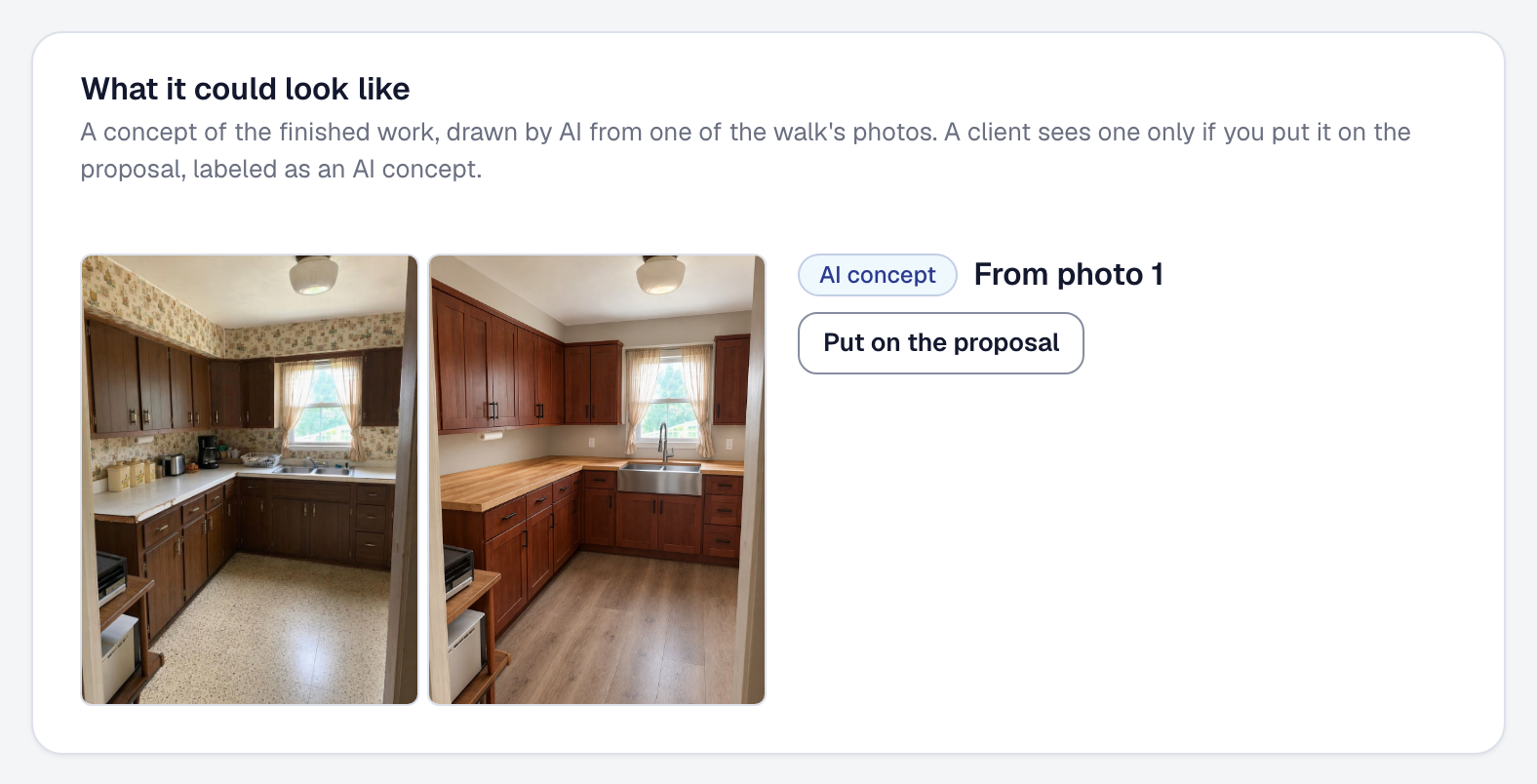
In full: Drafted for you — Show the client what the finished work could look like
Won, with a deposit
Ask for a payment at each stage
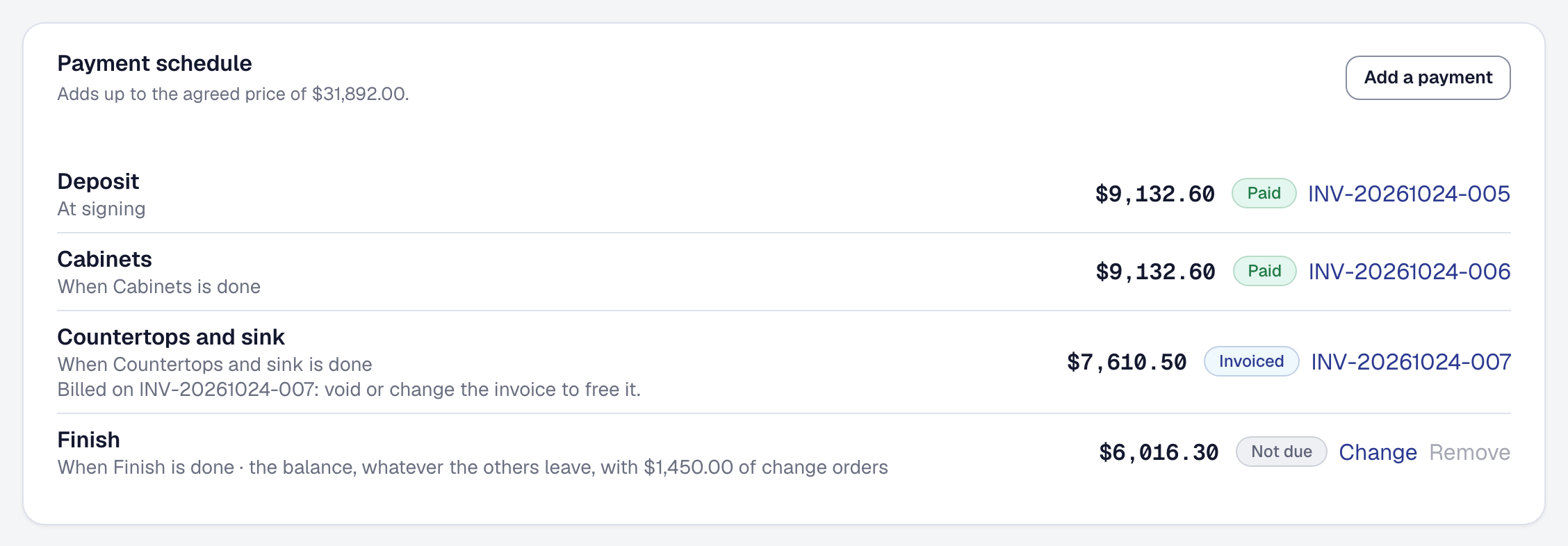
A kitchen takes weeks, and nobody carries its cabinets for that long. The proposal is paid by Milestones: 30% at signing, 30% when the cabinets are in, 25% at the countertops and sink, and the balance at the finish. Once it is accepted each is a stage on the job, its payment due when the stage is done.
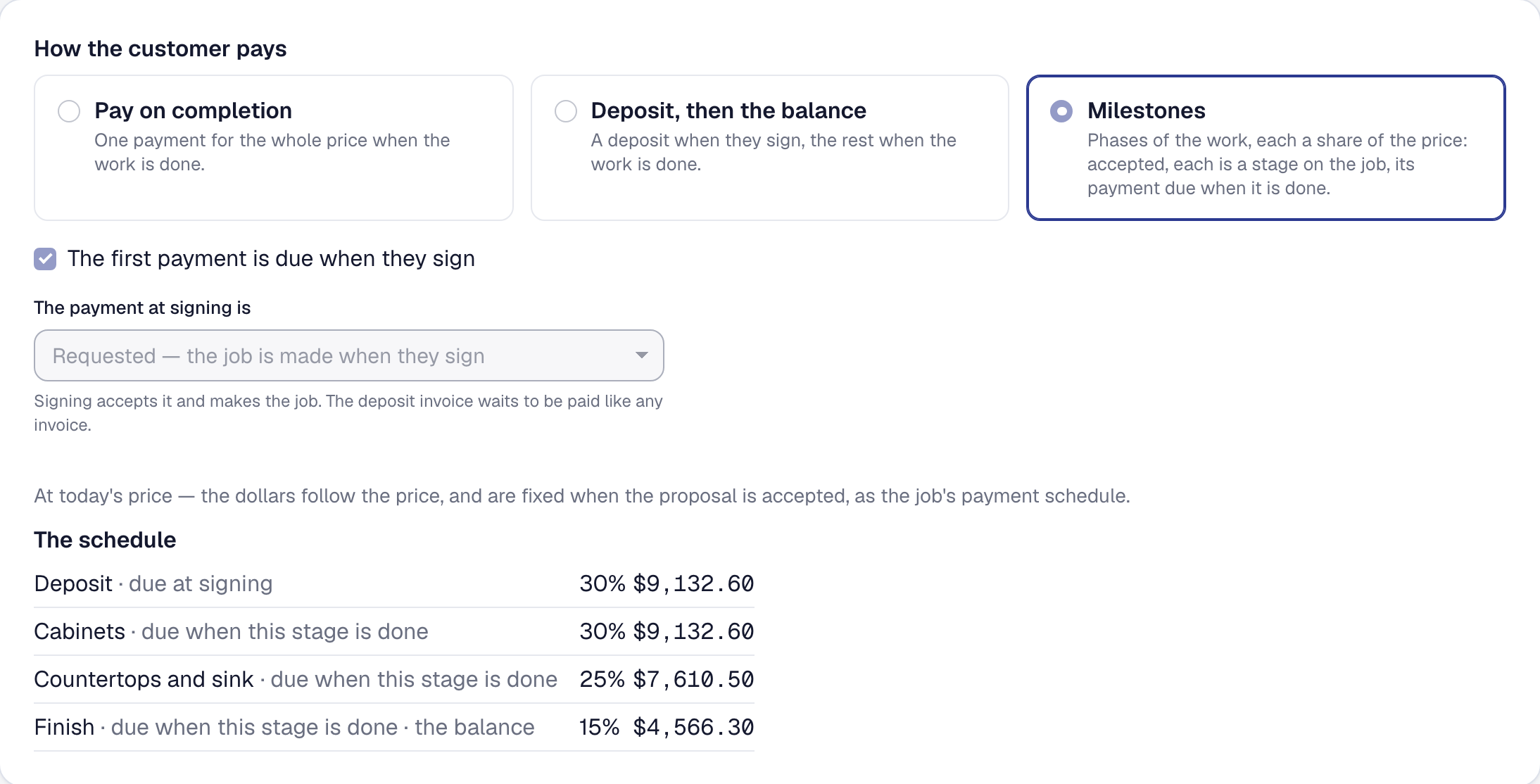
In full: Proposals — Say how your client pays
Let the client see it finished
The client opens the proposal on their own phone: the work, the price, the payments, and the concept under What it could look like, which says it was made by AI and that the finished work will differ. They sign it there, and the deposit is asked for as they do.

Scheduled
Plan the job in stages
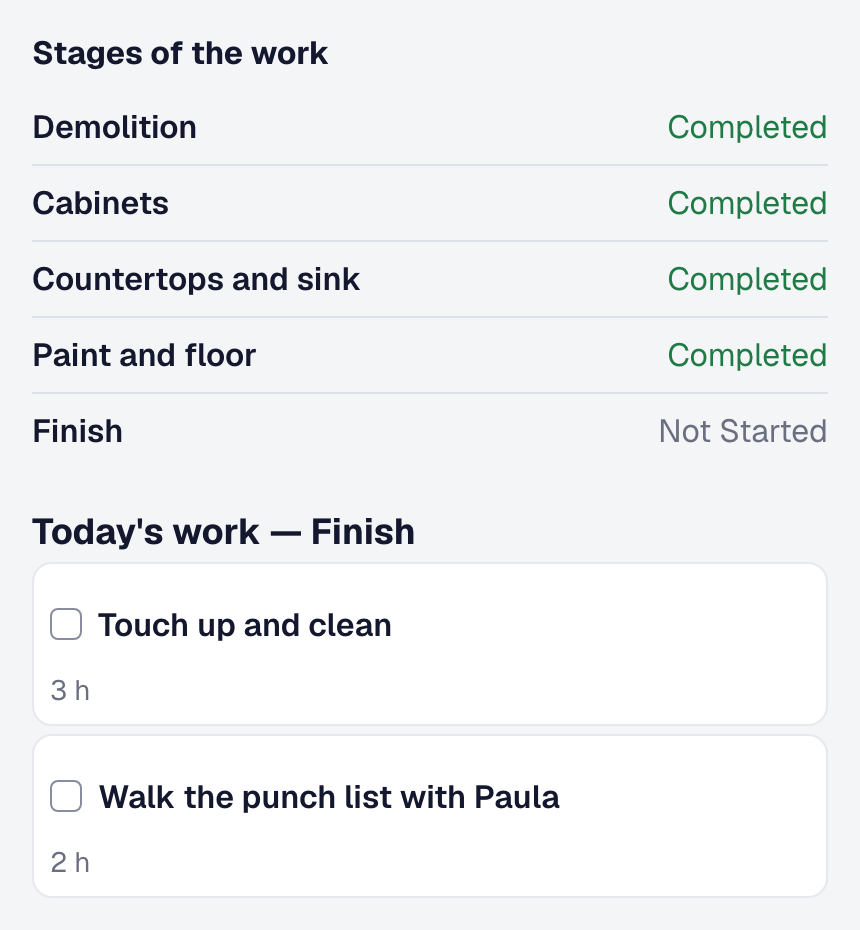
A kitchen is five jobs in a row — demolition, the cabinets, the countertops and sink, paint and floor, and the finish — and the plan lays them out in that order. Each stage holds its tasks with their hours and the people on them, and the visits that do the work; a task ticked on site says who did it and when. A fortnight in, the plan is 94% done by its planned hours.

In full: Projects — plan a big job in stages — Lay out the stages and their tasks
Order for the stage
The cabinets are ordered for the job — 38 feet of cherry shaker, $11,020 at cost — from Foothills Cabinet Supply, a week ahead, to be delivered to the site the day before the cabinets stage starts. The order names the job, so what it costs is the job’s, and the office records the cabinets arriving under What has arrived.
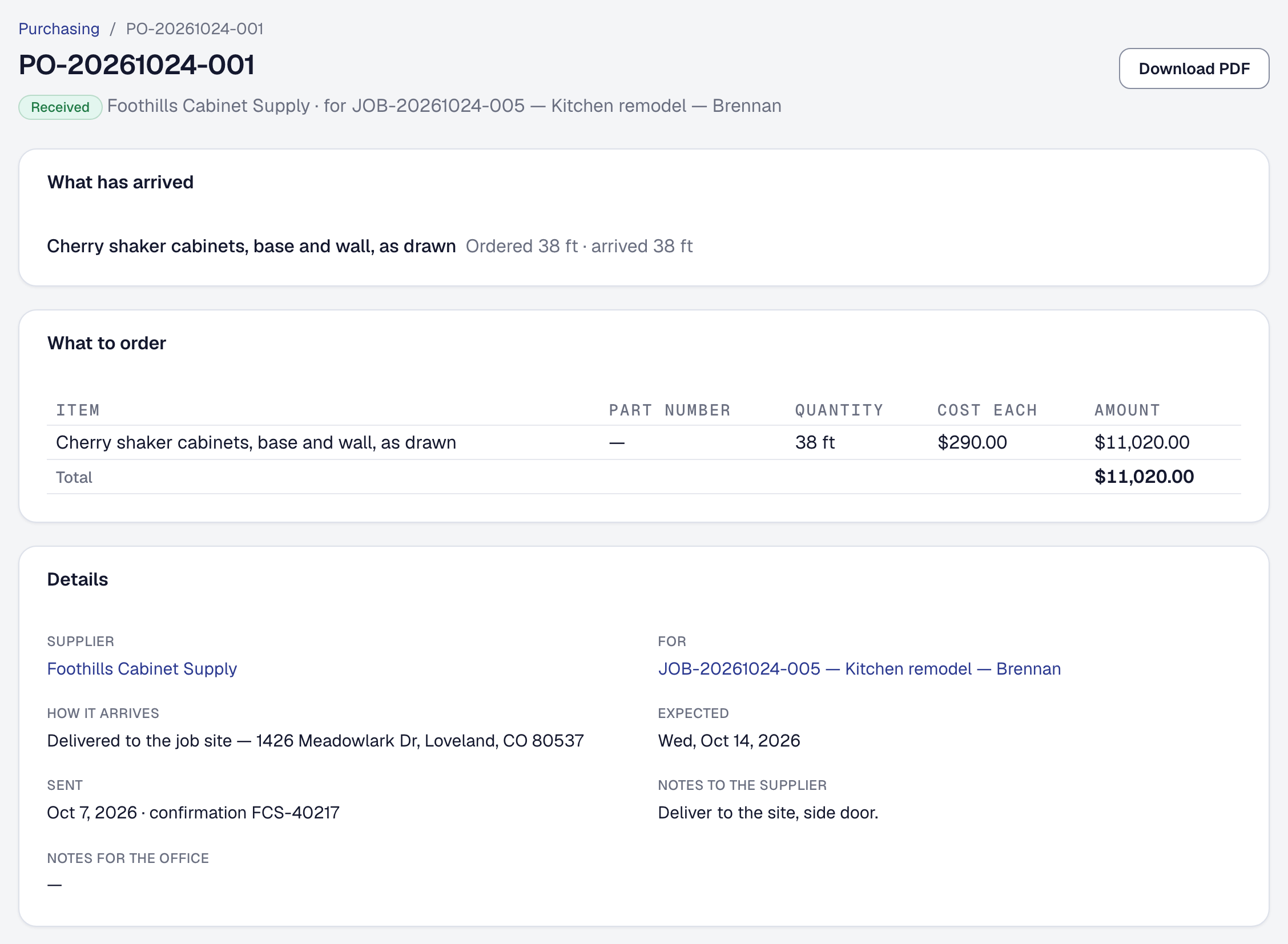
In full: Purchasing: suppliers, purchase orders and what they charge you — Receive what arrives
Bring in the plumber for the sink
The sink needs a licensed plumber, and the business keeps none on staff. Its plumbing subcontractor is on the roster like anyone on the team, and goes on the stage’s second visit beside the crew lead to set the sink and hook it up; the stage is done when its last task is ticked.
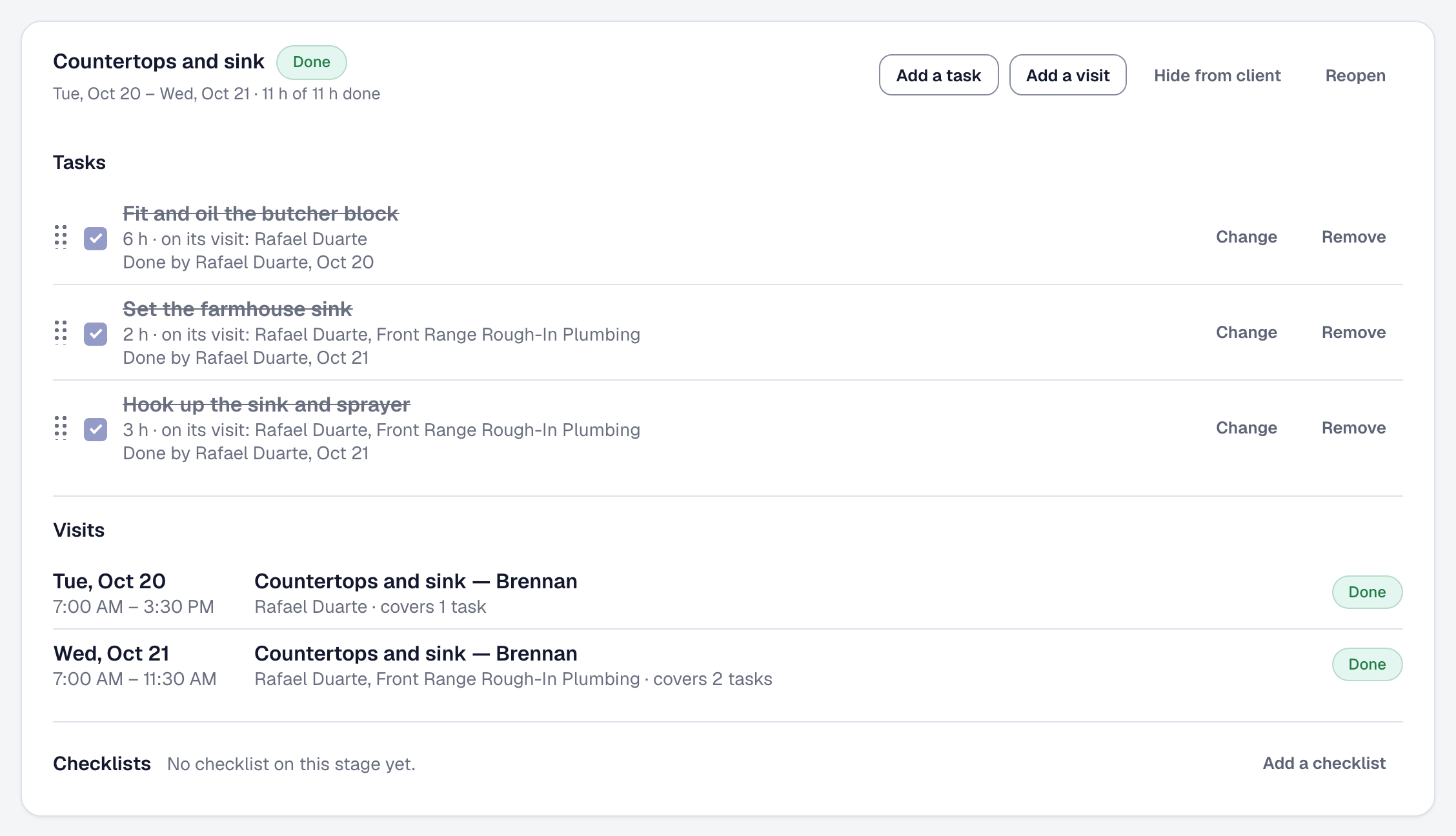
In full: Projects — plan a big job in stages — Book the visits for a stage
Give the crew their day
Each carpenter opens the day’s visit on their own phone: where the job’s stages stand, and the tasks this visit is for, with their hours. A task is ticked there when it is done, by name, and the office sees the stage move without a phone call.
In full: The crew's phone — Work the plan
Done, and proved
Price the change before you build it
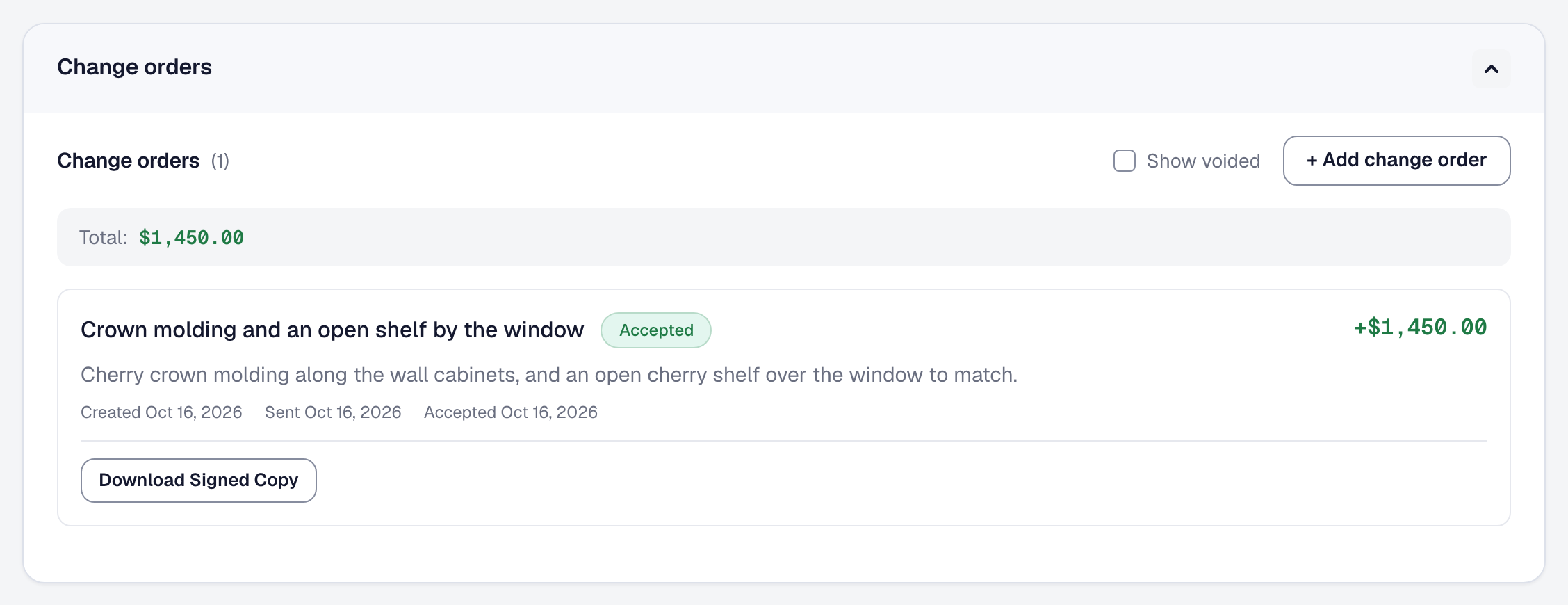
As the wall cabinets go up, the client asks for crown molding and an open shelf by the window. The change is priced at $1,450, sent and signed the same evening before anybody builds it, and the signed copy is kept with the job. Its price is added to what the client pays at the finish.
In full: E-signatures and change orders — Send a change order
Paid
Bill each stage as it finishes
As each stage is marked done, its payment is billed. A fortnight in, the deposit and the cabinets are paid, the countertops and sink are invoiced, and the finish — the balance, with the change order in it — is not due until the last stage is done. The schedule adds up to the agreed price, $31,892 with the change.
In full: Milestones and the payment schedule — Bill by stage rather than at the end
What it made, and the books
See what the kitchen made
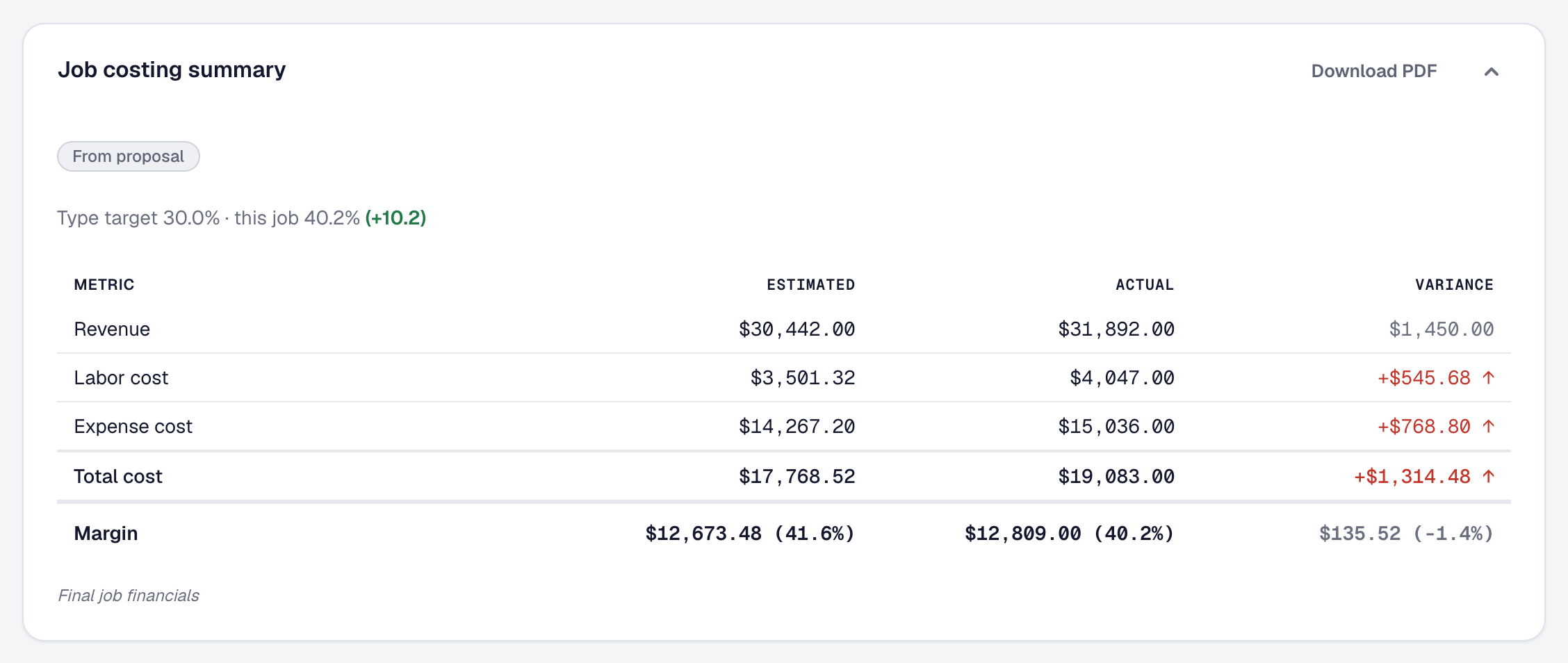
With the kitchen finished and paid, its Financials tab sets the estimate the client signed beside what the job really took. The crew’s hours ran $546 over what was quoted and the change brought in $1,450, so the kitchen made $12,809 — a 40.2% margin against the 30% target for a kitchen remodel. The next kitchen is quoted from what this one took.
In full: Job costing and margins — Watch a running job against its estimate
What it does not do yet
What a remodeling business might look for that SMG Tools does not do yet, and what you do today instead.
- A native phone app. Your crew’s day runs in the phone’s browser, with nothing to install.
- Two-way accounting sync, with what changes in QuickBooks or Xero coming back. On Professional, Accounting sync sends your customers, invoices, payments and costs to QuickBooks Online or Xero as they happen.
The same business, start to finish, as a video: watch the walkthrough on YouTube.