Route planning
Turn a day's stops into a driven order with real arrival times, so you know when the crew reaches each door and when they are back.
Watch it

The product already knows everything a route needs — who is going where, the addresses, the windows you promised — and until now it never drew the line between the points.
A route is the day as a drive: which order, how long each leg takes, when the crew actually reaches each door, and when they will be back.
Build the day’s route
A route is one person, one day, built from the stops already in their lane — the visits that carry an address.
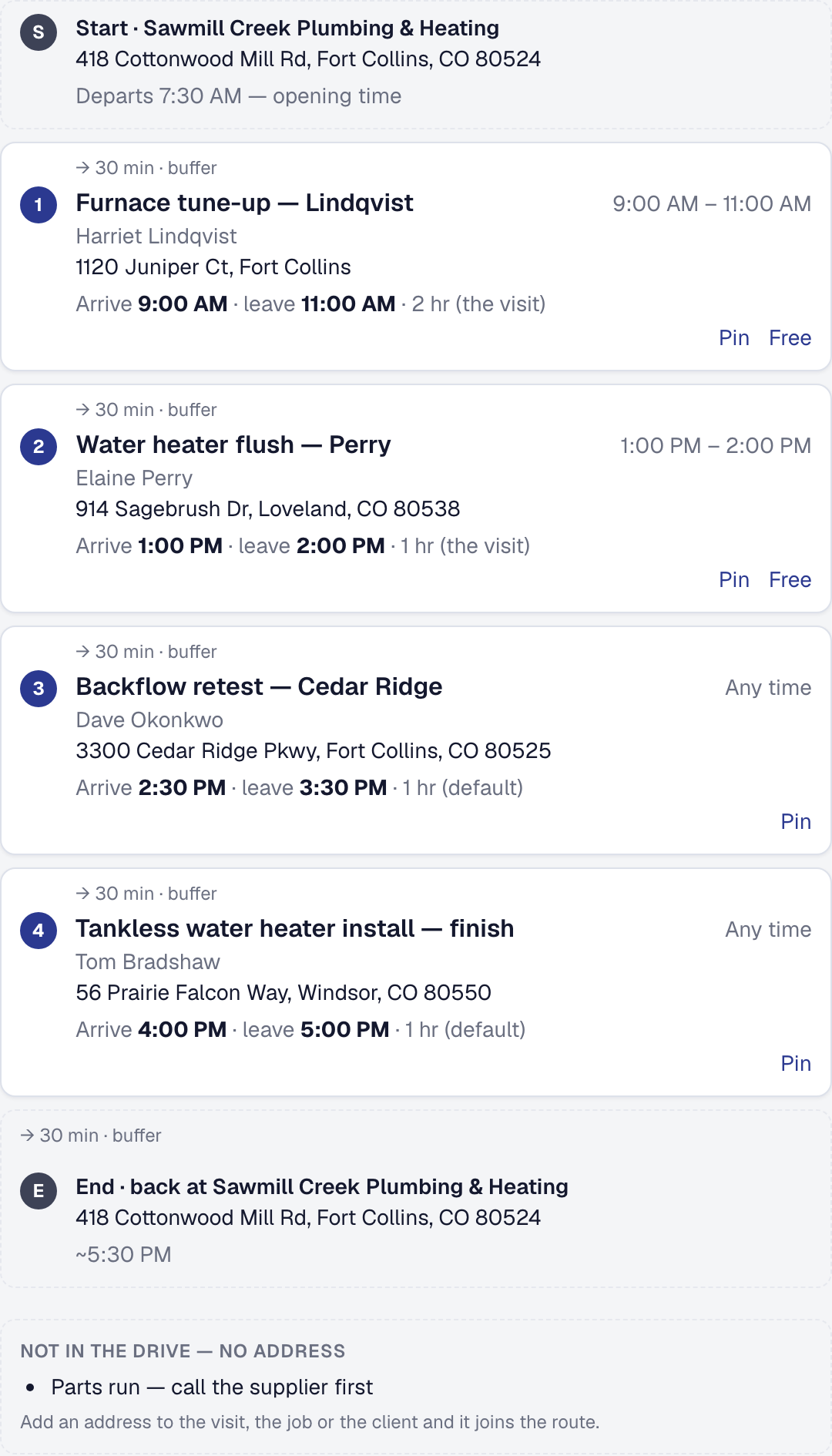
Open the plan for that person and date: each stop is listed with a planned arrival. Drag them into the order you will drive, and the arrivals follow; Save plan keeps it. On Professional, Optimize puts them in the order with the least driving for you.
Pin what cannot move
Optimize never moves a visit with an exact time, and plans a visit inside the window you promised wherever the order allows; a stop no order can keep is named, with the minutes it misses by, rather than quietly planned late. Pin is for anything else that has to stay where it is — a customer who is only in first thing, a stop you want last — and holds that stop at its place in the order while everything else is arranged around it.
That is what makes the plan usable rather than theoretical. A route optimizer that reorders the one appointment you committed to is worse than no optimizer.
A pin comes off on its own when the visit it holds is rescheduled or canceled, because the promise it was keeping has changed.
Read the arrival times
Each stop shows when the crew should reach it, and the end of the route shows when the day ends.
Every stop is a visit, and each is given as long as it will take: a visit booked for an exact time uses its own length, a visit booked into an arrival window its service’s duration — never the job’s estimate. Anything else gets the Default stop length, sixty minutes until the owner changes it. That is the Day Board’s setting, shown on Route planning’s page under Works with.
That figure is what lets you answer a customer honestly on the phone — and what tells you a day has one job too many in it before anybody sets off.
Your appointment reminders can tell the customer that arrival — around 10:30 — instead of the visit’s own time or window: Reminders name the planned arrival, on Route planning’s page and shown under Works with on Client Reminders’. The reminder goes out on the morning it is due — the day before the visit, unless it is set to remind earlier — so save the plan by then; it changes the email and the text alike.
Give open visits the plan’s times
Set visit times from the plan gives the visits on a saved plan that have no exact time the times the plan worked out: an all-day visit gets its planned arrival, and a visit booked into an arrival window gets a start inside that window. It is offered once the plan is saved, lists what it will change before it changes anything, and leaves a visit with an exact time alone.
Each change is an ordinary reschedule, so your customer hears about it exactly as they would if you had moved the visit yourself.
Watch it against the real day
As the crew moves through the day — on their way, arrived, working, finished — the plan is measured against what is actually happening, so running behind shows up on the board, from its first minute, rather than arriving as a phone call. How far behind is worth telling anybody about is the Running behind setting on On the way’s page, fifteen minutes until the owner changes it.
The office can be told when a day passes it: Tell me when a day is running behind, on this page or in Automations, reaches the owner or a manager you choose by notification and email. See Notifications on your phone.
See Assigning work and the Day Board.
What the crew gets
The crew sees their stops in route order on their phone, with a map link for each. They do not plan the route; they drive it. See The crew’s phone.
What it costs
Planning a day is on every plan: the order you drag the stops into, a planned arrival at each worked out from your travel buffer, the crew’s view and running late on the board.
Professional with maps enabled adds the parts a mapping provider answers, which cost per request: Optimize, each leg’s real drive time and distance, the route on a map, the minutes in the on-my-way text, and a booking page that offers only the times the day’s driving allows.
Each Optimize or Plan the rest of the day counts one on Billing’s route optimizations this month, whether or not you keep it; keeping it counts nothing more.
Remove the tool
Removing Route planning deletes no plan. While it is off nothing reads one: the Day Board’s lanes show no plan and offer none, the crew’s day is in its own order, the on-my-way text names no minutes, the tracking page shows no planned time, booking does not plan around a planned day, reminders name the visit’s own time, and no day is said to be running behind. Add it back and every saved plan reads as it did.
This page describes Route Planning & Optimization. It is written from that feature’s record and covers what has shipped, never what is planned.