Online booking and availability
Publish what you can be booked for and when, and let customers pick a real time that fits your crew, your area and your travel.
Watch it

A customer who wants work done wants to know one thing before anything else: when can you come. Availability is your published answer to that, and online booking is that answer opened to the people asking — on your public page, on a client’s own link, and on the phone.
Every door gives the same answer, because they all read the same calendar and the same crew.
Say what you can be booked for
Under Tools → Online Booking → Bookable services, list the things a customer may book. Each one carries:
- How long it takes — the duration, which is what makes a real slot possible at all.
- A published price, in your own words, if you want one shown. Words like per visit or plus parts follow the price; from and starting at go before it, so a customer reads “From $189”.
- The kind of work it should be filed under, so the job lands in the right place.
- Whether the diagnostic fee applies.
- Who performs it — which of your people can do this work.
- Whether it can repeat, and how often a customer may ask for: every week, every 2 weeks, every 4 weeks or every month. The card says Can repeat.
- Where it happens — At the customer’s, or By phone or video. A call asks the customer no address, is not checked against your service area, and keeps no travel buffer, so a 30-minute call can start half an hour before you close. Say How you’ll meet — We’ll email you a video link before the call — and the customer reads it when they book and in their confirmation; left blank, it says you will be in touch at the time. A kind of work you do at your own place is booked there, so a service of that kind cannot be a call.
- The question it asks — the one box the customer writes in, in your words (What would you like estimated?), with the example shown in it, and whether it is Required, Optional or Not asked. Required, a booking with the box empty is refused with your question and please answer this.
- Button words — what booking it is called, up to 30 characters: Book a demo, Schedule a consultation. Left blank, it is Book a visit, or Book a call for a call. They are on its card, they head the booking page once it is chosen, and they are your public page’s button when it is the main one.
- Link name — the short name in its own link, made from its name: lowercase letters, numbers and hyphens, up to 40, and no two of your services alike. The link keeps working when you rename the service. Change the link name and you are asked first, because links already shared will open your list of services instead.
Or tell the assistant — “add a bookable service, drain cleaning, 90 minutes, $189, Sam does it” — and it fills in the same card for you to check, or changes one you already offer: “make water heater replacement $1,350.” When online booking is on, the card says customers can book it the moment you save. The assistant needs Professional; see what it will and will not do.
The star on a service makes it the main one on your public page: its button words become the page’s button, and
the button opens its times. Until you star one, the first in your order is the main one, and archiving the main one
hands the page to the next. Copy link on a service’s row copies its own link —
smgtools.com/org/your-page/book?service=demo — for your website, an email or a card; it opens the booking page
straight on that service’s times. A link for a service you no longer offer opens your list instead.
You can archive a service, restore it, and drag them into the order a customer sees. Archiving a worker takes them off every service that named them, so you cannot end up offering a slot nobody can attend.
Say when you can be booked
Whether customers can book at all is Online Booking’s own switch: Add at the head of its page, Tools → Online Booking, which is the owner’s, as adding any tool is. It is refused, saying why, until there is something to book and somewhere in the day to book it. Tools → Online Booking → Settings holds the rest of the answer, and can be set up before it is added:
- How you promise a time — arrival windows (Morning) or exact times. Pick the one you can actually keep.
- Booking hours, per day, started off from your Hours of operation.
- Minimum notice (hours) — how much warning you need.
- Booking horizon (days) — how far ahead you will commit.
- Capacity — a number of visits per window, or one per bookable person. Counted per person, a time is offered only while somebody who does the service is working and not away for all of it — each person’s hours and time away are on the Schedule tab of their page under Workers.
- Travel buffer (minutes), with exact times — the gap kept free before and after each visit so the slot is honest.
- Slot interval, with exact times — how finely the day is cut.
- Blackout dates — whole days the business takes no bookings, each with an optional private reason so you remember why. A day off for one person is their time away, recorded on the Schedule tab of their page under Workers, and booking reads it from there.
- Confirmation — Instant, or Hold for my confirmation if you would rather approve first.
A seven-day preview on that page shows exactly what a customer would be offered, so you can see the effect of a change before a stranger does.
How a free slot is worked out
Availability is arithmetic over things you already keep: your booking hours, your blackout dates, your capacity, your travel buffer, the service’s duration, the appointments already on the calendar, the visits a repeat still has coming, and — when capacity is one per person — when each person works and their time away.
There is one computation and every door reads it. The office’s Find a time in the appointment form, the intake screen, your public page and the phone all reach the same answer — so you never give a customer one answer and your own screen another.
What makes a booking here worth more than a booking on a generic scheduler:
- It knows your territory. On Professional, the service zones you drew decide whether a stranger can book at all. Somebody outside your area is captured as a request instead, because a booking you would not actually drive to is worse than no booking. On Starter, every address is accepted.
- It knows your crew. Counted one per person, capacity comes from the roster you already keep rather than a number you typed once and forgot.
- It knows who can do the work. With Scheduling & dispatch added and capacity one per person, a time is offered only while somebody who performs the service, and who has every skill its kind of work requires, can make it — and the booking goes to the person the dispatch engine would suggest. See Scheduling and dispatch.
- It knows what each kind of work leaves behind. A kind of work given a Turnover after each visit on Job types — cleaning the room, resetting the chair, loading out — keeps its person busy that long after each visit, before the travel buffer, so the next customer is never offered the time you always lose.
- It knows where the work is done. A service whose kind of work is done at your own shop, studio or bay asks the customer no address, is offered only while one of its spaces is free, and can be a drop-off with a ready-by date. See Work at your own place.
Take bookings from your public page
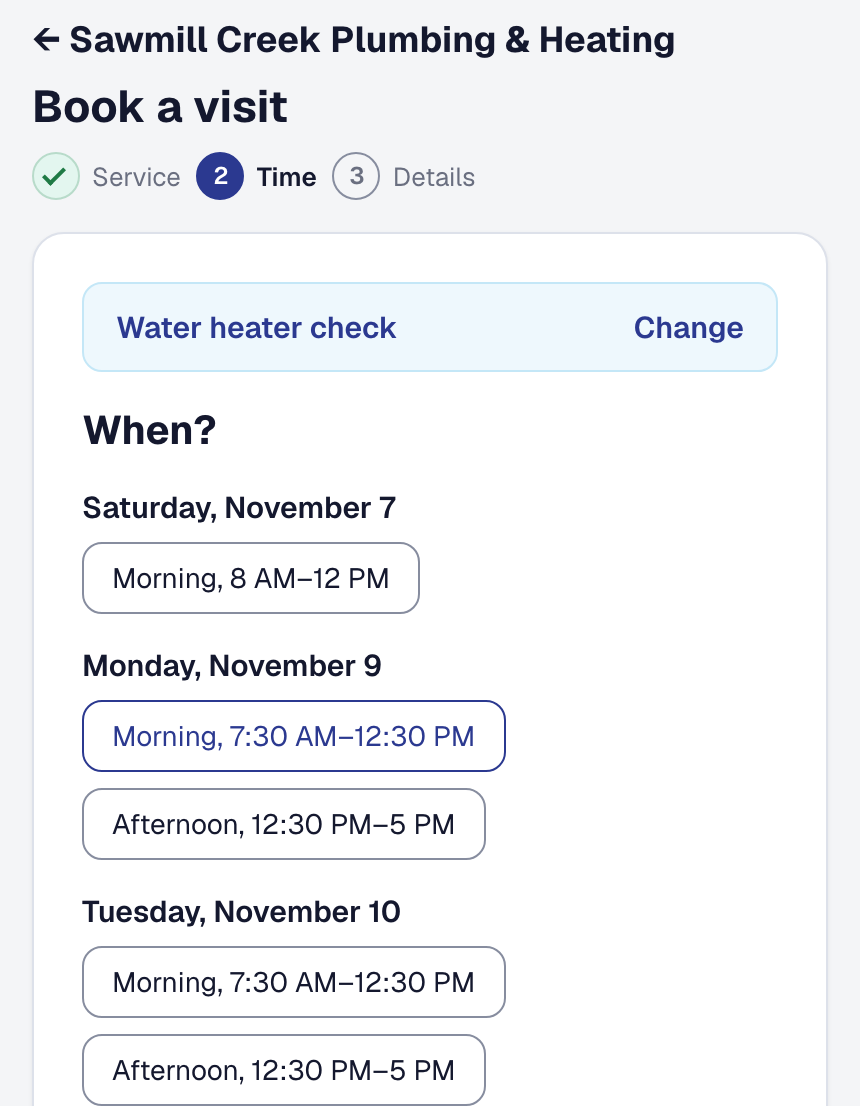
With booking on, your public page offers real times. Its button is your main service’s, in its words, opening its times; with more than one service, See everything we offer beneath it opens the list. The booking page reads Book with your business’s name until a service is chosen. Each service’s card says how long it takes and what it costs — Free where its price is 0 — with a long description folded to two lines and More to read the rest. A business with one service opens straight on its times. A customer picks one, and depending on your setting it is either confirmed instantly or held for you to approve.
When nothing is open in the weeks a customer is looking at, the page says when the next open time is and offers to show it, rather than leaving them to page ahead; when nothing is open as far ahead as you take bookings, it says that. If the times cannot be read at all, the page gives your business’s phone number to call, from Business Details.
Under the mobile number, the form tells the customer you may text them about the visit and that they can reply STOP to opt out, so a reminder or a confirmation by text is never a surprise. Where you do not confirm bookings by text, the form asks for an email address, so the confirmation has somewhere to go, and the customer’s receipt says where it went.
On Professional, the address field suggests real addresses as the customer types, the way the console does for you, so the visit lands at a place that can be found and measured from your service areas. On Starter it is a plain field.
Either way the visit is on your calendar at once, as a job in Planning, and the customer is emailed — Booked with a calendar invitation, or Requested while you decide. Your business’s contact email, on Business Details, is told about every booking. The booking also waits in For you: one held for you to approve until you answer it, and one booked outright as New booking until somebody in the office opens it or presses Got it. To hear the moment one lands, switch on Tell me when somebody books online — it is under Works with on Online Booking’s page, and it can tell you or a manager you choose.
On Professional, an address outside your service area books nothing: the customer can still describe the work, with what they typed carried across, and it reaches you as a request — see Requests and booking.
A visit booked from the QR label on a client’s unit names the unit. Booked by the client — the email or phone they give is theirs on record — it is filed on their record and the job names the unit at once. Booked by anybody else, it is booked as them, and the appointment names the unit’s client as the possible existing client; Use existing client moves it there and names the unit. See A request from a label.
Let a customer book a repeat
A service that can repeat asks the customer Just once, or one of the cadences you offer, before it shows any times. With a cadence chosen, the page offers only the times that are free for every visit as far ahead as you take bookings — a customer who picks every 2 weeks at nine is never given a first visit whose fourth week is already somebody else’s. A service whose work is dropped off at your place is booked just once, whatever its card says, because it waits on the item rather than the calendar.
The first visit is booked or requested as any booking is. The repeat waits for you: in For you, as Asks for a repeat, with Confirm and Decline, and on the repeat’s own page. Until you answer, its visits keep their times. Confirm and it repeats like a repeat you set yourself — see Repeat a visit. Decline, with a reason if you want to give one, and the first visit stands on its own. Declining a held booking declines the repeat with it.
The customer’s confirmation says the repeat is waiting for you, and a second email tells them your answer: the next visits, or why not. Your own email about the booking names the cadence asked for. A diagnostic fee, on a service that takes one, is paid for the first visit only. The same choice is on a client’s own booking link and on their client hub, and the phone assistant books just once.
Let an existing client book, move or cancel
A client you already have gets their own link to the same booking. A request through it arrives filed against their record rather than creating a second copy of somebody you already know — even a client you archived, whose record comes back when the booking is made.
They can move a visit with Change the time, on the page that tracks it or on their client hub. They pick from the times your booking page would offer, and a short code sent to the contact details you already hold confirms it is them. You are emailed with where the visit was and where it is now. A visit still held for you waits for your answer first. One sooner than your minimum notice, or a drop-off, cannot be moved online, and the page says to call you; once somebody is on the way, a move is not offered at all.
They can also call off a visit from the page that tracks it, one still held for you included. That is the call that otherwise never gets made — and the van goes anyway.
Recognize a returning caller
Where the phone add-on is active, Recognize returning customers on the phone lets a caller you already know be identified from their number, so they are not asked for details you already hold. It is the phone assistant’s setting, on its Returning callers tab — Tools → Phone assistant — which is there only while call answering is.
Add it, or put it away
Online Booking is one of the tools your business chooses: the owner adds it, or removes it, under Tools in the main menu — see Your tools. While it is off nobody can book on your public page, and the booking emails to your customer and to your business stop with it. Removing it deletes nothing you have recorded; add it back and everything is where you left it, its settings included.
Whether a visit is confirmed by text as well is Booking confirmations by text, on Organization → Texting with your business’s texting — it goes for a visit you book yourself as much as for one a customer books online.
This page describes Availability & Online Booking. It is written from that feature’s record and covers what has shipped, never what is planned.