Change history: who changed what, and when
Every change to every record — who made it, the role they held and where it came from — back to your business's first day, and on most records each value before and after.
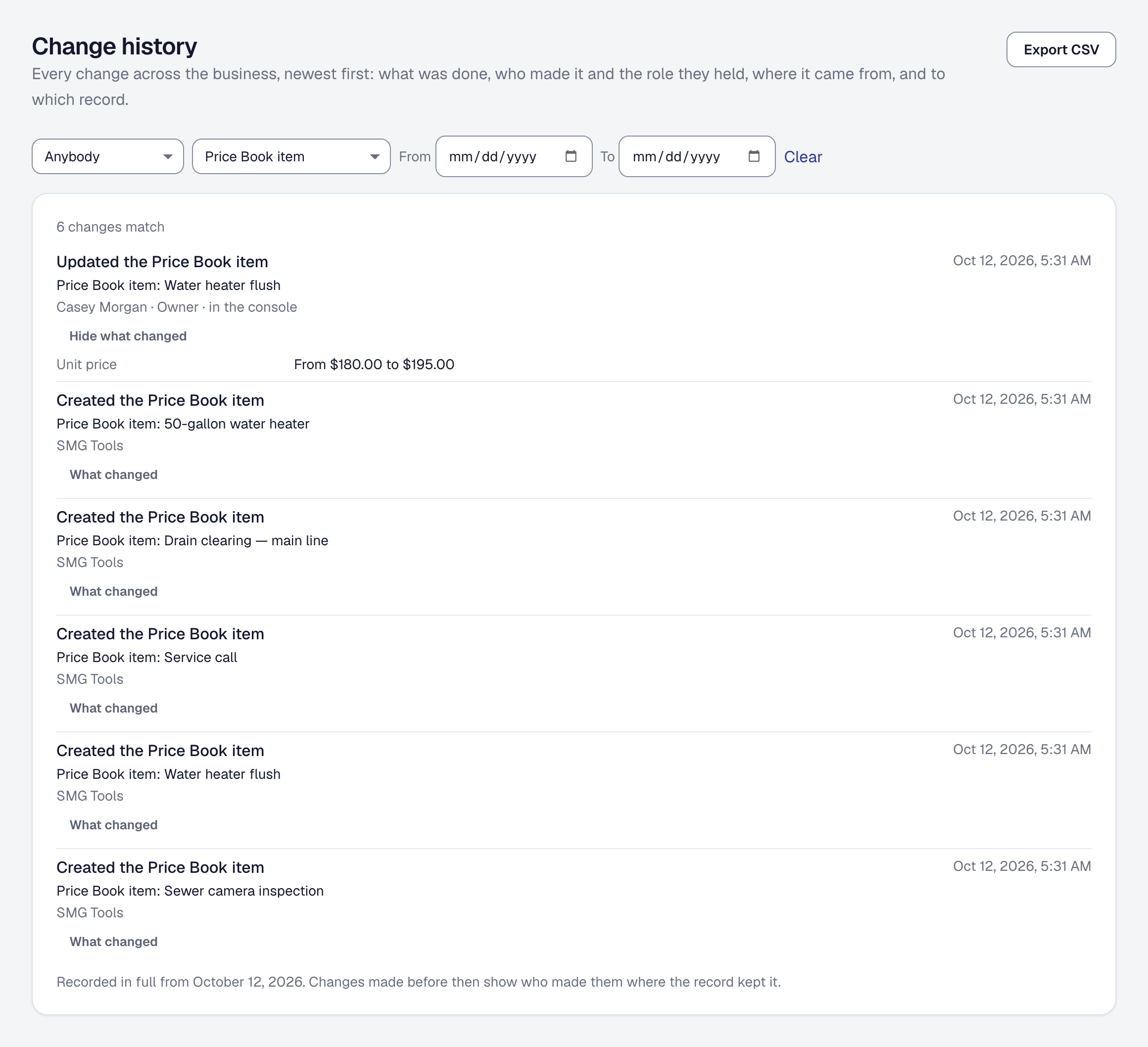
Somebody moved a visit, raised a price or corrected a phone number, and you want to know who and when. Change history answers it on the record itself and across the whole business, on every plan, back to your business’s first day.
Read a record’s history
Open a record and press Change history on its page — the panel is closed until you open it. Clients, jobs, proposals, invoices, visits, leads, expenses, income, mileage, time entries, workers, equipment, service agreements, a client’s units, Price Book items, change orders, suppliers, purchase orders, bills, returns, stock places, roles you built and the phone assistant’s requests all have one.
Each change is a line, newest first: what was done — Sent the proposal, Updated the Price Book item — then who did it, the role they held and where it came from, and when. For example Morgan Lee · Manager · in the console, or Harriet Lindqvist · on their page when your client signed a proposal from their link. Show more brings the next fifty.
Who did it is one of:
- A person on your team, by name and the role they held at the time. Somebody who has since left reads A former team member.
- Your client, by name, for what they did on their own page: signing, paying, booking, answering a request. Somebody the product could not match to a client — a stranger booking from your public page — reads The client.
- An automation, by the name you gave it.
- An API key, by its name — the key you made for Zapier, say.
- SMG Tools, for what the product does on its own, on a schedule or as the result of something else, and SMG Tools support for a change our support team made while helping you.
Where it came from is in the console, on their page, through the API, by automation, in an import, with the assistant or by phone.
Anybody who can open a record can read its history. A dispatcher who can open a job sees the job’s changes; somebody who cannot open invoices cannot read an invoice’s history either.
See what a change altered
Press What changed under a change to see each value as it was and as it became: Unit price: From $1,850.00 to $1,950.00, Status: From Draft to Sent, Phone: Cleared; it was 970-555-0142. A list says what was added, removed and changed — Added Flush the tank. Removed Anode rod. A change that created the record says what it started with.
This is worked out when you open it, by setting the record as it stood just before the change beside the record just after, so a field the product gains later shows in its history from the day it ships.
It is shown for every record above except four: a client, a job, an invoice and a piece of equipment. Each of those also holds what changes to other records did to it — a job holds its visits’ times, a client its jobs — so it cannot be rebuilt on its own, and its changes say who, when and what was done, without the values. The same is true of your business’s own details, and of a few settings kept for the business as a whole, such as skills, pay rules and routes. Opening one of their changes says so.
Somebody whose role keeps prices and costs from them never sees a price, a cost or a margin here either: a change to nothing else they can see says Nothing you can see changed.
Read the whole business’s history
Change history in the menu — or under Your data in Organization — is every change across the business on one page, newest first, each saying which record it was made to and linking to it. It is yours as the owner, because it shows what everybody did, including you.
Narrow it with the boxes along the top:
- Who — a person, or SMG Tools, API keys, Automations or Clients as a group.
- Kind of record — clients, jobs, the Price Book and so on.
- From and To — the days to look between.
Clear puts them back. The filters stay in the page’s address, so a bookmark or a link to a colleague opens the same view.
Export the history
Export CSV downloads what the page is showing, with your filters: when (in UTC), what, who, their role, where from, the kind of record and the record. One export holds up to 10,000 changes; narrow the dates for more.
The whole history is also in your account’s archive — see Your data and your rights — so it leaves with you if you go.
Give somebody the permission
The whole business’s history is a permission of its own, Change history, and no preset role holds it — not even the manager’s. To let a bookkeeper or an office manager read it, build a role that includes it, on Scale (see Roles). Its people see the changes to the kinds of record their role reaches anyway: a role that cannot open invoices sees no invoice’s changes on this page either.
A record’s own history needs no permission beyond opening the record.
What is recorded, and for how long
Every change records who made it, the role they held and where it came from. It does not record an address or a device.
The history is kept as long as your business has an account, and goes when the account is closed. Nobody in your business can edit it or take a change out of it — not even you.
Changes made before the history began
Every business’s history reaches back to its first day, because SMG Tools never overwrote a record: every change was kept, in order, from the start. What was not kept everywhere before this feature was who made each change. So the page says the day its history began recording in full — Recorded in full from … — and a change made before then shows who made it where the record kept that, and Not recorded where it did not. Before and after works the same for those changes as for new ones.
This page describes Change History — Who Changed What, and When. It is written from that feature’s record and covers what has shipped, never what is planned.